

State Farm® APK Screenshots
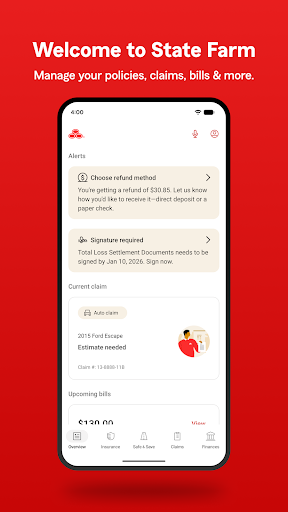


State Farm® App Information
Download Sources
Device Configuration
Old Versions of State Farm®
| Version | Size | Min OS | Architecture | Release Date | Action |
|---|---|---|---|---|---|
| v5.30.5 | 17.9 MB | Android 19+ | Dec 1, 2017 | Download |
Split APKs Installation Guide
Some apps are distributed as Split APKs (multiple .apk files packaged together) to optimize resources. Standard Android installers cannot open them.
What's New in State Farm®
What’s new in 10.164?
• Drive Safe and Save® customers can now see a Most Recent Trip card to help identify when they may no longer be recording trips.
• Auto loss reporting now includes a new incident type for objects flying or falling, so you can describe what happened more accurately.
• More feature enhancements and bug fixes to keep the app running at its best.
About State Farm®
With the award-winning State Farm® app, you can manage your insurance and other products, request roadside assistance, file and track claims, and much more.
Drive Safe & Save® is on the move!
• We're moving all the great features of our safe driving discount program - Drive Safe & Save - into the State Farm app.
• If you're enrolled in the program, we'll email the first person listed on your auto policies when it's time to start using the State Farm app to access your Drive Safe & Save details.
• If you're already using the Drive Safe & Save app, you won't lose any of your info.
IMPORTANT: Drive Safe & Save terms of use, including precise location data collection and sharing, only apply to customers who have set up Drive Safe & Save and enable specific permissions on their mobile devices.
View and manage your insurance policies.
• Quickly pay your insurance bill - even with Google Pay.
• View your insurance card and add it to G-Pay.
• View your insurance policies and coverage details.
We're here to help when you have a claim.
• File a vehicle, property or vehicle glass claim.
• Track the status of your claim through every step.
• Get claim status notifications.
• Get roadside assistance with tire changes, dead batteries, stuck vehicles and more.
• Search for repair facilities.
More convenient features:
• Get personalized reminders and notifications when you log in.
• Log in with biometrics or a PIN.
• Need technical assistance? Send us a message on your time with our messaging feature.
• View details about your financial products.
• Help topics are available in the app when you need them.
• Learn about other products State Farm offers.
User Reviews

Premiums are too high. Also I was quoted one rate and when the policy renewed I was charged a higher rate and had to push them to provide a reason. It took them about 1-2 months to come back and say it was a glitch in their system, sharing that other customers had the same problem. I continued to pay the higher cost even though they confirmed that it was a system problem. They called last month and said they went through everything again and the higher rate is correct. SF=scammers

It's simple to use, but it requires certain permissions that just are not necessary. Having location set as 'always on' is not necessary. I have it set for 'while using the app'. Also, another permission that I don't like is, it is set to go inactive if not used. That won't happen as long as I am covered by your insurance. remove that on all together. It's really not your business.

In order to have the drive safe and save, the app becomes far too intrusive. I don't need a notification every single time I'm in a vehicle. Yet, you can't shut notifications off, or they won't allow the discounts. I understand precise location permissions, maybe even the physical activity, but this app does nothing but notify me every hour and drain my battery. Figure out a better system.

This app is nice for the most part, but there's one thing I have an issue with. "Drive Safe and Save" is WAY too sensitive for cornering and hard braking. l drive like a grandma compared to a lot of people and I don't take hard corners or hard brakes. It doesn't just mark you if you slam on the brakes; it marks you if you stop at a light. If you take a left at more than like 10 mph it dings you. It also counts gradual curves as corners. So please make it less sensitive.
How to Download State Farm® APK
- Enter the package name
com.statefarm.pocketagenton the APK Downloader. - Select your device architecture (ARM64 recommended for modern devices).
- Click Download to get the merged APK file.
- Transfer and install the APK on your Android device.
- Keep Updated: Visit APKDER.COM regularly to search for and download the latest secure versions of your favorite apps.
Frequently Asked Questions
Yes! Every APK download provided by APKDER undergoes rigorous security verification. We verify that the cryptographic signature of the APK file matches the official signature from the developer, ensuring the APK is original, untouched, and free from any modifications.
To install it, you first need to enable "Unknown Sources" in your Android device's security settings. After downloading the APK file from APKDER, tap it to begin the installation and follow the on-screen prompts.
Yes! As soon as the developer releases a new version of State Farm®, we will update and provide the updated APK on APKDER. You can simply download and install the new APK over the existing installation without losing your app data.
Yes. APKDER allows you to bypass geographic restrictions and download official APK files directly, even if the app or game is not officially available in your country's store.
A standard APK is a single installation package. An XAPK or Split APK contains multiple resource files (like OBB expansions or device-specific layout parts) packaged together. To install them, you can download splits individually or use dynamic helper tools like Split APKs Installer (SAI).
Security & Signature Verification
This APK download is 100% safe. We verify that the cryptographic signature of the file matches the official developer credentials. No modifications or adware are injected.


