




Download Sources
Device Configuration
Split APKs Installation Guide
Some apps are distributed as Split APKs (multiple .apk files packaged together) to optimize resources. Standard Android installers cannot open them.
What's New
🌟 Enhanced performance and smoother experience.
🌟 Bug fixes for better stability.
🌟 New features added for more functionality.
🌟 Improved user interface for easier navigation.
🌟 Lightweight and user-friendly design.
This update focuses on making our app even better for you. Thank you for keeping it up to date!
If you enjoy our app, we’d love to hear your feedback! Please consider leaving a rating and review.
About this app
Pedometer: Step Counter – Perfect For Easy Step Tracking!Accessing your fitness goals is more easy than ever with Pedometer: Step Counter. Now you can walk, run, or simply move around, and this Step Tracker: Walking App will encourage you to remain active and achieve your fitness goals. Measure your daily steps, map the calories burnt, and monitor your walking distance in real time with the most advanced Walk Tracker: Steps App.
📄 Key Features of Pedometer: Step Counter: 📄
🚶 Automatic Track Steps Counter – Count your steps all day, even while sleeping;
🔥 Easy to use Calorie Counter – Keep track of calories burnt while taking a stroll;
📏 Distance Calculator – Know the distance you cover through walking on a daily basis;
⏳ Live Stats – Monitor your Steps Tracker With Calorie Count;
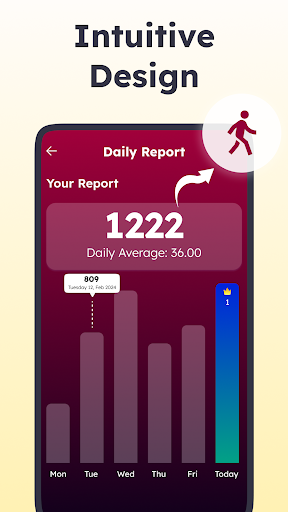
📊 Final Report – Review your daily, weekly and monthly activities;
🔒 Secure & Private – No login process and all features can be used freely;
⚙️ Adjustable Sensitivity – Change settings for tracking;
📱 Battery Friendly – Works perfectly without consuming a lot of battery.
Keep track of your fitness goals with efficiency!The Step Tracker: Walking App guarantees result oriented step tracking and keeps updating you on your walking activities. By default, it records your steps, walking duration, and distance. This aids in analyzing your movement history. This Walk Tracker: Steps App is perfect for anyone pursuing daily goals or tracking everyday activity.
Pedometer: Step Counter With Calorie Count:🔥
Now you can easily monitor your calories spent with the steps tracker with calorie count. Every step you take is counted towards the calories burned and helps you realize how physically active you actually are. This Track Steps Counter tracks all your fitness progress accurately, keeping you on course for a healthier lifestyle.
Stay Active & Healthy:💪
This feature makes the Pedometer: Step Counter very helpful in keeping fit. Be it walking to lose weight or walking for general fitness, this Step Tracker: Walking App encourages more movement to accomplish personal fitness targets. Track your steps easily and lead an active life.
Real-Time Step Tracker: Walking App & Detailed Insights:📊
All your movements are recorded in real-time by the Walk Tracker: Steps App and shown in user friendly graphs. You get a detailed report about how many steps you took, the distance you walked, and the calories burned.
This Track Steps Counter lets you set personal goals as well as monitor your progress over a period.
Simple & Easy to Use: 🎯
Nothing complicated at all! Just grab the pedometer: step counter app and go for the walk. It functions in the background and will automatically count your steps. The user friendly interface makes it simple to track your progress and stay active throughout the day.
Start Your Fitness Journey Today!Now is the time to download Pedometer: Step Counter and take charge of your daily activity. Whether you are in need of a Step Tracker: Walking App, a Walk Tracker: Steps App and even a steps tracker with calorie counter, this app has all the feautures to help you stay active and enhance your health.
Foreground Service Permission: The app requires the FOREGROUND_SERVICE_LOCATION permission to accurately track walking distance and movement patterns in real time while running as a background service. This ensures step counting, distance calculation, and calorie tracking continue uninterrupted even when the app is not actively in use, providing users with precise and continuous fitness insights.
User Reviews

Worked for some time, but at some point it counted zero steps for the whole week. I assumed some permissions had been revoked, so I granted location access and disabled auto-removal, everything was fine for two weeks. After that it managed to count 158081 steps in one day and then got stuck on zero steps per day no matter what. Vibecoded steps counter myself, totally worth it

it installs but will not open except in free 3-day $14.99 / month mode!! clicking the only option "next" shuts the app down - every time!! Worthless!! (Android Pixel 9) p.s. exact same app works fine on my Android Google Pixel 5.

great. it tracks my daily steps , distance and calories burnt. Also sort of motivating. do we track our targets on daily basis

it is very good and it is easy to use while doing jogging and it is also have an tracking time so you will be in time walking
How to Download Step Counter & Pedometer APK
- Enter the package name
com.step.counter.pedometer.tracker.walking.running.stepson the APK Downloader. - Select your device architecture (ARM64 recommended for modern devices).
- Click Download to get the merged APK file.
- Transfer and install the APK on your Android device.
- Keep Updated: Visit APKDER.COM regularly to search for and download the latest secure versions of your favorite apps.
Security & Signature Verification
This APK download is 100% safe. We verify that the cryptographic signature of the file matches the official developer credentials. No modifications or adware are injected.


