
Download Sources
Device Configuration
Split APKs Installation Guide
Some apps are distributed as Split APKs (multiple .apk files packaged together) to optimize resources. Standard Android installers cannot open them.
Related Applications



What's New
Hi there. We fixed a couple bugs and made some performance improvements, so the app should now be almost as speedy as you. Have fun out there!
About this app
Join over 180 million active people on Strava – the free app where building community meets fitness tracking.
Whether you're a world-class athlete or just starting out, Strava has your back the entire journey. Here's how:
Track your growth
• Record It All: Running, cycling, walking, hiking, yoga. You can record all those activities – plus over 40 other sport types. If it's not on Strava, it didn’t happen.
• See the full story of your strength training Lifting in the gym weekly, doing HIIT workouts? Use your favorite device or strength app and your exercises, sets, reps, weights and a muscle map show up automatically.
• Connect Your Favorite Apps and Devices: Sync with thousands of devices like Apple Watch, Garmin, Fitbit and Peloton – you name it. The Strava Wear OS app includes a tile and a complication you can use to quickly launch activities.
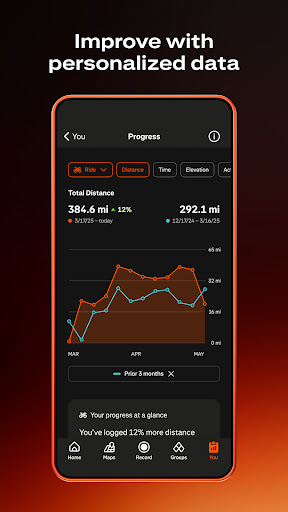
• Understand Your Progress: Get data insights to see how you're improving over time.
• Compete on Segments: Show off your competitive streak. Race against others on segments to the top of the leaderboards.
Find and connect with your crew
• Build a Support Network: Take the Strava community offline and meet in real life.
• Join and Create Challenges: Participate in monthly challenges to chase new goals, collect digital badges and stay motivated while encouraging others.
• Stay Connected: Your Strava feed is filled with real efforts from real people. Follow friends or your favorite athletes and send kudos to celebrate every win.
Move with confidence
• Move Safer with Beacon: Share your real-time location with loved ones for an extra layer of safety during your activities.
• Control your privacy: Adjust who can see your activities and personal data.
• Edit Map Visibility: Hide the beginning or end points of your activities.
Get even more with a Strava subscription
• Discover Routes Anywhere: Get intelligent route recommendations with popular routes based on your preferences and location, or create your own bike routes and footpaths using our Routes tool.
• Live Segments: Receive real-time updates on your performance during popular segments.
• Training Log & Best Efforts: Dive deeper into your data to understand your progress and set new personal records.
• Group Challenges: Create challenges with friends to stay motivated together.
• Athlete Intelligence (AI): Access AI-driven insights that makes your workout data easy to understand. No confusion. No guesswork.
• Access Recover Athletics: Prevent injury with custom exercises tailored to your activities.
• Goals: Set custom goals for distance, time or segments, and stay motivated as you work towards them.
• Deals: Enjoy special offers and discounts from our partner brands.
• Training Log: Dive deeper into your data with detailed training logs and track your progress over time.
Whether you’re aiming for a personal best or just getting started, you belong here. Just record and go.
Strava includes both a free version and a subscription version with premium features.
Terms of Service: https://www.strava.com/legal/terms Privacy Policy: https://www.strava.com/legal/privacy NOTE ON GPS SUPPORT: Strava depends on GPS for recording activities. In some devices, the GPS does not work properly and Strava will not record effectively. If your Strava recordings show poor location estimation behavior, please try to update the operating system to the most recent version. There are some devices which have consistently poor performance with no known remedies. On these devices, we restrict installation of Strava, for example the Samsung Galaxy Ace 3 and the Galaxy Express 2. See our support site for more information: https://support.strava.com/hc/en-us/articles/216919047-Supported-Android-devices-and-Android-operating-systems
How to Download Strava: Run, Bike, Walk APK
- Enter the package name
com.stravaon the APK Downloader homepage. - Select your device architecture (ARM64 recommended for modern devices).
- Click Download to get the merged APK file.
- Transfer and install the APK on your Android device.
- Keep Updated: Visit APK Downloader regularly to search for and download the latest secure versions of your favorite apps.
Security & Signature Verification
This APK download is 100% safe. We verify that the cryptographic signature of the file matches the official developer credentials. No modifications or adware are injected.