

Triple A APK Screenshots


Triple A App Information
Download Sources
Device Configuration
Old Versions of Triple A
| Version | Size | Min OS | Architecture | Release Date | Action |
|---|---|---|---|---|---|
| v3.3 | 18.1 MB | Android 9+ | armeabiarmeabi-v7a |
May 19, 2018 | Download |
Split APKs Installation Guide
Some apps are distributed as Split APKs (multiple .apk files packaged together) to optimize resources. Standard Android installers cannot open them.
What's New in Triple A
GPU Optimization : CS to VS
Fix: Compute Shader Syntax Issue
Fix: ANR(App Not Responding) Issue for specific old devices
Feat: Orientation Support for Tablets
About Triple A
Triple A — A Calming Interactive Particle Experience
Touch light. Watch it flow. Let your mind slow down.
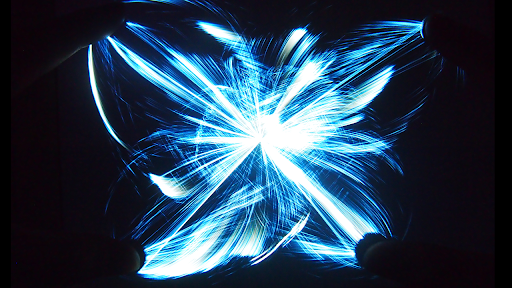
Triple A is an immersive interactive visual experience where thousands of particles respond instantly to your touch, creating flowing patterns, luminous waves, and calming motion that feels both artistic and deeply relaxing.
Designed for moments when you want to slow down, breathe, and reset, Triple A helps transform simple touch into a soothing sensory experience — ideal for relaxation, meditation, emotional calm, creative focus, or quiet moments before sleep.
Whether you are feeling stressed, mentally overloaded, restless, or simply need a beautiful pause during the day, Triple A offers a gentle space where movement, light, and sound come together naturally.
Why users love Triple A
• Instant Calm: Watch stress melt away as particles dance with your movement.
• Beautiful particle motion that reacts to every touch
• Ideal for stress relief, mindfulness, and focus
• Creates a satisfying sensory experience many users return to daily
• Loved by adults, children, and even pets
Immersive Visual Modes
Explore 5 distinct visual worlds:
• Particle
• Wave
• Gravity
• Linear
• Lightning
Each mode includes multiple unique effects, giving you 25 core interactive experiences and many more variations inspired by galaxies, flowers, flowing energy, rainbows, vortexes, and living light.
Real-Time Performance
• Up to 30,000 particles rendered in real time
• Smooth 60 FPS interaction
• 5-finger / 2-hand multi-touch support
• Adjustable particle size, quantity, and trail length
• Built-in relaxing music tracks (optional)
A Different Kind of Calm
Triple A is not just a visual toy.
Many users open it during moments of anxiety, before sleep, while listening to music, during meditation, or when they simply want to disconnect for a few minutes and watch something beautiful respond to their hands.
Free Version
Enjoy the core experience for free.
Upgrade to remove ads and unlock:
• 3× more particles
• Additional visual effects
• Cleaner uninterrupted immersion
Support
If you have ideas, questions, or feedback, I would love to hear from you.
[email protected]
www.sunglab.com
User Reviews

verry cool, many things you can do with the particles. worth giving a try especially since its free. I haven't even gotten an ad yet and I've been playing for a while. very relaxing, would reccomend. edit: ok so now I have gotten an ad, but very rarely and does not ruin the vibe. so relaxing. AMAZING music. all in all, one of my favorite apps.

This app is my favorite for entertainment. It transports me to another mindset in seconds. You can create galaxies with particles, you control the number, size, and trail length. Touch the screen with more fingers and it changes, add another, take one off, move them around for an endless palate of patterns or complete chaos. If I could give more than 5 stars, I would.

It's fun and the colors are pretty and I like the music and the options, my favorite is the linear art one. but it could be better especially if you make it so you can change the colors, not it changing colors on it's own, I mean, also if you could draw with it meaning the particles stay if you were to like make a heart shape for example.

This is actually a very mesmerizing app. I saw it while scrolling on Instagram, so I decided to try it out. It distracted me for 3 hours. The colors are pretty to look at, and the sounds the effects make are satisfying to my ears. Seeing the colors mix together when I put my finger on the screen made my brain tingle in a good way. It's a nice, satisfying app. I would recommend for anyone who easily gets distracted by colors.
How to Download Triple A APK
- Enter the package name
com.sunglab.tripleafreeon the APK Downloader. - Select your device architecture (ARM64 recommended for modern devices).
- Click Download to get the merged APK file.
- Transfer and install the APK on your Android device.
- Keep Updated: Visit APKDER.COM regularly to search for and download the latest secure versions of your favorite apps.
Frequently Asked Questions
Yes! Every APK download provided by APKDER undergoes rigorous security verification. We verify that the cryptographic signature of the APK file matches the official signature from the developer, ensuring the APK is original, untouched, and free from any modifications.
To install it, you first need to enable "Unknown Sources" in your Android device's security settings. After downloading the APK file from APKDER, tap it to begin the installation and follow the on-screen prompts.
Yes! As soon as the developer releases a new version of Triple A, we will update and provide the updated APK on APKDER. You can simply download and install the new APK over the existing installation without losing your app data.
Yes. APKDER allows you to bypass geographic restrictions and download official APK files directly, even if the app or game is not officially available in your country's store.
A standard APK is a single installation package. An XAPK or Split APK contains multiple resource files (like OBB expansions or device-specific layout parts) packaged together. To install them, you can download splits individually or use dynamic helper tools like Split APKs Installer (SAI).
Security & Signature Verification
This APK download is 100% safe. We verify that the cryptographic signature of the file matches the official developer credentials. No modifications or adware are injected.


