
Download Sources
Device Configuration
Split APKs Installation Guide
Some apps are distributed as Split APKs (multiple .apk files packaged together) to optimize resources. Standard Android installers cannot open them.
Related Applications



What's New
Bug fixes and performance improvements
Happy New Year, everyone!
About this app
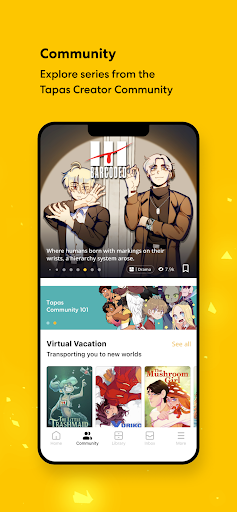
The Ultimate App for Comics, Novels, Mangas, Manhwas, Webtoons and More!—Discover Your Next Favorite Story with Tapas
Love comic books and engaging stories? Looking for the perfect way to pass the time? Tapas is the go-to app for those who crave captivating tales. Whether you love romance, action, fantasy, or BL, Tapas has something for everyone. Discover new chapters released daily, with exclusive free episodes dropping every three hours.
Get hooked on international sensations and trending Tapas Original Series like:
- The Beginning After the End
- Solo Leveling
- Little Rabbit and the Big Bad Leopard
- A Business Proposal
- Heartstopper
- Moving
Only on Tapas, you can enjoy many of these mega-hit series in both webcomic and novel versions. And thanks to the Wait-Until-Free system, you can enjoy them for free! Simply wait for your timer to run out, and you can read the next episode for free. Or, grab multiple episodes in bundles with the best deal to keep the excitement going!
No need to stop at a bookstore or the library to read comic books when you can explore an endless library of stories spanning everything from premium comics/novels, Tapas Originals, K-content, to indie comics, right in the palm of your hand. Indulge in isekai adventures, otome game stories, breathtaking romantasy, and so on!
Download the app and engage with 10 million other readers and creators. Get notified about updates on your favorite series. Plus, you’ll have access to app-exclusive perks like Gift Passes and free Ink. Try your luck on the weekly Fortune Cookies every Monday carrying random amounts of bonus Ink!
Want to write your own epic saga? Tapas is also the perfect platform to share your creativity with a supportive global audience. Join over 75,000 talented creators—from established, award-winning authors to aspiring independent artists—and publish your work on Tapas.
Turn your phone time into story time with Tapas—your go-to destination for the comic books, romance stories, and episodes you crave!
Website: http://www.tapas.io
Email: [email protected]
Instagram: @tapas_app
Twitter: @tapas_app
Facebook: Tapas
How to Download Tapas – Comics and Novels APK
- Enter the package name
com.tapasticon the APK Downloader homepage. - Select your device architecture (ARM64 recommended for modern devices).
- Click Download to get the merged APK file.
- Transfer and install the APK on your Android device.
- Keep Updated: Visit APK Downloader regularly to search for and download the latest secure versions of your favorite apps.
Security & Signature Verification
This APK download is 100% safe. We verify that the cryptographic signature of the file matches the official developer credentials. No modifications or adware are injected.