
Teladoc Health APK Screenshots




Teladoc Health App Information
Download Sources
Device Configuration
Split APKs Installation Guide
Some apps are distributed as Split APKs (multiple .apk files packaged together) to optimize resources. Standard Android installers cannot open them.
What's New in Teladoc Health
We’ve made some improvements:
Performance updates to increase the app’s speed
Bug fixes to make the app more reliable
About Teladoc Health
Teladoc Health is the leader in virtual care. Our doctors diagnose, treat and prescribe when needed. You can also use our app to help manage weight, diabetes, blood pressure and your overall health.
Depending on your coverage and eligibility, services may include:
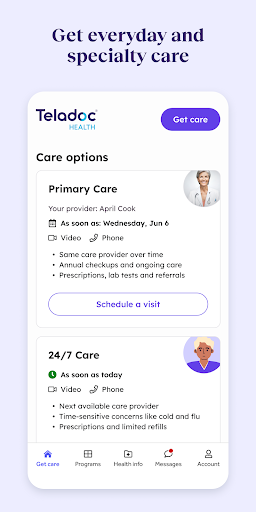
24/7 CARE
-On-demand visits with board-certified doctors and nurse practitioners
-Help with time-sensitive concerns like cold and flu
-Prescriptions and limited refills
PRIMARY CARE
-Care provider who gets to know you over time
-Annual checkups and ongoing care
-Prescriptions, lab tests and referrals
CONDITION MANAGEMENT
-Help managing weight, blood sugar and blood pressure
-Connected scale, blood glucose meter or blood pressure monitor
-Tips and tools to help manage your health, including AI-powered food tracking
-Unlimited 1:1 health coaching
-GLP-1 support for those who qualify
MENTAL HEALTH
-Therapists, psychiatrists and coaches
-Personalized digital program
-Help with stress, anxiety, depression, relationships and more
DERMATOLOGY
-Photo review of skin concerns
-Treatment plan delivered by message within 24 hours
-Prescriptions and limited refills
NUTRITION
-Registered dietitians
-Help with your conditions and goals
-Personalized meal plans, grocery guides and more
SEXUAL HEALTH
-Confidential lab testing for STDs through STDcheck.com
-Results in under three days
SECOND OPINIONS
-Expert opinions on diagnoses and care
-Help choosing a treatment
-Many available specialties
***
Care at Teladoc Health is:
COVERED BY MOST MAJOR HEALTH INSURERS
More than 1 in 4 Americans have Teladoc Health coverage through their employer or health insurance. When you create an account, we’ll help you check if you’re covered. But coverage isn’t required. Many services are available without it.
PERSONALIZED
Our care providers get to know you and tend to every part of your well-being. We also offer digital tools and programs designed around your needs. You can even connect Apple Health to sync your data and get health insights.
CONVENIENT
We can address most common health needs anytime, anywhere. With some programs, you’ll get a blood pressure monitor, scale or blood glucose meter sent to your home. We also offer in-home lab services and prescription delivery in some locations. If you need in-person care, we can refer you to in-network providers.
HIGH-QUALITY
Teladoc Health has been caring for people virtually for more than 20 years. More than 50 million visits later, we’re the leader in virtual care. Newsweek has recognized us as one of the most trustworthy companies in America. USA Today has called us one of America’s most trusted brands.
PRIVATE AND SECURE
Teladoc Health takes your privacy seriously. Your health information is protected by federal and state laws, including HIPAA. View our privacy policies for more information on how Teladoc Health uses your personal information: https://www.teladochealth.com/legal/privacy-policy.
User Reviews

This app is extremely slow (unresponsive) at times, buggy and, suffers from routine connectivity issues. Many times during video chat sessions, the video would drop while the audio would stay connected. Even when you close out the app the audio still comes through and doesn't stop. On screen, it appears you're not within the call/meeting anymore and so if you rejoin the call then you'll have double audio.

Full of issues, I was initially logging on through my computer for sessions and it would log me completely out exactly 30 min from when I joined the session. This happened on all computers. The only thing support told me was try using my phone. At first it worked well, but I've the last few months there connection errors, no audio, it freezes, my audio is echoed, and even trying just a call vs video has not worked properly. My provider and I make it work, if it wasn't for her I would have quit.

This app doesn't even sync well with the scale. The features are missing from the weight management program. There are supposed to be lessons each day, but these do not even pop up. you can even customize what your eating, so it becomes inaccurate. My biggest gripe has to be the scale and steps not even syncing with the app so the app becomes pointless.

Has potential to be a good app but needs work! Should be an option to for a code/pin to log in, typing the password everytime with how much you have to use the app to log things is annoying. Speaking of logging, the food log I'm about to give up on! Just a few generic options and keeps saying "having trouble connecting to food data base" the only reason for the 2 stars is the scale, coaching and therapy options, otherwise Google health and Samsung health do a better job for free!
How to Download Teladoc Health APK
- Enter the package name
com.teladoc.memberson the APK Downloader. - Select your device architecture (ARM64 recommended for modern devices).
- Click Download to get the merged APK file.
- Transfer and install the APK on your Android device.
- Keep Updated: Visit APKDER.COM regularly to search for and download the latest secure versions of your favorite apps.
Frequently Asked Questions
Yes! Every APK download provided by APKDER undergoes rigorous security verification. We verify that the cryptographic signature of the APK file matches the official signature from the developer, ensuring the APK is original, untouched, and free from any modifications.
To install it, you first need to enable "Unknown Sources" in your Android device's security settings. After downloading the APK file from APKDER, tap it to begin the installation and follow the on-screen prompts.
Yes! As soon as the developer releases a new version of Teladoc Health, we will update and provide the updated APK on APKDER. You can simply download and install the new APK over the existing installation without losing your app data.
Yes. APKDER allows you to bypass geographic restrictions and download official APK files directly, even if the app or game is not officially available in your country's store.
A standard APK is a single installation package. An XAPK or Split APK contains multiple resource files (like OBB expansions or device-specific layout parts) packaged together. To install them, you can download splits individually or use dynamic helper tools like Split APKs Installer (SAI).
Security & Signature Verification
This APK download is 100% safe. We verify that the cryptographic signature of the file matches the official developer credentials. No modifications or adware are injected.


