
Download Sources
Device Configuration
Split APKs Installation Guide
Some apps are distributed as Split APKs (multiple .apk files packaged together) to optimize resources. Standard Android installers cannot open them.
Related Applications




What's New
Performance updates
About this app
Note: You will only be able to sign in if your school has subscribed to Toddle’s premium plan.
Toddle Educator App is a one-stop solution for all your teaching and learning needs related to the curriculum.
Through the Toddle Educator App, teachers can:
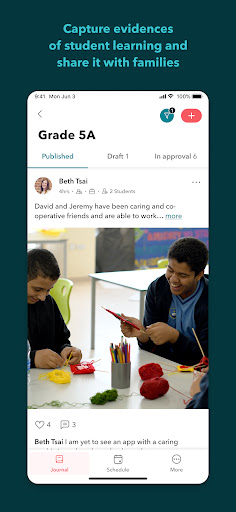
* Capture evidences of student learning through photos, videos, audio notes and more
* Align class activities and unit plans to requirements and insights
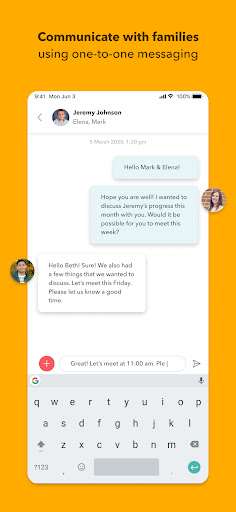
* Have one-to-one conversations with parents
* Send school announcements
* Access school calendar and school policies
Developed by experienced Educators, Toddle is your school’s partner for all things related to the curriculum. Toddle streamlines planning, portfolios, reports, and family communication— all on one beautiful interface. Toddle is currently being used by 30,000+ educators across 1000+ schools.
In case you have any questions, please reach out to [email protected].
How to Download Toddle Educator APK
- Enter the package name
com.toddle.teacheron the APK Downloader homepage. - Select your device architecture (ARM64 recommended for modern devices).
- Click Download to get the merged APK file.
- Transfer and install the APK on your Android device.
- Keep Updated: Visit APK Downloader regularly to search for and download the latest secure versions of your favorite apps.
Security & Signature Verification
This APK download is 100% safe. We verify that the cryptographic signature of the file matches the official developer credentials. No modifications or adware are injected.