
Download Sources
Device Configuration
Split APKs Installation Guide
Some apps are distributed as Split APKs (multiple .apk files packaged together) to optimize resources. Standard Android installers cannot open them.
Related Applications




What's New
Clef Scan is now Opuscan!
The same app for turning printed music into playable, editable scores — with a fresh name and look.
• New name and branding across the app
• Bug fixes and performance improvements
About this app
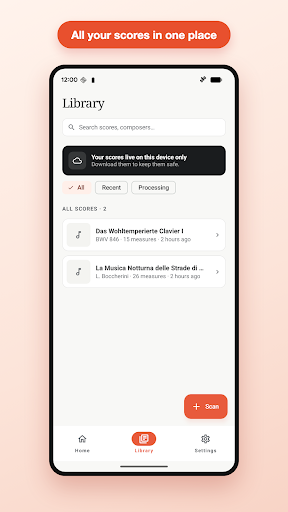
Turn any printed score into a playable, editable digital file in seconds - straight from your phone.
Snap a photo of a page (or open a PDF) and Opuscan reads every note, builds a clean digital score, and hands it back ready to play, transpose, mark up, and share. No scanner, no desktop app, no retyping.
WHAT YOU CAN DO
• Scan printed sheet music with your camera, or import existing PDFs.
• Watch the scan turn into real, editable notes, not just an image.
• Tap any note to fix a misread, change a rhythm, or adjust a pitch.
• Press play to hear what's on the page. Change tempo, key, or instrument.
• Export to MusicXML, MIDI, PDF or MP3 - and share with your students, your band, or your computer.
GREAT SCANS, EVERY TIME
Lay the page flat and fill the frame. Auto-edge detection straightens skew, smooths creases, and cleans glare on device before recognition starts. The clearer the original page, the better the result.
WHO IT'S FOR
• Music teachers tired of retyping arrangements by hand.
• Performers practicing from second-hand or out-of-print editions.
• Composers archiving older manuscripts.
• Anyone with a stack of printed scores and a phone.
PAY ONLY FOR WHAT YOU SCAN
Opuscan uses credits, not subscriptions. Credits never expire. Editing, playback, cloud sync, and exports stay free once a score is in your library.
POWERED BY FLAT
Built by Tutteo, the team behind Flat.io. Sign in with the same Flat account and your scores appear on the web app, the main Flat mobile app, and any other device you use.
QUESTIONS, FEEDBACK, BUG REPORTS
We read every email - drop us a line at [email protected].
How to Download Opuscan: Sheet Music Scanner APK
- Enter the package name
com.tutteo.flat.pdfscanneron the APK Downloader homepage. - Select your device architecture (ARM64 recommended for modern devices).
- Click Download to get the merged APK file.
- Transfer and install the APK on your Android device.
- Keep Updated: Visit APK Downloader regularly to search for and download the latest secure versions of your favorite apps.
Security & Signature Verification
This APK download is 100% safe. We verify that the cryptographic signature of the file matches the official developer credentials. No modifications or adware are injected.