



Download Sources
Device Configuration
Split APKs Installation Guide
Some apps are distributed as Split APKs (multiple .apk files packaged together) to optimize resources. Standard Android installers cannot open them.
What's New
Changelog:
Improvements
- Read-only user login to UISP Application.
- Improved site discovery.
Bugfixes
- UI and stability fixes.
About this app
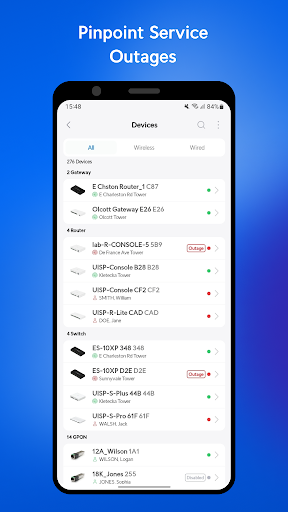
The UISP app gives users a single-point device installation and management tool for Ubiquiti’s extensive line of ISP-grade products. With the app, you will be able to:
*Integrate your ISP devices into the UISP controller.
*Quickly and easily setup ISP devices and align links with bluetooth or a dedicated management radio.
*Manage and monitor every aspect of your ISP network from a single app.
User Reviews

Definitely not anywhere near as good as signing in on the https. This app doesn't show the link percentage, map, aiming degrees, and you can't change many settings on the radio. I would love to see more functionality added or know if there's something I'm missing. This is useable and has utility, but It's not on the same level as other ubiquity products.

This app takes longer than setting a static IP on a laptop and directly connecting it to the device that needs to be configured. It found my device twice, but couldn't do anything with it. Most of the time it doesn't find it at all. The app gives a list of devices to search but the list doesn't do anything, so manually selecting the device does nothing. Not sure what this app is actually for other than wasting time.

Junk app, doesn't notify anymore and reading false timslots under events tab. Absolutely garbage. I gotta pay $30pm for this junk? Support none exists and your monitoring app just gets worse after every update. 2026 still pretty useless even paying the money to use it on the network. almost like UI team just doesn't give a damn.

I hope you dont get use to any feature in this app because as soon as you do they update it and make it 100 times worse or just remove it.
How to Download UISP Mobile APK
- Enter the package name
com.ubnt.umobileon the APK Downloader. - Select your device architecture (ARM64 recommended for modern devices).
- Click Download to get the merged APK file.
- Transfer and install the APK on your Android device.
- Keep Updated: Visit APKDER.COM regularly to search for and download the latest secure versions of your favorite apps.
Security & Signature Verification
This APK download is 100% safe. We verify that the cryptographic signature of the file matches the official developer credentials. No modifications or adware are injected.


