

Upromise: Cash Back Rewards APK Screenshots



Upromise: Cash Back Rewards App Information
Download Sources
Device Configuration
Split APKs Installation Guide
Some apps are distributed as Split APKs (multiple .apk files packaged together) to optimize resources. Standard Android installers cannot open them.
What's New in Upromise: Cash Back Rewards
Check out the new features and enhancements that make earning cash back even easier and more rewarding:
* Improvements and Bug fixes
About Upromise: Cash Back Rewards
Upromise is the free cash back shopping and rewards app that lets you earn cash for college. Get a $5.29 bonus just for joining. Link any 529 college savings plan to your Upromise account and get an additional $25 bonus.
Additionally, every month Upromise awards a free $529 college scholarship to five lucky members.
Shop Online.
Shop at your favorite stores. Upromise offers cash back at hundreds of popular retailers brands, including Kohl's, Macy's, Home Depot, and all your other favorite stores. On top of the cash back rewards, you can save up to 60% on your online retail purchase with exclusive coupon codes and promo codes.
Scan those Sales Slips.
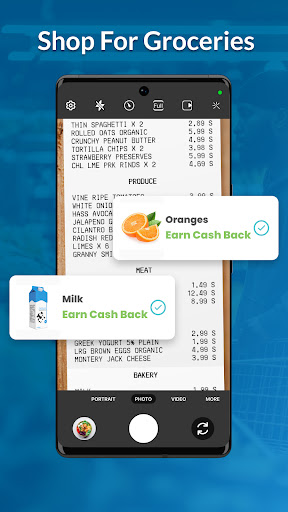
Scan your store receipts, earn cash back rewards. Shopping trips at the mall. Gas station runs. Supermarket hauls. Earn cash back bonuses for purchasing featured products or brands. Get paid for the shopping you're already doing. You'll never toss your receipt again.
Save Easy, Sleep Easy.
Upromise makes it painless and easy to save for college. Eligible funds in your Upromise account are automatically transferred to your 529 college savings account every month (subject to a minimum transfer requirement). So easy. But it's definitely not set it and forget it. You'll love watching your college savings grow.
UPROMISE APP FUNCTIONALITY
If you're already a Upromise member, you'll want to download the app. Rewards at your fingertips. Track your pending rewards, online store visits, and total rewards balance right from your phone.
ABOUT UPROMISE
Founded in 2000, Upromise helps families save money for college. Members who join the free Upromise rewards program can accrue cash rewards on eligible purchases that are applied to their linked college savings account.
Since 2000, families have saved over $1 billion for college using Upromise. And every month, Upromise awards thousands of dollars in college scholarship money.
WHICH 529 PLANS ARE COMPATIBLE WITH UPROMISE?
All of them. You can link any 529 college savings plan to the Upromise rewards platform. Upromise is the only rewards service that can be linked to every single 529 savings plan. You can also link ABLE (special needs) plans to the Upromise platform as well.
WHAT IF I DON'T HAVE A 529 PLAN? CAN I STILL JOIN AND BENEFIT FROM UPROMISE?
Yes. If you don't have a 529 plan, think about opening one -- they are a great way to save for college with tax advantages. But if you don't have a 529 plan and don't want to open one, no problem! You can still join and participate in Upromise's rewards program just by linking to any U.S. checking or savings account.
WHAT STORES GIVE CASH BACK REWARDS FOR UPROMISE?
There are hundreds of online stores that participate in Upromise to offer cash back on your shopping. Some of the more popular retailers include:
Home Depot
Old Navy
Kohl's
Staples
Best Buy
eBay
Chewy.com
Orbitz
Travelocity
Macy's
Aerie
Bed Bath & Beyond
Bloomingdale's
Dick's Sporting Goods
GameStop
J. Crew
Janie and Jack
Shutterfly
LEGO
PetSmart
ULTA Beauty
Minted
...and hundreds more!
IS UPROMISE WORTH IT?
Absolutely. Upromise has helped families save over $1 billion for college. Read about Upromise in the news. Forbes, Clark Howard, The Dough Roller, New York Times, Nerd Wallet, Boston Globe, and U.S. News & World Report all rave about Upromise as a simple way to save for college.
WHAT OTHER APPS ARE LIKE UPROMISE?
Upromise is similar to other cash back and savings apps like Drop, Rakuten, Swagbucks, InboxDollars, Tada, Ibotta, Shopkick, Ascensus READYSAVE 529, CalSavers, Cashback for College, Digit, and Gift 529. If you use any of these other apps, give Upromise a try. You'll get $25 for free just for linking your 529 savings plan.
User Reviews

Shopping through the app for eligible stores is horrible. For example if you go to Walmart the search bar is cut off and adding items to your cart is basically impossible. It would also be nice to add a back button within the site. I can't tell you the amount of times I click the back button and it takes me back to the upromise homepage

I have not been able to upload grocery receipts for several months. When trying, during the second attempt the app will not access the camera or albums. App must be restarted. There is no way to create a trouble ticket from the grocery receipt section. When creating a ticket from the general help area, they did not respond for a full month. When they did, it was to tell me I did not submit my ticket the correct way.

Make an app that we can use. Why do you limit 10 items per receipt for grocery items. Why do you have to manually enter each item that appears on your receipt when you scan and upload it. Added eligible items to my list but I am unable to submit receipts within the app. When I click on the upload button to scan or choose the receipt, the button does not do anything. I had to submit my receipt(s) online which kind of defeats the purpose of the app. Too much work for what it's worth.

Receipt cannot be scanned within the app. It must be uploaded. The app takes at least 3 minutes for a one line item receipt. The computer takes 5 seconds. The app isn't worth the time to install and uninstall after you figure out how much it doesn't work. Why bother with the app if it isn't going to be at least marginally functional.
How to Download Upromise: Cash Back Rewards APK
- Enter the package name
com.upromise.appon the APK Downloader. - Select your device architecture (ARM64 recommended for modern devices).
- Click Download to get the merged APK file.
- Transfer and install the APK on your Android device.
- Keep Updated: Visit APKDER.COM regularly to search for and download the latest secure versions of your favorite apps.
Frequently Asked Questions
Yes! Every APK download provided by APKDER undergoes rigorous security verification. We verify that the cryptographic signature of the APK file matches the official signature from the developer, ensuring the APK is original, untouched, and free from any modifications.
To install it, you first need to enable "Unknown Sources" in your Android device's security settings. After downloading the APK file from APKDER, tap it to begin the installation and follow the on-screen prompts.
Yes! As soon as the developer releases a new version of Upromise: Cash Back Rewards, we will update and provide the updated APK on APKDER. You can simply download and install the new APK over the existing installation without losing your app data.
Yes. APKDER allows you to bypass geographic restrictions and download official APK files directly, even if the app or game is not officially available in your country's store.
A standard APK is a single installation package. An XAPK or Split APK contains multiple resource files (like OBB expansions or device-specific layout parts) packaged together. To install them, you can download splits individually or use dynamic helper tools like Split APKs Installer (SAI).
Security & Signature Verification
This APK download is 100% safe. We verify that the cryptographic signature of the file matches the official developer credentials. No modifications or adware are injected.


