

Download Sources
Device Configuration
Split APKs Installation Guide
Some apps are distributed as Split APKs (multiple .apk files packaged together) to optimize resources. Standard Android installers cannot open them.
About This App
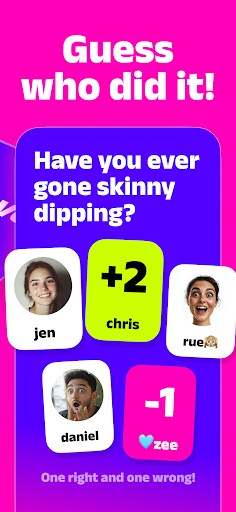
NoCap – think you know your friends? Get ready for surprises, laughter, and some jaw-dropping confessions!
How It Works: One friend hosts a game room, shares a 6-digit code, and everyone joins in!
Each round, answer fun prompts like “Have you ever cracked your phone screen?” Then, take your best guess at who’s done it, and brace yourself for the big reveal! Will your friends own up, or keep you guessing?
Perfect for parties, hangouts, or any time you’re ready to start unforgettable conversations. Dive into NoCap! — No lie, all laughs!
---
This app contains a subscription:
You can subscribe for a premium account with unlimited access to all game modes, new monthly content and no ads. The subscription period is 1 week with a 3 day trial or 1 month.
Link to our Terms of Use:
https://www.vanilla.nl/terms-of-use/
Link to our Privacy Policy:
https://www.vanilla.nl/privacy-policy/
How to Download NoCap! APK
- Enter the package name
com.vanilla.nhiemultiplayeron the APK Downloader. - Select your device architecture (ARM64 recommended for modern devices).
- Click Download to get the merged APK file.
- Transfer and install the APK on your Android device.
- Keep Updated: Visit APKDER.COM regularly to search for and download the latest secure versions of your favorite apps.
Security & Signature Verification
This APK download is 100% safe. We verify that the cryptographic signature of the file matches the official developer credentials. No modifications or adware are injected.