




Download Sources
Device Configuration
Split APKs Installation Guide
Some apps are distributed as Split APKs (multiple .apk files packaged together) to optimize resources. Standard Android installers cannot open them.
What's New
1.All brand new editing UI
2.Now,you can change language in settings
About This App
VivaCut is an amazing video editor & video maker. Whether you want to make a great movie or just want to share memories and fun moments with your friends, VivaCut is a perfect choice for you.
Create short videos with one click using cool effect and transition templates! VivaCut is also a professional video editing app with all the editing features. Multi-layer timeline, chroma key and green screen features help you create cinematic videos with music for YouTube, Instagram and TikTok. Want to get more likes on your social media? Download this video editor & video maker now!
Basic Video Editing
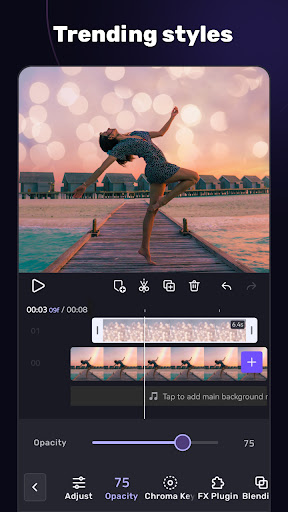
[Multi-layer timeline] An intuitive and sleek editing interface with zoom for frame-by-frame precision with overlay video editor app.
[Text] Edit, duplicate, and modify styles (variety of fonts & emoji, color, opacity, shadow, stroke).
[Trim videos] Professional tools developed for precise Video Editing App.
[Split videos] Split videos and optimize them for sharing.
[Combine video clips] Merge clips into a stunning video with transitions effects; combine video clips into one video.
[Speed Control] Fast & slow motion video like a pro, only with VivaCut Video - Pro Video Editing App!
Advanced Video Editing
[Green Screen/Chroma key] Combine/mix videos like a Hollywood-level movie. Best chroma key video editor app & video background changer editor.
[Keyframe Animation] Apply to Mask, Video Collage, Text, Stickers, Emoji, etc. Pro aesthetic video editor app.
[Mask] Linear, mirror, radial, rectangle, and oval, all for the scene. Full-screen video editor for YouTube.
[Picture in Picture] Combine clips together to create double exposures and eye-catching YouTube videos with transitions for free.
[Collage] Add pictures to your clips and edit videos, then go viral with VivaCut!
[Overlay options] Customize layers with tools such as opacity and blending.
[Blend videos] Mix videos using powerful blending modes such as Color Burn, Multiply, Screen, Soft Light, Hard Light, etc. VivaCut - best video background changer editor.
Effect & Filter & Transition
[Video Transition] Create amazing effects with cinematic overlay video editor with transition effects in VivaCut, a movie-level video background changer editor.
[Filters] Edit videos/combine video clips with adjustable filters and effects.
[Glitch Effects] Coolest video editing app with glitch effects and transitions!
Trendy Music
[Music Marker] Mark the track and add effects according to the music rhythm. Pro video editor app with music and effects.
[Audio Extraction] Aesthetic video editor with transition effects: extract music/audio from any video. Pro video editing app with sound effects.
[Templates] Create your own music videos by automatically adding unique filters and cool effects to video templates.
Save & Share
[Custom video resolution] Export videos in 720p, 1080p, and 4k.
[Rename] Rename video and mark memory with PRO aesthetic video editor.
Save videos directly with transition effects to your device's gallery, non-destructive video maker. One-click sharing to YouTube, Instagram, TikTok, Snapchat, etc.
VivaCut is a pro video editor and video editing app with all features you need! It's a video maker with music for cutting and splitting videos. Take a leap for your video and experience the next PRO video editor generation
Subscription
- Your subscription automatically renews unless auto-renew is turned off at least 24-hours before the end of the current period
- Your account will be charged for renewal within 24-hours prior to the end of the current period
Acknowledgements:
Music by audionautix.com and https://icons8.com/music/
User Reviews

This app is a FRAUD! I downloaded it due to the "10 day FREE TRIAL" they were offering, on April 6th or 7th I believe. I tried the app, but decided it just wasn't what I was looking for and just as I was getting ready to cancel my trial after only 3 days use, I get an email notification that I was charged $35.99 for a year subscription. I was shorted 7 whole days from this trial! WOW! If you download this app, take into consideration you should be certain you want it or cancel within 72 hours.

So I do fan edits so this was a really great app. At first. There aren't really enough transitions to use, not enough effects, and I would not get the pro, just because of the price. I've been having a issue lately though. When I'm done with it I sometimes forget to save it. When I go back to it, either the audio is gone, or some of the clips I added are gone. I would not recommend, but it's simple to use, I'm going to find a different app though
Pretty easy to use once you play around a little. I like that you can easily loop short videos to repeat for a longer overall video (like for posting boomerangs). Took a bit to get used to how to mess with the different editing tools, but once you get the hang of it there are a lot of cool options & ways to use the tools! You can't get all of the editing tools with the free version, but it's still good!

Simple to use! Made my first video soon after installing and upgraded immediately! . . Update: I have been using this app for 2yrs and have made amazing videos with cool sound effects. The drawbacks...music library is small ,sound effects library is limited, there is no pc version, and you cannot set save location to SD card on Android. Other than that, I am happy with this app for on the go editing.
How to Download AI Video Editor - VivaCut APK
- Enter the package name
com.videoeditorpro.androidon the APK Downloader. - Select your device architecture (ARM64 recommended for modern devices).
- Click Download to get the merged APK file.
- Transfer and install the APK on your Android device.
- Keep Updated: Visit APKDER.COM regularly to search for and download the latest secure versions of your favorite apps.
Security & Signature Verification
This APK download is 100% safe. We verify that the cryptographic signature of the file matches the official developer credentials. No modifications or adware are injected.


