

Music Player - MP3 Offline APK Screenshots


Music Player - MP3 Offline App Information
Download Sources
Device Configuration
Old Versions of Music Player - MP3 Offline
| Version | Size | Min OS | Architecture | Release Date | Action |
|---|---|---|---|---|---|
| v6.5.0 | Varies | Android 5.0+ | universal | Jul 11, 2026 | Download |
Split APKs Installation Guide
Some apps are distributed as Split APKs (multiple .apk files packaged together) to optimize resources. Standard Android installers cannot open them.
What's New in Music Player - MP3 Offline
Fix application errors
Improve applications
About Music Player - MP3 Offline
Enjoy your favorite songs with a powerful offline music player designed for smooth playback and easy music management. Customize your listening experience with advanced equalizer controls, ringtone editing tools, playlists, themes, and more.
🎧 Offline Music Playback
• Play music anytime without an internet connection
• Fast and lightweight audio player
• Smooth background playback
• Shuffle and repeat modes
✂️ Ringtone Cutter
• Trim audio files and create custom ringtones
• Save your favorite song clips
• Quickly set personalized ringtones
🎚 Advanced Equalizer
• 5-band equalizer
• 10-band equalizer
• Bass boost and treble adjustment
• Save and manage custom sound presets
🎵 Playlist Management
• Create and organize playlists
• Customize playlist order
• Automatic playlist backup and restore
📂 Smart Music Library
• Manage your music collection with ease
• Browse songs by folders, albums, artists and genres
• Fast search for songs, albums and artists
🎨 Personalization
• Multiple player layouts
• Multiple color themes
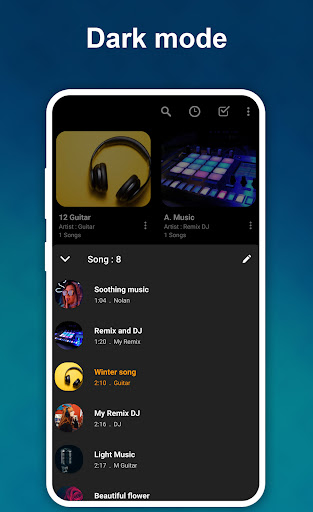
• Dark mode support
• Customize the look of your music player
⏯ Playback Controls
• Playback speed adjustment
• Sleep timer
• Convenient playback controls
📱 Home Screen Widgets
• Two music widgets
• Quick access to playback controls
• Control music directly from your home screen
🎼 Lyrics Support
• Display lyrics from local files stored on your device
• Support embedded lyrics when available
🎼 Supported Audio Formats
Supports popular audio formats including:
• MP3
• AAC
• M4A
• FLAC
• OGG Vorbis
• Opus
• WAV
Music Player helps you enjoy your local music collection with powerful audio controls, customizable sound effects, playlist management, ringtone editing, and a modern user experience.
User Reviews

My last amd final review. I've had this app for years, and paying for the premium was worth it. Now, I'm looking for a replacement app. For over a year, the Playlist would vanish and settings would reset on their own. Now they have backup option for the Playlist. But the Playlists created are shuffling the track order on their own. IE: I will make a Playlist, put an album in correct track listing order. The next time I open the app- that Playlist is completely out of order. It is annoying.

While there's some bells and whistles that may improve the app, one thing I noticed is it doesn't just randomly shut down. There were some other apps where the music player shut down for some unknown reason, and assumed the app just didn't allow a music player to run. But this one has been running the whole time regardless. So major fan here as of now. Keep it up.

I couldn't stand using YouTube Music, once Play Music was discontinued, and we were all forced to switch. This is a fabulous alternative (if you prefer to physically keep your music files on your mobile device and don't pay for music streaming) to YouTube music. Whoever developed this app, THANK YOU! The app is clean, simple, and theres no BS features to just get in your way.

I absolutely love it omg!!! The ads are a bit annoying but hey ads are everywhere. And plus you have the forward option and then exit the ad. You can edit the song name etc, you can even add a picture from your gallery. I love this app 100% and I recommend it. This was the first app I tried when Google no longer supported my music. Best choice I made.
How to Download Music Player - MP3 Offline APK
- Enter the package name
com.vmons.mediaplayer.musicon the APK Downloader. - Select your device architecture (ARM64 recommended for modern devices).
- Click Download to get the merged APK file.
- Transfer and install the APK on your Android device.
- Keep Updated: Visit APKDER.COM regularly to search for and download the latest secure versions of your favorite apps.
Frequently Asked Questions
Yes! Every APK download provided by APKDER undergoes rigorous security verification. We verify that the cryptographic signature of the APK file matches the official signature from the developer, ensuring the APK is original, untouched, and free from any modifications.
To install it, you first need to enable "Unknown Sources" in your Android device's security settings. After downloading the APK file from APKDER, tap it to begin the installation and follow the on-screen prompts.
Yes! As soon as the developer releases a new version of Music Player - MP3 Offline, we will update and provide the updated APK on APKDER. You can simply download and install the new APK over the existing installation without losing your app data.
Yes. APKDER allows you to bypass geographic restrictions and download official APK files directly, even if the app or game is not officially available in your country's store.
A standard APK is a single installation package. An XAPK or Split APK contains multiple resource files (like OBB expansions or device-specific layout parts) packaged together. To install them, you can download splits individually or use dynamic helper tools like Split APKs Installer (SAI).
Security & Signature Verification
This APK download is 100% safe. We verify that the cryptographic signature of the file matches the official developer credentials. No modifications or adware are injected.


