
Download Sources
Device Configuration
Split APKs Installation Guide
Some apps are distributed as Split APKs (multiple .apk files packaged together) to optimize resources. Standard Android installers cannot open them.
Related Applications




What's New
-You can now directly transcribe YouTube, Instagram, TikTok, and X videos using their links!
-Some performance improvements have been made and issues have been resolved.
We continue to work to provide you with a better experience. Please don't forget to download the latest version to use our latest features!
About this app
Turn speech into text instantly — with AI accuracy.
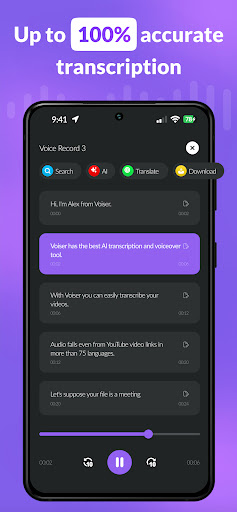
Voiser Speech to Text is a professional transcription app for journalists, students, professionals, and content creators. Transcribe live voice, audio files, and social media videos in 140+ languages.
What makes Voiser different?
One app for every transcription need — live voice, uploaded audio, recorded meetings, and social video links — all with high AI accuracy.
Transcribe any video from a link
Paste a YouTube, Instagram, TikTok, or X video link and get a full transcript in seconds. No downloading, no converting.
Real-time transcription
Speak and watch words appear instantly. Perfect for lectures, interviews, and meetings — even in noisy environments.
Transcribe audio files
Upload voice memos, podcast episodes, or interviews and get accurate transcripts in minutes.
140+ languages
Handles different accents and speech patterns with high accuracy — ideal for global teams and multilingual content.
Speaker identification
Automatically identifies and labels different speakers — essential for interviews and group meetings.
Key features:
— Real-time speech to text, 140+ languages
— Transcribe YouTube, TikTok, Instagram, X videos from a link
— Audio file and voice memo transcription
— Speaker identification
— Hands-free dictation
— Multi-format export
— AI accuracy that improves continuously
Stop typing. Start transcribing — with Voiser.
For more information, visit our Privacy Policy and Terms of Use:
Privacy Policy: https://voiser.net/privacy
Terms of Use: https://voiser.net/terms-of-use
How to Download Voiser: Speech to Text & STT APK
- Enter the package name
com.voiser.speechtotextandroidon the APK Downloader homepage. - Select your device architecture (ARM64 recommended for modern devices).
- Click Download to get the merged APK file.
- Transfer and install the APK on your Android device.
- Keep Updated: Visit APK Downloader regularly to search for and download the latest secure versions of your favorite apps.
Security & Signature Verification
This APK download is 100% safe. We verify that the cryptographic signature of the file matches the official developer credentials. No modifications or adware are injected.