My Verizon

My Verizon

Verizon Consumer Group
★★★★★ 4.6 Lifestyle v21.9.6 100,000,000+
Verified Safe & Direct
Download APK Google Play

Download Sources

Device Configuration

Split APKs Installation Guide

Some apps are distributed as Split APKs (multiple .apk files packaged together) to optimize resources. Standard Android installers cannot open them.

1. Download Split APKs Installer (SAI) from Google Play Store.
2. Download the app archive (.apks) using the download sources listed above.
3. Open SAI, click "Install APKs", choose the downloaded archive, and click Install.

Related Applications

Version
21.9.6
Downloads
100,000,000+
Updated
Jun 13, 2026
Developer
Verizon Consumer Group
Category
Lifestyle
Content Rating
Mature 17+
Package
com.vzw.hss.myverizon
Platform
Android
ScreenshotScreenshotScreenshotScreenshotScreenshotScreenshot

What's New

- Enhancements to Connected Life, making it easier for customers to navigate between Verizon Apps
- Unlock even more benefits and savings.

About this app

Meet the My Verizon app. Everything Verizon all in one place. When you launch the app you’ll see all the latest just for you. This is your personalized view, with customizable shortcuts, current balance, bill savings, perks, offers and more. And to find what you’re looking for faster, switch between different app sections using the tab bar.

Your Mobile and Home Internet accounts are just a tap away. Quickly manage your devices, make plan changes, view usage and discover everything your plan has to offer. Keep track of all your Home Internet accounts, 5G Home. LTE Home and Fios.

With our simplified bill, you can see details, schedule AutoPay and make secure payments.

Best of all, you can shop or upgrade right from the app. It’s the fastest way to get what you want for Mobile and Home.

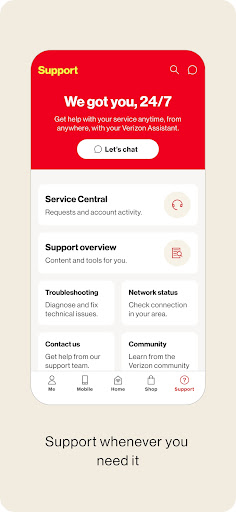
Looking for answers? The new support page has you covered. Chat with your Verizon Assistant 24/7, walk through account details, explore new plans, get help with troubleshooting and more.

Everything is easier with the MyVerizon app. Do it all. All in one place.

How to Download My Verizon APK

  1. Enter the package name com.vzw.hss.myverizon on the APK Downloader homepage.
  2. Select your device architecture (ARM64 recommended for modern devices).
  3. Click Download to get the merged APK file.
  4. Transfer and install the APK on your Android device.
  5. Keep Updated: Visit APK Downloader regularly to search for and download the latest secure versions of your favorite apps.

Security & Signature Verification

This APK download is 100% safe. We verify that the cryptographic signature of the file matches the official developer credentials. No modifications or adware are injected.

Device & app history Basic Access
  • retrieve running apps
Calendar Basic Access
  • read calendar events plus confidential information
  • add or modify calendar events and send email to guests without owners' knowledge
Contacts Special Access
  • read your contacts
  • modify your contacts
Location Special Access
  • approximate location (network-based)
  • precise location (GPS and network-based)
SMS Basic Access
  • receive text messages (SMS)
Phone Special Access
  • directly call phone numbers
  • reroute outgoing calls
  • read phone status and identity
Photos/Media/Files Basic Access
  • read the contents of your USB storage
  • modify or delete the contents of your USB storage
Storage Basic Access
  • read the contents of your USB storage
  • modify or delete the contents of your USB storage
Camera Special Access
  • take pictures and videos
Microphone Special Access
  • record audio
Wi-Fi connection information Basic Access
  • view Wi-Fi connections
Device ID & call information Special Access
  • read phone status and identity
Other Basic Access
  • view network connections
  • read battery statistics
  • pair with Bluetooth devices
  • access Bluetooth settings
  • change network connectivity
  • allow Wi-Fi Multicast reception
  • connect and disconnect from Wi-Fi
  • delete all app cache data
  • control flashlight
  • measure app storage space
  • full network access
  • close other apps
  • change your audio settings
  • control Near Field Communication
  • run at startup
  • draw over other apps
  • control vibration
  • prevent device from sleeping
  • modify system settings
  • read Google service configuration