

Video Velocity: Slow Motion HD APK Screenshots



App Information
Download Sources
Device Configuration
Split APKs Installation Guide
Some apps are distributed as Split APKs (multiple .apk files packaged together) to optimize resources. Standard Android installers cannot open them.
What's New
📱 Improved compatibility with the latest Android version
🔁 Increased reliability of background tasks
🧩 Fixed minor alignment issues in UI components
🩺 Performed a general stability sweep, addressing various user-reported issues
🧠 Resolved several rare “App Not Responding” scenarios to keep the experience smooth
About This App
Fast and slow motion Video Velocity editor. Make your video faster or slower easily!
Fantastic Fast & Slow Motion Video Editor
Create stunning slow-motion videos or make your videos more exciting by speeding them up. Get the ultimate Video Velocity Editor today! ✅
Slow down the time with a smooth slow-motion video editor! Make aesthetic videos with fast or slow motion effects!
Simple, yet POWERFUL Video Velocity Tool!
FHD Quality
Simple Video editing app with FHD Quality and amazing slow and fast motion! Create your own masterpiece in FHD Quality.
Speed up or slow down your videos with ease. Experience VIDEO VELOCITY now!
Choose your SPEED
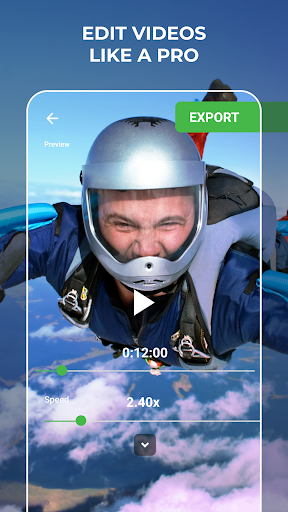
Edit videos like a pro with a fast and slow-motion video velocity editor. Add smooth slow motion or make videos faster, it’s up to you. ✅
Perfect for Social Networks
Create cool videos with fast and slow motion effects and surprise your friends. Enjoy videos in fast and slow motion with the ultimate VIDEO VELOCITY tool! ✅
Smooth Slow Motion
Slow-Mo Video Editor - slow down the time or record slow-motion videos! Make Video slower in two simple steps with our video speed editor tool.
Throughout its history, Video Velocity became a default app for fast and slow-motion video editing. Video Velocity is so rich in features that it's got a whole set of nicknames from our amazing users: slo mo video editor, a tool to slow down video, Time Freeze Tool, Video Speed Editor, or SloMo tool. Regardless of what you call it, once you install Video Velocity, you receive a smart tool, which will help you edit videos like a pro. ✅
Start creating amazing videos with #1 Video Velocity Editor.
Enjoy videos at your own pace with VIDEO VELOCITY!
User Reviews

I love this app so much!! I've been looking for apps that give you a smooth slowmo, but I couldn't find any. Until I found this app! It's amazing!! The exporting time is quite slow but it's manageable. But i do have one problem that i was hoping you could fix. Whenever i import my video it looks normal and all but whenever i export it and look at the results, it changes the coloring of my video. I was hoping if you could let us have the smooth slowmo but without affecting the video in any way :)

Best app out there to smooth slow motion your clips it even has 1080p export and 90 fps best app to smooth out your clips higley recommended but it takes very long when you put low settings it goes fast but if you put high settings it goes slow like I waited an hour for it to slow down my video but it's very good for reverse edits it works on any clip best smooth slow motion app!🔥🔥 video velocity should be 1. smooth slow motion app you can even choose how much slow motion you want it's awesom

Another one I I installed before using it one time. I have no interest in a free trial especially on something I very seldom use. Plus there are a lot of good video players that are really good. Every time I get a new phone I try a couple of new apps even if the ones I had worked fine. Sometimes I find one that's a little better or that's easier.. Other times I find some that I uninstall after using a couple of times. This app got uninstall before I even used it one time.

This app is NO BETTER than most other similar apps; however, the greed of the developer is beyond belief! To get rid of the (very)! invasive ads, and use all the Pro features, will cost you - wait for it...£14.99 per MONTH, or £779.48 per YEAR! OUTRAGEOUS...you'd need to be very wealthy &/or INSANE to subscribe! I have just purchased an excellent, better app, (as a one-off payment), for a LIFETIME, ADS-FREE Pro version for...£4.69. Go figure! Uninstalled this one.
How to Download Video Velocity: Slow Motion HD APK
- Enter the package name
com.wallisonfx.videovelocityon the APK Downloader. - Select your device architecture (ARM64 recommended for modern devices).
- Click Download to get the merged APK file.
- Transfer and install the APK on your Android device.
- Keep Updated: Visit APKDER.COM regularly to search for and download the latest secure versions of your favorite apps.
Frequently Asked Questions
Yes! Every APK download provided by APKDER undergoes rigorous security verification. We verify that the cryptographic signature of the APK file matches the official signature from the developer, ensuring the APK is original, untouched, and free from any modifications.
To install it, you first need to enable "Unknown Sources" in your Android device's security settings. After downloading the APK file from APKDER, tap it to begin the installation and follow the on-screen prompts.
Yes! As soon as the developer releases a new version of Video Velocity: Slow Motion HD, we will update and provide the updated APK on APKDER. You can simply download and install the new APK over the existing installation without losing your app data.
Yes. APKDER allows you to bypass geographic restrictions and download official APK files directly, even if the app or game is not officially available in your country's store.
A standard APK is a single installation package. An XAPK or Split APK contains multiple resource files (like OBB expansions or device-specific layout parts) packaged together. To install them, you can download splits individually or use dynamic helper tools like Split APKs Installer (SAI).
Security & Signature Verification
This APK download is 100% safe. We verify that the cryptographic signature of the file matches the official developer credentials. No modifications or adware are injected.


