


Download Sources
Device Configuration
Split APKs Installation Guide
Some apps are distributed as Split APKs (multiple .apk files packaged together) to optimize resources. Standard Android installers cannot open them.
About This App
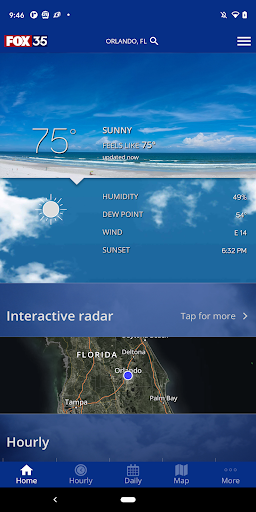
Track your local forecast anywhere in Central Florida quickly with the free FOX 35 Storm Team Weather app. The improved design gives you radar, hourly and 7-day weather information just by scrolling. Our weather alerts will warn you early and help to keep you and your family safe during severe weather.
Why download the FOX 35 Storm Team Weather app?
• Get your current forecasts at a glance, with fully integrated GPS to give you accurate conditions wherever you are located.
• Receive severe storm alerts from the National Weather Service so you and your family can stay safe.
• Interactive radar map includes the past hour of a storm's movement and future radar to see where severe weather is headed. Regional lightning data and high-resolution satellite cloud imagery are also included. Radar is optimized for in-network and WiFi performance.
• Video forecasts and live streaming from the FOX 35 Storm Center, so you can stay informed even during power outages.
• Daily and Hourly forecasts update from our computer models.
• Add and save your favorite locations, anywhere in the world.
• Live traffic map for the greater Orlando area.
• Share your weather photos and videos easily with FOX 35.
User Reviews

I don't know who is running this app but weather radar appears to be useless. there can be a 90% chance of rain and nothing happens. The map can show it pouring rain right over my house, except that it's not raining at all. Don't plan your day by looking at this app. It is wrong almost all of the time

The app itself works okay, but their weather forecast is absolutely the WORST I have ever experienced. The chance of rain is wildly exaggerated. For instance, in the morning, it often says 75% or more chance of rain at 4 pm, then when the afternoon arrives, their forecast is downgraded to 10% This happens over and over again. Once in awhile being wrong is understandable, but they are wrong far more than they are right. I really think they do it on purpose for "clicks". Don't waste your time.

Bring the past radar view back! Future track doesn't show what's actually happening. This app is almost worthless to me without it.

Love its accuracy and the weather map
How to Download FOX 35 Orlando Storm Team APK
- Enter the package name
com.wofl.android.weatheron the APK Downloader. - Select your device architecture (ARM64 recommended for modern devices).
- Click Download to get the merged APK file.
- Transfer and install the APK on your Android device.
- Keep Updated: Visit APKDER.COM regularly to search for and download the latest secure versions of your favorite apps.
Security & Signature Verification
This APK download is 100% safe. We verify that the cryptographic signature of the file matches the official developer credentials. No modifications or adware are injected.


