
Download Sources
Device Configuration
Split APKs Installation Guide
Some apps are distributed as Split APKs (multiple .apk files packaged together) to optimize resources. Standard Android installers cannot open them.
Related Applications



What's New
We’ve made updates to add new features & improve the app experience. The latest version includes:
• Bug and performance fixes
About this app
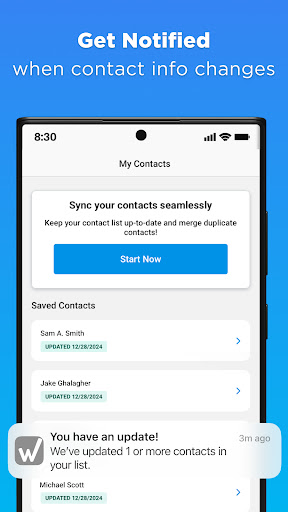
Look up on more than 200 million phone numbers and find out who called with Whitepages Reverse Phone Lookup. Get detailed information on unknown callers, including names, addresses, emails & background check reports. Whitepages Reverse Phone Lookup app helps you reveal unknown callers, block spam, and stay protected. Access trending spam numbers to add to your block list for extra security. Plus, keep your contacts accurate by syncing with Whitepages Reverse Phone Lookup to ensure up-to-date information.
What you'll get with the Whitepages Reverse Phone Lookup app:
REVERSE PHONE NUMBER LOOKUPS
• Search on any cell phone number or landline to get the owner’s name, address, emails and other public record information
• Look up more than 200 million landlines and business phone numbers for free
ACCESS BACKGROUND REPORTS OF PHONE OWNERS
• Obtain instant online background check reports of phone owners including criminal & arrest records, property info and other public records along with complete contact information
IDENTIFY UNKNOWN CALLERS AND SPAM CALLS
• Use reverse phone lookup to reveal callers in seconds, plus additional info on cell numbers & Caller ID
• Access user-reported trending spam numbers and identify spam calls with ease
• Recognize the type of spam calls you're receiving to keep your phone secure
• Proactively add spam numbers to your device to block future spam calls
SYNC & MERGE CONTACTS
• Sync your contacts, detect duplicates, and merge them seamlessly
EASILY ADD PHONE NUMBERS TO CONTACTS
• Add looked up phone numbers and names to your contacts with just a tap
HOW PEOPLE USE WHITEPAGES REVERSE PHONE LOOKUP / CALLER ID APP:
• Look up unknown numbers calling your cell phone to decide if you should block the number
• Identify suspicious callers and texts in seconds
• Verify & update phone numbers in your contact list
• Find out who owns a phone number and get their background report including criminal history and other public records
• Get addresses & emails for acquaintances, extended family and others by searching on their phone numbers
• View trending spam numbers with spam types and add them to the block list proactively
• Sync & clean up contacts to keep the contact list organized and up-to-date
Privacy policy: https://www.whitepages.com/data-policy
Terms of use: https://www.whitepages.com/terms-of-service
www.whitepages.com the authority in people search since 1997
How to Download Reverse Phone: Caller ID APK
- Enter the package name
com.wpconnecton the APK Downloader homepage. - Select your device architecture (ARM64 recommended for modern devices).
- Click Download to get the merged APK file.
- Transfer and install the APK on your Android device.
- Keep Updated: Visit APK Downloader regularly to search for and download the latest secure versions of your favorite apps.
Security & Signature Verification
This APK download is 100% safe. We verify that the cryptographic signature of the file matches the official developer credentials. No modifications or adware are injected.