
Music Player - MP3 & Audio APK Screenshots

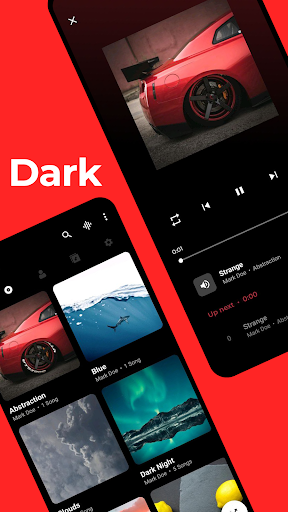


Music Player - MP3 & Audio App Information
Download Sources
Device Configuration
Split APKs Installation Guide
Some apps are distributed as Split APKs (multiple .apk files packaged together) to optimize resources. Standard Android installers cannot open them.
What's New in Music Player - MP3 & Audio
Bug fixes and optimizations
About Music Player - MP3 & Audio
Experience high-quality music playback. This offline music player offers a sleek design and powerful features, all in a small package. Manage your playlists and albums with ease.
What we offer
- High-quality music playback.
- Song, genre, playlist, album, and artist tabs.
- Powerful Equalizer with multiple EQ profiles, bass boost, and surround sound (3D audio).
- System Equalizer option.
- Smart playlists
- Song and album tag editors.
- Audiobook controls.
- Music player widgets.
- Lock screen and notification controls.
- Bluetooth music controls
- Music library search.
- Multiple "Now Playing" styles.
- Stunning music player themes (requires in-app purchase)
- Sleep timer (requires in-app purchase)
- UI color customization (requires in-app purchase)
Please note that this app is an offline music player and does not support music streaming or downloads. Feel free to reach out to us with any questions. Your feedback is always appreciated.
This application is open source under the GNU GPL v3 License.
https://github.com/mP0-22git/22player-repo-5b
User Reviews

Used this app for a long time and enjoyed it being one of the truly ad-free mp3 apps, and only ever asking for a one time payment of $3 for premium features to support them. However, not only have they now added ads (despite their promise not to), they removed the one-time payment for a subscription service, and bumped up the price to $5 a month. This is a blatant money grab and in protest, I've uninstalled the app and reinstalled an older version that doesn't have ads with an apk site.

This is a very good music player! If I could request, it would be the ability to sort the albums within an artists' profile. Right now, it's sorted by album, but in a random order, kinda by year but not always. I'd like to be able to choose how to sort it, or at least for it to be sorted alphabetically by default so it's easier to search through. If the app gets that feature, though, this is definitely a five-star app.

Just bought the Pro version bc I liked it enough as a replacement following the retirement of the Play Music app. Really appreciated there were no ads in the free version. What I would love is a search feature in the top icon bar. Currently, search is hidden in the 3-dots. Most of the time, given the quantity of music on my phone, I don't scroll but search what I want. The feature itself is present, but hidden. It'd be wonderful to move it up front.

Could be a truly wonderful app, had it read multiple folder sources. Your app offers better tone than most. As a musician myself, I'm able to compare it to a reference standard system, based on my own studio. Yours is incredibly good. Could use a treble adjuster, but still very good. I would also suggest an overall signal boost adjuster. As an Android user with an additional 1Gb of external storage on a micro sd, 80% of it music, it would help if multiple storage sources were readable.
How to Download Music Player - MP3 & Audio APK
- Enter the package name
cyberwolf.musicplayeron the APK Downloader. - Select your device architecture (ARM64 recommended for modern devices).
- Click Download to get the merged APK file.
- Transfer and install the APK on your Android device.
- Keep Updated: Visit APKDER.COM regularly to search for and download the latest secure versions of your favorite apps.
Frequently Asked Questions
Yes! Every APK download provided by APKDER undergoes rigorous security verification. We verify that the cryptographic signature of the APK file matches the official signature from the developer, ensuring the APK is original, untouched, and free from any modifications.
To install it, you first need to enable "Unknown Sources" in your Android device's security settings. After downloading the APK file from APKDER, tap it to begin the installation and follow the on-screen prompts.
Yes! As soon as the developer releases a new version of Music Player - MP3 & Audio, we will update and provide the updated APK on APKDER. You can simply download and install the new APK over the existing installation without losing your app data.
Yes. APKDER allows you to bypass geographic restrictions and download official APK files directly, even if the app or game is not officially available in your country's store.
A standard APK is a single installation package. An XAPK or Split APK contains multiple resource files (like OBB expansions or device-specific layout parts) packaged together. To install them, you can download splits individually or use dynamic helper tools like Split APKs Installer (SAI).
Security & Signature Verification
This APK download is 100% safe. We verify that the cryptographic signature of the file matches the official developer credentials. No modifications or adware are injected.


