




Download Sources
Device Configuration
Split APKs Installation Guide
Some apps are distributed as Split APKs (multiple .apk files packaged together) to optimize resources. Standard Android installers cannot open them.
What's New
🩺 Performed a general stability sweep, addressing various user-reported issues
🧠 Resolved several rare “App Not Responding” scenarios to keep the experience smooth
📱 Improved compatibility with the latest Android version
🧰 Updated internal libraries and dependencies
About this app
Ultimate Video Editor - the easiest way to Cut, Crop, Blur and Trim Videos. Edit Videos like a PRO with Video Cutter and Video Trimmer features!
The easiest way to Cut, Crop, and Trim Videos!
Video Cutter & Trimmer helps you trim and crop video, removing unwanted portions. You can blur video as well, or avoid cropping and enhance video colors easily like in Photoshop. Simple video editor for all your needs!
Edit Videos like a PRO
Simple to use drag and scale part of the video that you want to crop, blur or select the trim interval. You can crop, trim, blur video, and enhance colors for the social networks. Create a masterpiece and share it with friends on social media with ease. All video editing tools that you need in one place!
Cool Features of Trim & Crop Video Editor:
Crop video - Use the video resizer feature to resize the video to the size that meets your needs. There are various options available, where you can choose from predefined sizes to any custom size!
Trim and cut video - The video trimmer feature enables you to set the video's interval that you want to trim. When you set it, tap the button and get it done!
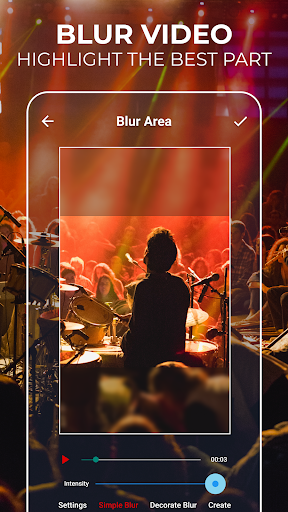
Blur video - Do you want to blur video parts, some faces, or any other area of the video? Just use the blur video feature, and the problem is solved!
No crop video - Use the video's full size and make it fit without cropping. No crop video feature offers you more predefined and most often used aspect ratios, but you can also set a custom one.
Enhance video color - Select specific parts of your video and adjust colors. Change the saturation and make it more vibrant!
No watermark - You can edit videos without any watermark!
Social networks - Post your creative usage of our app on social networks, get followers or views, and you can get featured in our app! Crop and Cut Video for your social media!
Share videos - Share your video editing creations with your friends or with your community and let them know about your creative work.
Unique Video Cutter & Trimmer
If you need a quick and easy way to cut videos - you found it! Video Cutter with all the editing tools you need. Most importantly, it's easy to use! Edit videos easily with the best video editing tool. Cut & Crop Video instantly!
Blur Video Easily
Yes, we have this great feature as well! Blur video parts easily and create unique content.
Video Trimmer
Set the video's interval that you want to trim, and it's done!
Video crop, cut & trim - How to edit videos?
✔ Select the video
✔ Set trim or blur position with width and height or select the interval to cut videos
✔ Click on the crop, trim, enhance colors or blur video
✔ Preview and share
✔ Easy video cutter, cropper, trimmer, or enhancer
For any suggestions, contact us at [email protected]
The only video cutter and trimmer you'll ever need!
Edit Video like a PRO and share it with your friends on Instagram and TikTok easily!
Start using a video editor app with amazing features and make your video more engaging! Blur video parts, enhance colors, trim, crop video, or use the no crop video feature - Show your video editing skills!
Disclaimer
All product names, logos, brands, trademarks and registered trademarks, which are not owned by us, are property of their respective owners.
All company, product and service names used in this app are for identification purposes only. Use of these names, trademarks and brands does not imply endorsement.
The Crop, Cut & Trim Video Editor app is owned by us. We are not affiliated, associated, authorized, endorsed by, or in any way officially connected with any 3rd party apps or companies.
User Reviews

been using for years. One of the best on the market because it is straight forward and simple to use. I tried using other video editors but some were confusing. If you are new to video editing like myself, cropping trimming etc..and you are overwhelmed with other platforms. Try this. highly recommended. little to zero ads and they do offer a small premium price to unlock ALL features and compared to whats out there and the steep cost, this app is fairly priced and worth it! EXCELLENT!

Absolutely amazing app! Been using it for a couple of years and I have to say it is a great tool to use for cropping videos, it's free, quick and keeps it's promise of no watermark even on the free version. It does have an ad every time you crop a video, but for such a decent app, it's honestly worth the ad, and you can skip it either way, plus you can adjust the arrows. The only issue is when I try to crop it crashes, other than that, it's very worth the download :))

Amazing for cropping my videos frame so I can post them on instagram. It can trim video length, but can't splice videos together. It also has an interesting color enhancement feature I haven't tried. There are many ads, but they pop up while you wait for your video to finish processing. Sometimes they pop up when you're trying to do something but that's rarer.

The best film editing app that can produce true black bars to enhance film making abilities! I highly recommend this app for those who make films on their devices and wish to use the "cinematic" black bars on top and bottom. And you can do all of this on the device alone without having to use computer software to do it. Great job, developers!
How to Download Crop, Cut & Trim Video Editor APK
- Enter the package name
fnzstudios.com.videocropon the APK Downloader. - Select your device architecture (ARM64 recommended for modern devices).
- Click Download to get the merged APK file.
- Transfer and install the APK on your Android device.
- Keep Updated: Visit APKDER.COM regularly to search for and download the latest secure versions of your favorite apps.
Security & Signature Verification
This APK download is 100% safe. We verify that the cryptographic signature of the file matches the official developer credentials. No modifications or adware are injected.


