
Download Sources
Device Configuration
Split APKs Installation Guide
Some apps are distributed as Split APKs (multiple .apk files packaged together) to optimize resources. Standard Android installers cannot open them.
Related Applications




What's New
- Bug fixes and performance improvements
- InstaSquare Photo Editor-Filter&Effect, SquareBlur
About this app
InstaSquare Photo Editor-Filter&Effect, Square Blur Image Background is a powerful photo editor and collage maker app for Instagram, WhatsApp, Snapchat, Facebook and Messenger etc you deserve.
InstaSquare Photo Editor-Filter&Effect, Square Blur Image Background offers a lot of powerful photo editing tools. You can easily create a unique photo with insta square, effect, filter, text, blur, no crop, layout, sticker, emoji, frame, background, collage maker and much more.
❤️InstaSquare Photo Editor
- Insta 1:1 square pic & no crop for Instagram
- Insta square blur photo with professional blur effect
- Apply professional effect and filter to picture
- Crop, rotate, resize, blur, mirror, and zoom photo
- Add stickers, text, backgrounds, borders, and frames
- Choose multiple ratios, 1:1, 4:5, 3:2 ratios, etc
- Paint your photo with color brush
- Share pictures to Instagram, Facebook, Whatsapp, etc
❤️Photo Collage Maker
- You can choose 1-12 pictures together
- Create photo collage with 100+ layouts in seconds
- Custom photo grid size, border and background
- Simply drag and drop to adjust the image size position
- You can also personalize your own scrapbook with freestyle pic stitches
❤️Magic Photo Effects & Leak Light
- 50+ magic photo effects to choose from
- One-tap make your picture be amazing with leak light
- Retro VHS, Bad TV, RGB
- Glitch, Emboss, Pixel
- Sketch, Moire, Monitor
- Swirl,Zoom Blur,Motion Blur,Cartoon
❤️Professional Filter
- Built-in 100+ professional filters
- Lomo, Retro, Food, BW, Film
- Nature, Color, Story, Youth
- Each will make your photos be unique. Try it!
❤️Powerful Photo Editing Tools
- Best insta square pic blur photo editor
- Pinch to resize the photo, rotate and move to customize
- No Crop, square blur, doodle, and mirror feature
- Adjust the brightness, contrast, saturation, and layout of your photo
- With blur border and no crop layout, it's the best and simplest no crop photo editor for Instagram
❤️Funny Sticker & Text
- Built-in 500+ stickers to choose from
- Add text on photo with 50+ typefaces
- Adjust the size and position of stickers and text by simple gestures
❤️Fashionable Background
- 200+ backgrounds to choose from
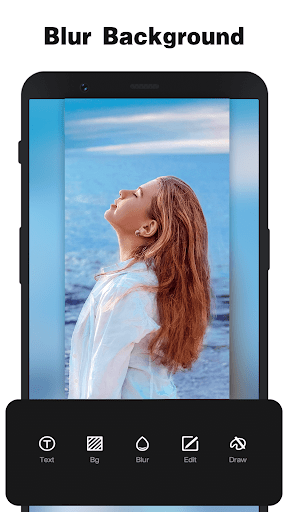
- Blur background with professional blur effect
- Set black background, white background and many colors
❤️Cool Photo Frame
- Built-in 100+ photo frames to choose from
- Awesome photo editor with cool photo frames, try now!
- Export HD images to your gallery
InstaSquare Photo Editor-Filter&Effect, Square Blur Image Background is a really easy photo editor and collage maker for social apps. If you have any problems or suggestions, feel free to let us know. Email: [email protected].
How to Download InstaSquare Photo Editor APK
- Enter the package name
instasquare.photoeditor.effect.cutouton the APK Downloader homepage. - Select your device architecture (ARM64 recommended for modern devices).
- Click Download to get the merged APK file.
- Transfer and install the APK on your Android device.
- Keep Updated: Visit APK Downloader regularly to search for and download the latest secure versions of your favorite apps.
Security & Signature Verification
This APK download is 100% safe. We verify that the cryptographic signature of the file matches the official developer credentials. No modifications or adware are injected.