

Download Sources
Device Configuration
Split APKs Installation Guide
Some apps are distributed as Split APKs (multiple .apk files packaged together) to optimize resources. Standard Android installers cannot open them.
What's New
Fixes sign-in issues.
Fixes server settings being lost during updates.
About This App
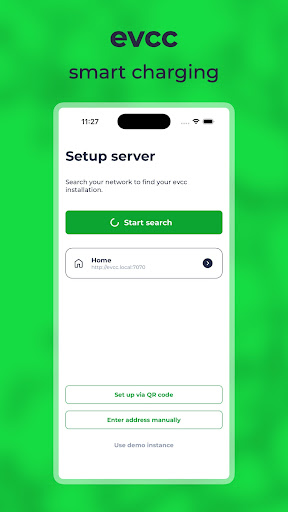
Charge your electric car when the sun is shining or when electricity is clean and affordable. With this app, you can access your local evcc instance on your home network.
App Features:
- Automatic detection of your evcc server
- Interaction with your evcc UI
- Demo instance available for testing
- Light/Dark Mode: Adapts to your device
Prerequisite:
You must have evcc installed on a device (Raspberry Pi, Windows, macOS, Linux Docker, ...) at your home.
What is evcc?
evcc is an open-source software that runs at your home. It is compatible with many PV and battery systems and controls your EV charger - regardless of manufacturer. If your car has an online interface, you can also use smart controls like charging schedules, minimum charging, and charging limits. Additionally, it supports dynamic electricity tariffs, smart plugs, balcony solar systems, and small home batteries.
Supported EV Chargers:
ABB, ABL, Alfen, Alphatec, Amperfied, Audi, Bender, BMW, cFos, Compleo, CUBOS, Cupra, Dadapower, DaheimLaden, Delta, E.ON Drive, E3/DC, Easee, Ebee, echarge, EcoHarmony, Edgetech, Elli, EM2GO, Ensto, ESL, eSystems, Etrel, EVBox, Fronius, Garo, go-e, HardyBarth, Heidelberg, Hesotec, Homecharge, Innogy, INRO, Juice, KEBA, Kontron Solar, Kostal, KSE, LadeFoxx, LRT, Mennekes, my-PV, NRGKick, OBO Bettermann, OpenEVSE, openWB, Optec, Orbis, PC Electric, Peblar, Phoenix Contact, Porsche, Pracht, Pulsares, Pulsatrix, Qcells, Schneider, Schrack, SENEC, Siemens, Skoda, SMA, Smartfox, SolarEdge, Solax, Sonnen, Spelsberg, Stark in Strom, Sungrow, TechniSat, Tesla, Tigo, TinkerForge, Ubitricity, Vestel, Victron, Viridian EV, Volkswagen, Wallbe, wallbox, Walther Werke, Webasto, Weidmüller, Zaptec
Supported Smart Plugs:
AVM, Homematic IP, HomeWizard, myStrom, Shelly, Tasmota, TP-Link
Supported Inverter and Battery Systems:
A-Tronix, Acrel, Ads-tec, Alpha ESS, Ampere, Anker, APsystems, AVM, BGEtech, Bosswerk, Carlo Gavazzi, Deye, E3/DC, Eastron, Enphase, FENECON, FoxESS, Fronius, Ginlong, go-e, GoodWe, Growatt, Homematic IP, HomeWizard, Hoymiles, Huawei, IGEN Tech, Kostal, LG, Loxone, M-TEC, myStrom, OpenEMS, Powerfox, QCells, Qcells, RCT, SAJ, SAX, SENEC, Senergy, Shelly, Siemens, SMA, Smartfox, SofarSolar, Solaranzeige, SolarEdge, SolarMax, Solarwatt, Solax, Solinteng, Sonnen, St-ems, Steca, Sungrow, Sunsynk, Sunway, Tasmota, Tesla, TP-Link, VARTA, Victron, Wattsonic, Youless, ZCS Azzurro, Zendure
Supported Vehicles:
Aiways, Audi, BMW, Citroën, Dacia, DS, Fiat, Ford, Hyundai, Jeep, Kia, Mercedes-Benz, MG, Mini, Nissan, NIU, Opel, Peugeot, Polestar, Renault, Seat, Skoda, Smart, Tesla, Volkswagen, Volvo, Zero Motorcycles
User Reviews

Works perfectly. Same UI like on the browser. No setup effort.
How to Download evcc - smart charging APK
- Enter the package name
io.evcc.androidon the APK Downloader. - Select your device architecture (ARM64 recommended for modern devices).
- Click Download to get the merged APK file.
- Transfer and install the APK on your Android device.
- Keep Updated: Visit APKDER.COM regularly to search for and download the latest secure versions of your favorite apps.
Security & Signature Verification
This APK download is 100% safe. We verify that the cryptographic signature of the file matches the official developer credentials. No modifications or adware are injected.