



Download Sources
Device Configuration
Split APKs Installation Guide
Some apps are distributed as Split APKs (multiple .apk files packaged together) to optimize resources. Standard Android installers cannot open them.
What's New
* Sync improvements and bug fixes
* Google Tasks: advance recurring task when completed remotely
* Fix flattening subtasks when moving between lists
* Update translations
About This App
Supercharge Your Productivity with Tasks.org: To-Do List & Tasks
Searching for the perfect "tasks" app? Look no further! Tasks.org is the open-source, privacy-focused to-do list and task management solution designed to streamline your life. Take control of your schedule with powerful features, seamless synchronization, and a completely customizable experience.
Effortless Task Management:
• Conquer Complex Projects: Organize your tasks with nested, collapsible subtasks of unlimited depth. Break down large projects into manageable steps and stay on top of every detail.
• Seamless Synchronization: Sync with Tasks.org Cloud, Google Tasks, DAVx⁵, Microsoft To Do, CalDAV, EteSync, and DecSync CC, or work completely offline. Your tasks are always accessible, wherever you are.
• Intuitive Drag & Drop: Prioritize your tasks with easy drag-and-drop sorting, compatible with Nextcloud Tasks and Apple Reminders.
• Powerful Recurring Tasks: Automate repetitive tasks with flexible and customizable recurrence options.
• Tasks.org Cloud: Share lists with Friends & Family and instantly turn your emails into tasks with a dedicated email address.
Privacy You Can Trust:
Tasks.org respects your privacy. Enjoy an ad-free experience with no ad or location tracking. You're in control of your data.
Key Features for Mastering Your Tasks:
• Location-Based Reminders: Set reminders based on arrival or departure from specific locations.
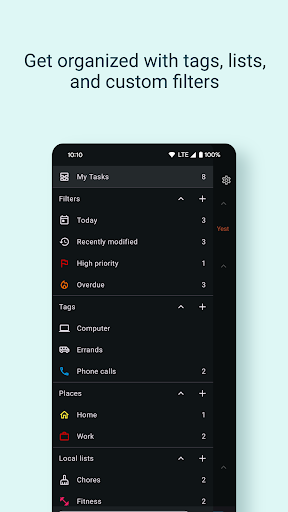
• Powerful Filtering & Search: Quickly find the tasks you need with robust filtering and search capabilities.
• Customizable Widgets: Access your tasks at a glance with highly customizable widgets.
• Beautiful & Personalized: Customize your lists with icons and colors to match your style.
• Automatic Backups: Secure your data with automatic backups to internal storage, Google Drive, and the Android Backup Service.
• Integrations: Connect with Tasker for automated task creation and list reminders.
• Wear OS Support: Manage your tasks on the go with our Wear OS app, featuring watch face complications so you can check your tasks with a flick of the wrist.
Join the Tasks.org Community:
• Website: tasks.org
• Reddit: r/tasks
• X: @tasks_org
• Email: [email protected]
Download Tasks.org today and experience the power of open-source task management! Take control of your to-do list, manage your tasks effectively, and reclaim your productivity.
User Reviews

The app has potential, but it isn't helpful in organizing long-term reoccurring tasks. I wanted an app that assisted in weekly to-do lists without cluttering my calendar with non-appointments. The filters only allows today & tomorrow visuals unless you manually make long-term tasks have multiple weekly due dates, which is time-consuming. By the third day, my recurring tasks stopped sending reminders. And you can only see the start times for tasks when editing instead of in the lists itself.

Without color codes and a few other basics that are paywalled, this is very limited in usefulness. Offer a one-time payment for the code that's fair and I'm happy to pay . But since I'm not using any storage for services I can't be tethered to a subscription for life for some basic features. Too bad because otherwise a good simple yet powerful organizer.

Initially had trouble figuring out how to connect to google tasks, needed to login to that option on the Not Logged In item in settings. So far it looks great. No separation of lists like TasksBoard (what I was looking for, but not on Android), but it syncs up great and gives me more mobility. A request would be to allow me to choose the order in which the tagged items/groups appear, to get some of that kanban-like attention on my most important stuff on the first screen. Nice job though!

This app is great. It takes a little getting used to but it's light weight and functional. the developer seems lovely and it's all open. I'm kinda a broke student but still gave a little. keep up the good work my dude. when I'm out of school I will get the full sub. Maybe when I finish my comp science degree I can contribute too. it's not super intuitive but easy enough to work it out and solid from there on. The widget is also fast and light.
How to Download Tasks.org: to-do list & tasks APK
- Enter the package name
org.taskson the APK Downloader. - Select your device architecture (ARM64 recommended for modern devices).
- Click Download to get the merged APK file.
- Transfer and install the APK on your Android device.
- Keep Updated: Visit APKDER.COM regularly to search for and download the latest secure versions of your favorite apps.
Security & Signature Verification
This APK download is 100% safe. We verify that the cryptographic signature of the file matches the official developer credentials. No modifications or adware are injected.


