
Download Sources
Device Configuration
Split APKs Installation Guide
Some apps are distributed as Split APKs (multiple .apk files packaged together) to optimize resources. Standard Android installers cannot open them.
Related Applications



What's New
★ Now you can securely share your Android phone's screen during video calls. Scroll through potential vacation rentals for the family reunion, ask your smartest friends to help you with a particularly challenging crossword, or take notes during a work call to make sure everyone is on the same page (and looking at it too).
About this app
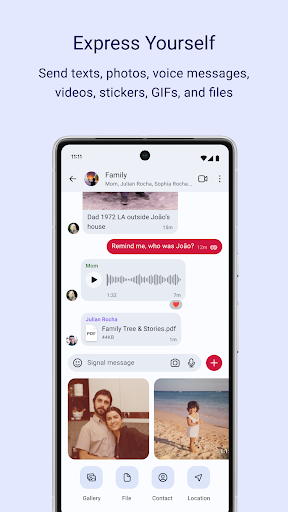
Signal is a messaging app with privacy at its core. It is free and easy to use, with strong end-to-end encryption that keeps your communication completely private.
• Send texts, voice messages, photos, videos, GIFs, and files for free. Signal uses your phone’s data connection, so you avoid SMS and MMS fees.
• Call your friends with crystal-clear encrypted voice and video calls. Group calls supported for up to 50 people.
• Stay connected with group chats up to 1,000 people. Control who can post and manage group members with admin permission settings.
• Share image, text, and video Stories that disappear after 24 hours. Privacy settings keep you in charge of exactly who can see each Story.
• Signal is built for your privacy. We know nothing about you or who you’re talking to. Our open source Signal Protocol means that we can’t read your messages or listen to your calls. Neither can anyone else. No back doors, no data collection, no compromises.
• Signal is independent and not for profit; a different kind of tech from a different kind of organization. As a 501c3 nonprofit we are supported by your donations, not by advertisers or investors.
• For support, questions, or more information please visit https://support.signal.org/
To check out our source code, visit https://github.com/signalapp
Follow us on Twitter @signalapp and Instagram @signal_app
How to Download Signal Private Messenger APK
- Enter the package name
org.thoughtcrime.securesmson the APK Downloader homepage. - Select your device architecture (ARM64 recommended for modern devices).
- Click Download to get the merged APK file.
- Transfer and install the APK on your Android device.
- Keep Updated: Visit APK Downloader regularly to search for and download the latest secure versions of your favorite apps.
Security & Signature Verification
This APK download is 100% safe. We verify that the cryptographic signature of the file matches the official developer credentials. No modifications or adware are injected.