
Download Sources
Device Configuration
Split APKs Installation Guide
Some apps are distributed as Split APKs (multiple .apk files packaged together) to optimize resources. Standard Android installers cannot open them.
Related Applications


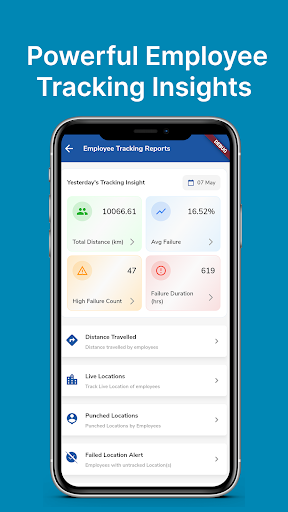


About this app
Leading Employee Location tracking App. Get a real time view of your staff location - whether in office or field. Employee GPS Tracker. Managers can track in real time Sales, Delivery & Service staff visit’s time & location during office hours.
Sales Reps can also capture feedback with picture for every client.
Employee movement tracking App. Sales reporting tool for Sales reps. Field staff management App. Current location tracker of Employees on work. Ensure that the clients visits by Staff are real.
Key Features:
Track Visits:Track field staff visits with images, location & time. Managers can check Client Visits on their phones from anywhere - even when they are traveling.
Visits Planner:Plan & assign Visits to the Sales or Support Employees. Emergency deliveries can be assigned on the fly.
Quick Start: Just register your company. Add Employees & assign them leads, prospects or clients. Track Field Sales. Simple?
Varied Industries: Works equally well for Construction sites, Logistic Companies, Security Agencies, Travel Agencies, MNC's, Service Providers.
Scalable: The App grows with your organization. Start with just 1 month's plan of a small group. Our Sales Reporting App caters to business of all sizes - Start-ups, SMEs, Large Enterprises.
Hassle free: No hardware, No Software, No office space required. Updates are free.
Highly Affordable: Budget friendly App. Free Trial. Pay as you go. Low investment risk. Start with 5 employees.
Data Safety: Employee data is fully secured on cloud - on top of the world AWS servers for quick retrieval.
Reliable Services25+ Years with more than 5000+ clients across 100+ Countries.
Unparalleled commitment Our dedicated support team ensures that queries of our clients are answered ASAP on top priority. Client satisfaction is reflected in the repeat orders we get.
Got questions? Contact us at [email protected]
How to Download Employee Location tracking App APK
- Enter the package name
org.ubitech.saleson the APK Downloader homepage. - Select your device architecture (ARM64 recommended for modern devices).
- Click Download to get the merged APK file.
- Transfer and install the APK on your Android device.
- Keep Updated: Visit APK Downloader regularly to search for and download the latest secure versions of your favorite apps.
Security & Signature Verification
This APK download is 100% safe. We verify that the cryptographic signature of the file matches the official developer credentials. No modifications or adware are injected.