
Download Sources
Device Configuration
Split APKs Installation Guide
Some apps are distributed as Split APKs (multiple .apk files packaged together) to optimize resources. Standard Android installers cannot open them.
Related Applications


What's New
General improvements
About this app
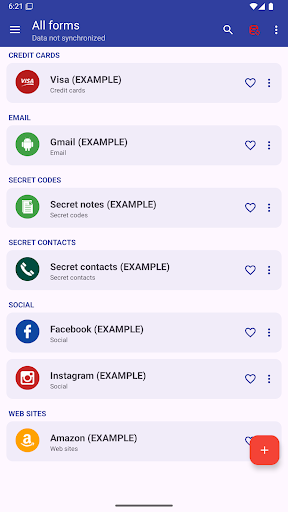
This app allows you to manage everything you need to keep secret: Password, Codes, Contacts, etc.
AES 256-bit encryption method was used, this is the most modern technology .
By automatic sync, you'll have all your passwords on all your Android devices and computer Windows, Linux and Mac.
MAIN FEATURES
➤ Access with fingerprint
➤ Sync with Google Drive and DropBox
➤ Desktop App (Windows, Mac & Linux)
➤ Password security analysis
➤ Password Generator
➤ Advanced search function
➤ Change app colors
➤ Automatic restore
➤ Auto lock
➤ Add your own custom icons
➤ Attach pictures and photographs, they will be encrypted and will be visible only within the application
➤ Add new categories
➤ Add new fields
➤ Creates PDF files with stored data to print on paper
➤ Material design
➤ Wear OS version
..and many more
AUTOMATIC SYNC:
Automatic synchronization lets you always have a backup of your passwords on a Cloud (
Also, with the same account, you can see your passwords in real time on all of your Android devices and Windows, Mac & Linux
ACCESS WITH FINGERPRINT:
Fingerprint access is an additional security method if you have a fingerprint and if your phone is compatible.
PASSWORD GENERATOR AND SECURITY ANALYSIS:
Within the app, a password generator is available, indicating the password security level. Also with the password generator you can check the password security you already have.
CUSTOM ICONS:
When you save a new password or other, you have the choice of over 110 icons, or easily insert your custom icon, which you can select from your phone's gallery or take a photo directly.
---------------------------------------------------------
Link to download the desktop version: https://www.2clab.it/passwordcloud
How to Download Password Manager APK
- Enter the package name
password.cloudon the APK Downloader homepage. - Select your device architecture (ARM64 recommended for modern devices).
- Click Download to get the merged APK file.
- Transfer and install the APK on your Android device.
- Keep Updated: Visit APK Downloader regularly to search for and download the latest secure versions of your favorite apps.
Security & Signature Verification
This APK download is 100% safe. We verify that the cryptographic signature of the file matches the official developer credentials. No modifications or adware are injected.