




Download Sources
Device Configuration
Split APKs Installation Guide
Some apps are distributed as Split APKs (multiple .apk files packaged together) to optimize resources. Standard Android installers cannot open them.
What's New
🌟 New
- Voice Changer: Apply fun voice effects to mic recordings.
- Quick Record: Create custom recording shortcuts for faster access.
Update now for a smoother recording experience!
Email us: [email protected]
About this app
AX Recorder - Screen Recorder is a lightweight and powerful video recorder & game recorder with both internal and external audio recording. No Lag and No Watermark to record videos and games with clear sound.
AX Recorder is perfect for recording gameplay, video tutorials, presentations, and more. With this screen recorder, you'll be able to draw, doodle, or note on the screen for better presentation. You can also record screen with facecam to show your face in the video.
Enjoy smooth screen recording using powerful built-in tools like screen capture, photo editor, and video editor with music, filters, stickers, and text. AX Screen Recorder makes it easy to create polished, professional-quality videos.
🔥 What can AX Recorder do?
- Start/Stop screen recording with one tap
- Screen recorder with audio On or Off
- Record video with Facecam: capture your reactions while recording
- Internal & External Audio: record clear sound without noise(Android 10 and above)
- Floating Ball: One tap to capture a precise moment or hide it if not needed
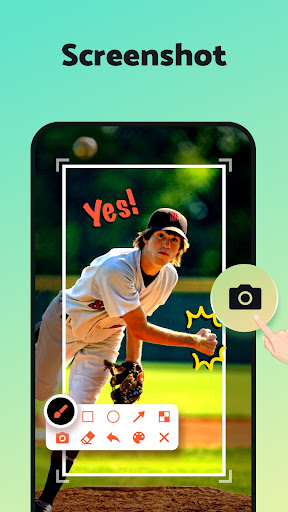
- Brush Tool: doodle on your screen and add rectangles, circles, arrows, etc.
- Screen Capture: capture screenshots of the entire screen with a single tap
- Region Recording: select the area you want to record
- Video Editor: trim or crop videos, add text, stickers & effects to enrich your video
- Time Stamp: link to a specific moment in your recording
- Quick Upload: directly upload from within the app to YouTube, TikTok, etc.
>>> Screen Recording for any occasion <<<
✅ Make an effective video tutorial
✅ Record a new maneuver in your favorite game
✅ Save non-downloadable videos for offline playback
✅ Make a YouTube/TikTok reaction video
✅ Create an online course
✅ Record important live streams and video calls
✅ Market your business to online customers
📹 HD Video Recorder
AX Recorder helps you record smooth and clear videos without quality loss(1080p, 16Mbps, 120FPS). You can adjust the resolution, quality, and frame rate of your video.
🤳 Record Video with Facecam
The Screen Recorder also lets you record using your front camera to show your reactions. This can be helpful if you want to create reaction videos because it will allow your viewers to see your face while you’re talking and your screen simultaneously.
💡 Selected Area Screen Recorder
This screen recorder gives you tremendous flexibility. With AX Screen Recorder, you can quickly record or screenshot a full screen of the phone, depending on your needs, and share screenshots directly with your friends.
⚡ Screen Recorder with a Powerful Editor
This screen recording app includes a full-featured video and photo editor. You can merge, compress, trim, or crop your video after you finish recording. Add trendy music, filters, and stickers to spice up your videos. AX Recorder also allows you to crop, add text, or paint over photos.
📼 Easy-to-use Video Recorder
With AX Recorder's clear interface and handy tools, you can easily doodle, write on the screen, and show touches in the recording to guide viewers through your recording and highlight important information.
💯 All-in-one Screen Recorder
When you're done recording and editing, you can start uploading to YouTube, TikTok, and other social platforms right from the app, so you can do everything from creation to upload - all from within AX Screen Recorder!
Floating Ball or Notification Bar permission is required to guarantee the normal use of Screen Recorder & Video Recorder tools. (Recommend opening both)
Remember to check whether there is a Privacy Protect in recording content and please abide by its policy and regulation.
Thank you for downloading AX Recorder - Screen Recorder & Video Recorder. If you have any suggestions or feedback, please contact us at [email protected]
User Reviews

Very easy to use, so many options! I was using the one that came with my phone but it's just not the best and I end up losing a lot of my recording, not to mention I am not able to pause it without a struggle and most of the time to complete a recording, I have to open the app and save it which includes that in my recording and then I have to edit it for when there's dead time(like when it's loading or if I get an email or really any notification, it comes up over my recording... Much better!

I tried to record a video and at first the recording worked. Than it exited me out of youtube to the app. So, I go back to youtube and try to record. Then of course the recorder dissappears mid recording. I try one more time to record and it dissappears again. HOLY RAGEBAIT!!!!!

Every time i try record a song, it never picks up the music. I have the device music button on, and it still wont work. The quality is also horrible. Also every time i go on the app i get an ad every two seconds.

Will give 5 stars after using it more. So far, great experience I've used it for about an hours worth of 720p recording so far, and it's caused no issues. Just watch a couple ads, click through the premium offers if you're going for the ad-included experience, and accept the conditional terms to begin recording each time.
How to Download Screen Recorder - AX Recorder APK
- Enter the package name
screenrecorder.videoeditor.videorecorderon the APK Downloader. - Select your device architecture (ARM64 recommended for modern devices).
- Click Download to get the merged APK file.
- Transfer and install the APK on your Android device.
- Keep Updated: Visit APKDER.COM regularly to search for and download the latest secure versions of your favorite apps.
Security & Signature Verification
This APK download is 100% safe. We verify that the cryptographic signature of the file matches the official developer credentials. No modifications or adware are injected.
More by this Developer


Related Applications
 Screen Recorder - XRec Lite
VIDEO PLAYERS & EDITORS
→
Screen Recorder - XRec Lite
VIDEO PLAYERS & EDITORS
→
 Screen Recorder - AZ Recorder
VIDEO PLAYERS & EDITORS
→
Screen Recorder - AZ Recorder
VIDEO PLAYERS & EDITORS
→
 Screen Recorder Video Recorder
TOOLS
→
Screen Recorder Video Recorder
TOOLS
→
 Screen Recorder - XRecorder
VIDEO PLAYERS & EDITORS
→
Screen Recorder - XRecorder
VIDEO PLAYERS & EDITORS
→
 Screen Recorder - Vidma Record
VIDEO PLAYERS & EDITORS
→
Screen Recorder - Vidma Record
VIDEO PLAYERS & EDITORS
→
 Screen Recorder
VIDEO PLAYERS & EDITORS
→
Screen Recorder
VIDEO PLAYERS & EDITORS
→