
مصادر التحميل
Device Configuration
دليل تثبيت حزم APK المجزأة (Split APKs)
يتم توزيع بعض التطبيقات كحزم APK مجزأة (ملفات .apk متعددة معاً) لتحسين الموارد. ولا يمكن لمثبت أندرويد القياسي فتحها.
التطبيقات ذات صلة




ما الجديد
v9.3
1. Added AI Features: HD Enhancement, Image Expansion, Beautification, and Colorization
2. UI Optimization
3. Bug Fixes
حول هذا التطبيق
MiX Camera is inspired by Mi camera, adding many many useful features🔥, such as beauty, collage, filter, blur, spiral, erase background, ID photo, etc. With MiX Camera, you may get many fantastic camera features which contain in Mi camera, and much more new added cool camera features💖.
MiX Camera will help you take nice photos on ALL Android 5.0+ devices!
🔥🔥 MiX Camera features:
- MiX Camera support real-time live AR stickers, emoji stickers and AR filter for you to take cool and funny photos or videos
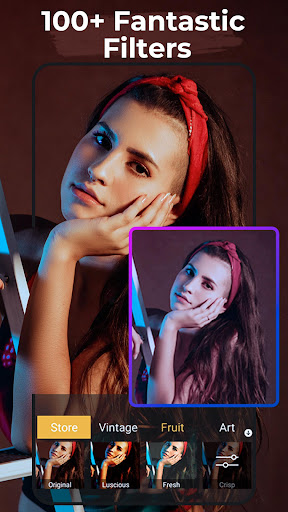
- MiX Camera has 200+ professional filters with random filter and also have a filter store to provide other advanced filters
- MiX Camera is a BEAUTY camera💄💋, support make up with skin tone, colorful lips, big eyes, face-lift and etc.
- MiX Camera is a FUNNY camera, it has amusing mask stickers for taking beauty and funny selfie
- MiX Camera is a SELFIE camera👁️🌟, support using volume key to take selfie handily. support filling light in front camera to take better selfie
- MiX Camera has cool seal sticker and watermark
- Long press shutter to create short video or burst shooting.
- Support 4K camera, Ultra HD camera
- Camera support HDR mode, help you take better photos
- Pinch to zoom or move shutter button left-right to zoom
- Touch to focus
- Auto flash on/off
- Professional mode: ISO, White balance, Scene modes, Exposure compensation adjustment, and etc. it is a professional camera
- MiX Camera support Silent capture mode
- MiX Camera support Timer shot and burst shot
- MiX Camera support resolution adjustment for Camera & Video
- Floating camera shutter button for easy capturing
- Support short video, long press shutter to create your own video
- Stamp photos with date tags
- Support tilt-shift photography to take pictures with blur background
- MiX Camera support Vignette function
- Easy-use album manage for your photos
- Default camera setting & reset
- White screen flash for front camera
- Grid line
- Mirror camera
🔥🔥 MiX Camera also have an ALL-IN-ONE AIO Photo Editor:
- Amazing Filters and Filters Store
- Cool collage, has 100+ collage templates
- Beauty Photo Editor💄💋👗: you can smooth face, brighten, skin tone, lipstick, face lift, enlarger eyes, change hair color, white teeth, slim body, etc
- MiX photo editor support crop and rotate photo
- MiX photo editor support photo adjustment: Contrast, Saturation, Brightness and Tone
- You can make ID photo
- You can doodle and text in MiX photo editor
- You get splash, spiral effects
- You can change photos' ratio for Instagram, Facebook, etc
- You can make double stacking artwork
- You can add cool frame to photos, there are many frame styles
- Wonderful Backgrounds, Fonts and Tags
- Tilt-shift and Vignette
- Photo save format
- Photo size adjust
Notes:
- Android™ is a registered trademark of Google, Inc.
Permissions required:
- Camera permission: take photos and record video
- Access SD card: manage photos, album
💖💖 Please rate and leave comments, you are helping us making MiX Camera the best camera for you, thanks a lot!
كيفية تنزيل APK MiX Camera for Mi Camera
- أدخل اسم الحزمة
com.camera.mix.cameraفي الصفحة الرئيسية لـ APK Downloader. - حدد بنية جهازك (يوصى بـ ARM64 للأجهزة الحديثة).
- انقر فوق تنزيل للحصول على ملف APK المدمج.
- قم بنقل وتثبيت APK على جهاز Android الخاص بك.
- ابقَ على اطلاع: قم بزيارة APK Downloader بانتظام للبحث عن أحدث الإصدارات الآمنة من تطبيقاتك المفضلة وتنزيلها.
الأمان والتحقق من التوقيع
تحميل ملف APK هذا آمن بنسبة 100٪. نحن نتحقق من أن التوقيع التشفيري للملف يطابق بيانات المطور الرسمية. لا توجد تعديلات أو إعلانات مدمجة.