


مصادر التحميل
Device Configuration
دليل تثبيت حزم APK المجزأة (Split APKs)
يتم توزيع بعض التطبيقات كحزم APK مجزأة (ملفات .apk متعددة معاً) لتحسين الموارد. ولا يمكن لمثبت أندرويد القياسي فتحها.
ما الجديد
1. Added CUE track splitting support in the multimedia service.
2. Optimized multimedia service server compatibility.
3. Optimized USB exclusive device compatibility.
4. Optimized the shuffle playback algorithm.
5. Fixed an issue where embedded lyrics occasionally failed to display.
6. Fixed an issue where songs would fail to play under the WebDAV protocol.
7. Fixed an issue of information display for some songs.
8.Fix the issue of failing to play ISO format in version 3.3.2.
حول هذا التطبيق
Notice: Google Play has added restrictions on the application listing, which requires us to modify the way to obtain the application folders. Therefore, installing the 3.1.1 version will clear the historical data of the old version, and you need to manually add the music folder.
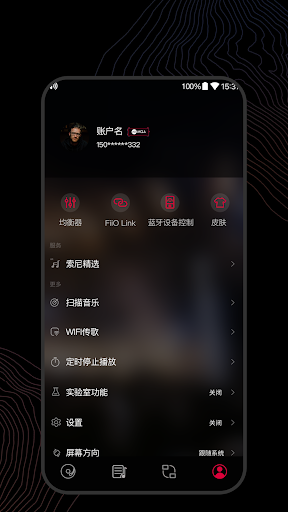
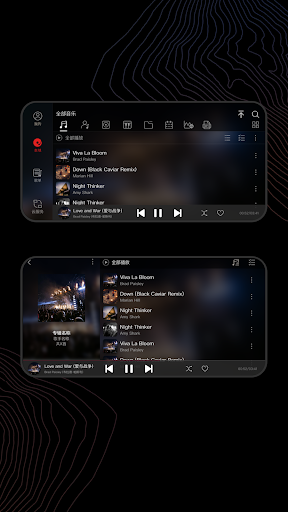
FiiO Music app is designed exclusively for mobile phone DAC/amps. It's a local player that is more suitable for audiophiles.
1.Supports raw DSD output. Enjoy native DSD on your Phone.
2.Supports playing Hi-Res music up to 384kHz/24bit and direct Hi-Res output.
3.Full audio format support - can play almost all the main-stream audio formats.
4.Supports HWA (LHDC) Bluetooth codec, which allows you to connect almost any Android phone to an LHDC enabled Bluetooth headphone to enjoy high quality music.
5.Supports playing all songs, playing by album (sorted by track no.), artist, genre, folder, custom playlist, etc.
6.Supports WiFi song transfer, making it easier for transferring your songs
7.Supports CUE sheet splitting.
8.Supports album art display and lyrics.
9.Supports last-position memory function.
10.Supports gapless track playback.
11.Supports replay gain.
12.Supports playing through folders.
More surprising features to be discovered!
If you have any questions of using this app or any suggestions, feel free to contact us using the below methods:
E-mail: [email protected]
FiiO website: http://www.fiio.com
Facebook: https://www.facebook.com/FiiOAUDIO
آراء المستخدمين

ممتاز

جيد👍 جدآ

جيد👍 جيدة

ممتاز
كيفية تنزيل APK FiiO Music
- أدخل اسم الحزمة
com.fiio.musicفي APK Downloader. - حدد بنية جهازك (يوصى بـ ARM64 للأجهزة الحديثة).
- انقر فوق تنزيل للحصول على ملف APK المدمج.
- قم بنقل وتثبيت APK على جهاز Android الخاص بك.
- ابقَ على اطلاع: قم بزيارة APKDER.COM بانتظام للبحث عن أحدث الإصدارات الآمنة من تطبيقاتك المفضلة وتنزيلها.
الأمان والتحقق من التوقيع
تحميل ملف APK هذا آمن بنسبة 100٪. نحن نتحقق من أن التوقيع التشفيري للملف يطابق بيانات المطور الرسمية. لا توجد تعديلات أو إعلانات مدمجة.


