
مصادر التحميل
Device Configuration
دليل تثبيت حزم APK المجزأة (Split APKs)
يتم توزيع بعض التطبيقات كحزم APK مجزأة (ملفات .apk متعددة معاً) لتحسين الموارد. ولا يمكن لمثبت أندرويد القياسي فتحها.
التطبيقات ذات صلة



ما الجديد
Our latest release includes app enhancements, minor bug fixes and performance improvements.
We’re always working to make the GS PWM app better for you.
حول هذا التطبيق
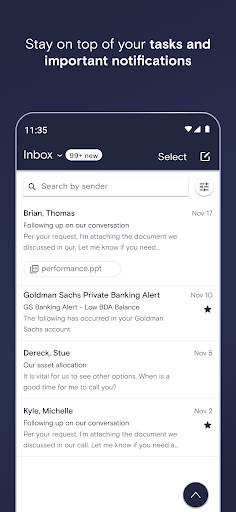
Access your Goldman Sachs account anytime on the new GS PWM app. Available for Goldman Sachs Private Wealth Management (PWM) and Goldman Sachs Ayco clients, GS PWM allows you to view your portfolio, contact your team, and keep up with the latest market insights.
Depending on whether you're a PWM or Goldman Sachs Ayco client and the type of services provided to you, you may have access to:
• See your accounts market value, investment results, available cash and recent activity at-a-glance
• Initiate transfers, approve transactions and deposit checks* without ever leaving the app
• Scan and attach documents when needed
This is just the beginning. The GS PWM mobile app will continue to grow and introduce more features to our valued clients.
*Region-dependent
**You must be a client of GS and have a Goldman.com or Goldman.ch username and password to use this app. Please contact your Goldman Sachs team with any questions.
Goldman Sachs and the Goldman Sachs logo are registered trademarks of Goldman Sachs.
كيفية تنزيل APK GS PWM
- أدخل اسم الحزمة
com.gs.pwmdigital.external.androidفي الصفحة الرئيسية لـ APK Downloader. - حدد بنية جهازك (يوصى بـ ARM64 للأجهزة الحديثة).
- انقر فوق تنزيل للحصول على ملف APK المدمج.
- قم بنقل وتثبيت APK على جهاز Android الخاص بك.
- ابقَ على اطلاع: قم بزيارة APK Downloader بانتظام للبحث عن أحدث الإصدارات الآمنة من تطبيقاتك المفضلة وتنزيلها.
الأمان والتحقق من التوقيع
تحميل ملف APK هذا آمن بنسبة 100٪. نحن نتحقق من أن التوقيع التشفيري للملف يطابق بيانات المطور الرسمية. لا توجد تعديلات أو إعلانات مدمجة.