
مصادر التحميل
Device Configuration
دليل تثبيت حزم APK المجزأة (Split APKs)
يتم توزيع بعض التطبيقات كحزم APK مجزأة (ملفات .apk متعددة معاً) لتحسين الموارد. ولا يمكن لمثبت أندرويد القياسي فتحها.
التطبيقات ذات صلة


ما الجديد
- Added 590+ new Icons.
- Total icons 28 000+.
- Search Widget: added theme and feature settings.
- Redesigned some Icons.
- Fixed non apply icons.
حول هذا التطبيق
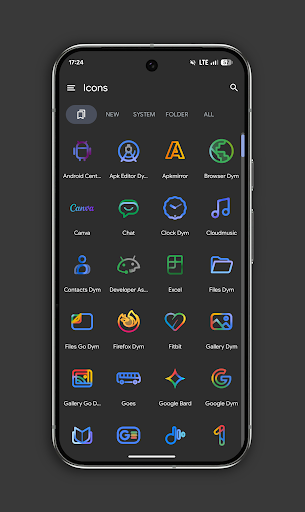
Experience the next level of Android customization with PixChroma!
Inspired by the latest design language of Google services, this pack combines the elegance of minimalist linear design with the energy of vibrant chroma gradients. Each icon is a masterpiece, handcrafted to bring a clean, premium, and futuristic look to your home screen.
Why PixChroma? ✨
• Massive Library: Over 27,500+ high-quality icons. We’ve got almost every app covered! 📱
• Unique Chroma Gradients: Carefully selected palettes with a soft glowing effect. 🎨
• Widgets (BETA): Includes a stylish clock and a Gemini-style search bar to complete the look. 🔍
• Frequent Updates: The pack is constantly growing with new icons and widgets added regularly. 🚀
What’s included right now? 📦
• 27,500+ Icons (and counting!)
• Exclusive Wallpapers designed to match the Chroma style.
• Easy Icon Request: Can't find your favorite app? Send us a request!
• Launcher Support: Works with Nova, Lawnchair, Smart Launcher, Niagara, Hyperion, Samsung(with Theme Park), OnePlus, and more.
Widgets in Beta Stage for Android 12+ 🛠️
Currently, the app features essential widgets to get you started:
1. Chroma Clock – Sleek analog and digital timepieces. 🕒
2. Search Bar – A futuristic search interface inspired by the latest AI designs.
We are actively developing new widgets for weather, calendar, and system info to be released in upcoming updates!
How to set up? ⚙️
1. Install a supported launcher.
2. Open PixChroma and go to the Apply section.
3. Select your launcher.
4. Enjoy the transformation! ✨
Have questions or feedback? Contact us in "technical support" in telegram:
https://t.me/devPashapuma
كيفية تنزيل APK PixChroma Icons and Widgets
- أدخل اسم الحزمة
com.pashapuma.pix.chroma.iconsفي الصفحة الرئيسية لـ APK Downloader. - حدد بنية جهازك (يوصى بـ ARM64 للأجهزة الحديثة).
- انقر فوق تنزيل للحصول على ملف APK المدمج.
- قم بنقل وتثبيت APK على جهاز Android الخاص بك.
- ابقَ على اطلاع: قم بزيارة APK Downloader بانتظام للبحث عن أحدث الإصدارات الآمنة من تطبيقاتك المفضلة وتنزيلها.
الأمان والتحقق من التوقيع
تحميل ملف APK هذا آمن بنسبة 100٪. نحن نتحقق من أن التوقيع التشفيري للملف يطابق بيانات المطور الرسمية. لا توجد تعديلات أو إعلانات مدمجة.