




مصادر التحميل
Device Configuration
دليل تثبيت حزم APK المجزأة (Split APKs)
يتم توزيع بعض التطبيقات كحزم APK مجزأة (ملفات .apk متعددة معاً) لتحسين الموارد. ولا يمكن لمثبت أندرويد القياسي فتحها.
ما الجديد
What’s New 🎉
• ✨ New Select Tool with improved controls
• ✂️ Crop videos and image overlays
• 🎨 New fonts in video editor
• 🌈 Image filters in video editor
• 🎬 Animations for videos, images & stickers
• 🐞 Bug fixes & performance improvements
حول هذا التطبيق
Unleash your creativity with Pixlr AI Art Photo Editor (formerly Pixlr Express) – your go-to free photo editor powered by advanced AI technology. Join over 18 million creators worldwide who trust Pixlr to transform their images with ease and precision. Whether you're a beginner or a seasoned photographer, Pixlr provides an intuitive platform to create stunning visuals with just a few clicks.
Capture any moment and let your creativity shine with over 2 million combinations of FREE effects, overlays, and filters. Seamlessly share your photos with friends or followers through email, Instagram, Facebook, TikTok, or any other social network.
New AI-Powered Features
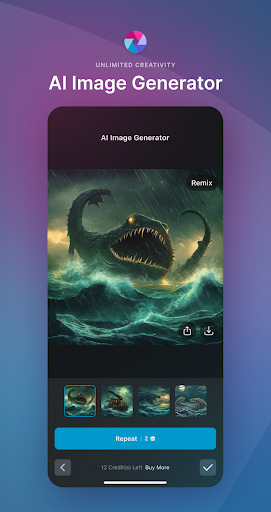
AI Generative Fill – Highlight any area in your photo and watch as Pixlr's AI-powered generator seamlessly fills it with objects.
AI Remove Object – Effortlessly remove any object from your image, and let our AI intelligently fill in the blanks.
AI Remove Background – Enjoy pixel-perfect background removal, thanks to our cutting-edge AI editor.
Comprehensive Photo Editing Features
Explore seasonally updated multi-layered Social Media templates designed to elevate your digital content.
Create stunning photo collages effortlessly with a variety of preset collage designs, grid styles, customized ratios, and backgrounds.
Instantly adjust the color of your photos in one click using Auto Fix, making your images pop with vibrant hues.
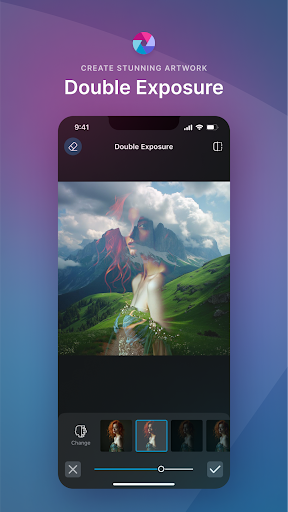
Experiment with Double Exposure to create breathtaking effects using layers and adjustable transparency.
Add artistic flair to your images with Stylize effects like pencil sketch, poster, watercolor, and more.
Remove blemishes, red-eye, smoothen skin, or whiten teeth effortlessly with simple and precise tools.
Highlight specific colors in your photo using the Color Splash effect, or create depth with Focal Blur.
Choose from a wide range of effect packs to give your photos the look and feel you desire.
Adjust the tone of your photos using overlays – amplify, cool down, or add surreal shades to your images.
Easily add text to your photos with a variety of fonts, ensuring your message stands out.
Complete your editing with the perfect border – select a style that complements your photo.
Keep your content fresh with our growing library of additional effects, overlays, and border packs.
Save time by keeping track of your favorite effects and overlays with the convenient Favorites button.
Quickly crop and resize images to your desired dimensions before saving and sharing.
Connect with Us
We value your feedback and ideas, as they help us make Pixlr the best photo editor experience possible. Connect with us on Instagram (@pixlr), TikTok (@pixlrofficial), or Facebook (/Pixlr) to stay updated with the latest features and news.
For support or bug reporting, feel free to reach out to us at [email protected].
Privacy Policy | Terms of Use
آراء المستخدمين

التطبيق يوجد فيه كثير من الأخطاء، مثل التحكم بأنماط صورة داخل صورة، بالإضافة إلى أنني لا اتسطيع ان اقوم بحفظ الصورة في الاستديو حفظ الصور غير متاح الا عبر النشر على فيس بوك أو الارسال برسالة عبر تويتر مزعج جداً

افجر برنامج على الأرض رجـــاء رجع قلم الرسم انسيابى زى الأول علشان لما بصغر المقاس بيدينى الخطوط مضلعه.. لكن حقيقى اجمل برنامج ع الأرض 🌎

البرنامج لي أكثر من سنتين بستخدمه بس هناك بعض التطويرات لو كانت موجوده سيكون أفضل برنامج واحد إضافة الخطوط العربية ثاني التعديل عند إضافة الصور تكون البكسل جدا ضعيف بمعنى وضوح الصور عند الاضافه
اصبح سيئاً لانه يجبر المستخدم ان يشتري او يسجل لكي يعمل البرنامج ؟؟ كنت استعمله منذ 2013 كان ممتاز لولا هذا التحديث الاخير ( يجب ان تسجل بطاقة اتمان وتدفع لكي تستخمه ) مع الاسف كانت فيه بعض الامور التي تشترى لكن لاداعي لكل التطبيق
كيفية تنزيل APK Pixlr AI Photo & Video Editor
- أدخل اسم الحزمة
com.pixlr.expressفي APK Downloader. - حدد بنية جهازك (يوصى بـ ARM64 للأجهزة الحديثة).
- انقر فوق تنزيل للحصول على ملف APK المدمج.
- قم بنقل وتثبيت APK على جهاز Android الخاص بك.
- ابقَ على اطلاع: قم بزيارة APKDER.COM بانتظام للبحث عن أحدث الإصدارات الآمنة من تطبيقاتك المفضلة وتنزيلها.
الأسئلة الشائعة
نعم! يخضع كل ملف يتم استضافته على APKDER لتحقق أمني صارم. نتحقق من أن التوقيع التشفيري يطابق التوقيع الرسمي من المطور، للتأكد من عدم تعديل التطبيق أو العبث به.
لتثبيته، ستحتاج أولاً إلى تمكين "مصادر غير معروفة" في إعدادات أمان جهاز Android الخاص بك. بعد تنزيل ملف APK من APKDER، اضغط عليه لبدء التثبيت واتبع المطالبات التي تظهر على الشاشة.
نعم! بمгرد أن يصدر المطور إصدارًا جديدًا من Pixlr AI Photo & Video Editor، سنقوم بتحديث الـ APK ونشره على APKDER. يمكنك ببساطة تنزيل وتثبيت الـ APK الجديد فوق التثبيت الحالي دون فقدان بيانات تطبيقك.
الأمان والتحقق من التوقيع
تحميل ملف APK هذا آمن بنسبة 100٪. نحن نتحقق من أن التوقيع التشفيري للملف يطابق بيانات المطور الرسمية. لا توجد تعديلات أو إعلانات مدمجة.


