

مصادر التحميل
Device Configuration
دليل تثبيت حزم APK المجزأة (Split APKs)
يتم توزيع بعض التطبيقات كحزم APK مجزأة (ملفات .apk متعددة معاً) لتحسين الموارد. ولا يمكن لمثبت أندرويد القياسي فتحها.
حول هذا التطبيق
Grade Corner is the easiest and fastest for students and parents to check grades.
FEATURES:
- Supports school systems that use the Aspen* grading system
- Shows current enrolled classes and current grade
- Shows grade breakdown by class categories
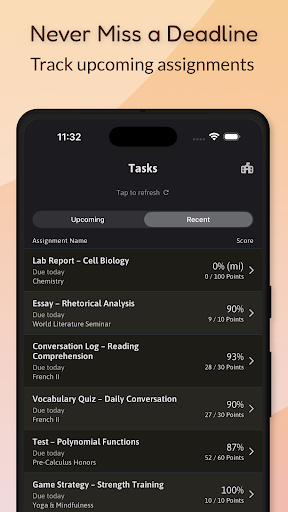
- Shows assignment due dates to help with planning
- Allows downloading of assignment attachments
- Shows recently graded assignments so parents and students can work with teachers as needed
- Easily email teachers directly from app
- Shows remarks from teachers per assignment
- Ability to filter assignments by class category
- Ability to view past grades from last year or term
- Supports families with multiple students
- Supports Dark Mode
- Secure login with FaceId / TouchId / PIN
- Supports schools using Single Sign-On (SSO)
Now offering Premium mode:
- Custom colors for classes. Set your own palette according to your mood or preference for classes. What do you think? Purple for French? Black for Math? Green for English? Yellow for Art? You decide!
- The Grade Calculators allows you to:
- See your true grade percentage including missing assignments
- Add future assignments to see effects
- Edit current assignments to plan out makeup grades
Important! The Grade Calculator is for estimation purposes only and does not guarantee your final score.
==============================
Grade Corner is now part of the Student Data Privacy Consortium (SDPC) and is endorsed for use in the states of:
- Maine
- Massachusetts
- New Hampshire
- Rhode Island
- Vermont
==============================
Some Common Questions:
Q: Do I need an Aspen login to use the app?
A: Yes! If you don't know your credentials, ask your school administrator.
Q: What School Districts are supported?**
A: Currently, the following districts are fully supported:
- Public schools in Washington, DC
- Chicago Public Schools
- Boston Public Schools
- School districts in Massachusetts, Maine, New Hampshire, Rhode Island, and Vermont
- MySchoolSask and MyEducation BC
- MyOntarioEdu is supported, but you have to add the link under 'My School District is not listed'
- DoD Education Activity (DoDEA)
- And more!
Additional school districts can be added easily. However, due to the flexibility of the Aspen system, not all features may be available for custom Aspen systems.
Q: How do I know what my Aspen Id is?
A: Your Student Aspen Id is provided by your school district.
For Boston and DC - It's usually 6 to 7 digits such as: 12345567. Parents accounts are usually email addresses.
For CPS - Use the first part of your cps.edu email.
Contact your school administrator to obtain credentials.
Q: How often are grades updated?
A: Grades are updated by teachers periodically. When they do, students can see the updates right away using the App.
Q: Is this app officially supported by my School District?
A: It depends. Grade Corner was created independently by a frustrated parent who had two children attending public schools in Washington, DC. We are working on getting officially endorsed by school districts. Any endorsements by School Districts are listed above.
Q: Is my data secure?
A: As a parent, I understand being protective of grade information. Your grade information never leaves the app and is not stored in any way. See privacy policy for more details.
* Grade Corner is not affiliated, associated, authorized, endorsed by, or in any way officially connected with the Follett Corporation who produce the Aspen Student Information System
** Grade Corner is not affiliated, associated, endorsed by, or in any way officially connected to the school districts listed here unless otherwise stated
كيفية تنزيل APK Grade Corner
- أدخل اسم الحزمة
com.romandc.gradecornerفي APK Downloader. - حدد بنية جهازك (يوصى بـ ARM64 للأجهزة الحديثة).
- انقر فوق تنزيل للحصول على ملف APK المدمج.
- قم بنقل وتثبيت APK على جهاز Android الخاص بك.
- ابقَ على اطلاع: قم بزيارة APKDER.COM بانتظام للبحث عن أحدث الإصدارات الآمنة من تطبيقاتك المفضلة وتنزيلها.
الأمان والتحقق من التوقيع
تحميل ملف APK هذا آمن بنسبة 100٪. نحن نتحقق من أن التوقيع التشفيري للملف يطابق بيانات المطور الرسمية. لا توجد تعديلات أو إعلانات مدمجة.