

ডাউনलोड উৎস
Device Configuration
স্প্লিট এপিকে (Split APK) ইনস্টলেশন গাইড
কিছু অ্যাপস স্প্লিট এপিকে (একাধিক .apk ফাইল একসঙ্গে প্যাকেজ করা) হিসেবে বিতরণ করা হয়। সাধারণ অ্যান্ড্রয়েড ইনস্টলার এগুলো ইনস্টল করতে পারে না।
앱 সম্পর্কে
🚀 **Key Features**
✅ **QR Code Generation**
Create QR codes from text, links, business cards, Wi-Fi, and more.
Customize your QR codes to fit different use cases.
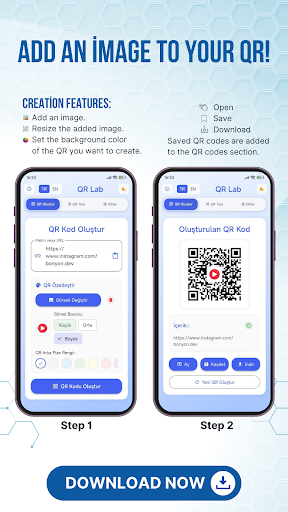
✅ **Add Images to QR Codes**
Insert any logo or image into the center of your QR code.
Reflect your brand or personal style in your QR codes.
✅ **Background Color Customization**
You don’t have to stick to just black and white.
Design aesthetic and creative QR codes by changing the background and code colors.
✅ **Save, Download & Share**
Save the QR codes you create to your device.
Download and use them anytime.
Share instantly via social media, messaging apps, or email with a single tap.
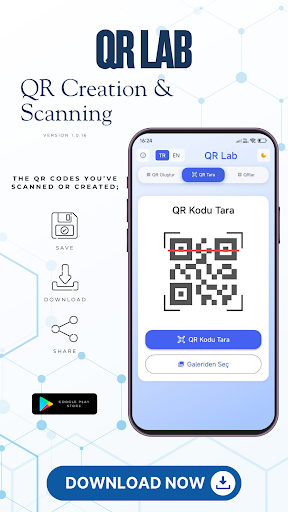
✅ **Scan QR Codes from Gallery**
Scan QR images not only from your camera but also from your gallery.
Easily analyze previously saved QR codes.
✅ **Scan QR Codes with Camera**
Use your camera to scan QR codes in real time.
Quickly access links or content from the scan results.
✅ **Dark & Light Mode**
Supports both dark and light themes to protect your eyes.
Interface design suitable for both day and night use.
🌟 **Why QR Lab?**
* **Easy to Use:** Simple, modern design makes it user-friendly.
* **Fast Scanning:** Get instant results from camera or gallery.
* **Personalization:** Add colors and logos to your QR codes for a unique touch.
* **Free:** All core features are completely free.
* **Secure:** The content of scanned QR codes is handled safely.
🎯 **What You Can Do with QR Lab**
* Design personal QR codes for business cards.
* Scan or create restaurant menus.
* Share Wi-Fi connections via QR code.
* Quickly promote your social media accounts with QR codes.
* Use QR codes in presentations, invitations, or advertising posters.
কীভাবে QR Lab – Create QR, Scan QR এপিকে ডাউনলোড করবেন
- APK Downloader-এ প্যাকেজ নাম
com.bonyon.qrলিখুন। - আপনার ডিভাইসের আর্কিটেকচার নির্বাচন করুন (আধুনিক ডিভাইসের জন্য ARM64 সুপারিশকৃত)।
- একত্রিত এপিকে ফাইল পেতে ডাউনলোড করুন এ ক্লিক করুন।
- আপনার অ্যান্ড্রয়েড ডিভাইসে এপিকে স্থানান্তর এবং ইনস্টল করুন।
- আপডেট থাকুন: আপনার প্রিয় অ্যাপগুলির সর্বশেষ নিরাপদ সংস্করণগুলি অনুসন্ধান এবং ডাউনলোড করতে নিয়মিত APKDER.COM ভিজিট করুন।
সচরাচর জিজ্ঞাস্য প্রশ্নাবলী
হ্যাঁ! APKDER-এ হোস্ট করা প্রতিটি ফাইল কঠোর নিরাপত্তা যাচাইকরণের মধ্য দিয়ে যায়। আমরা যাচাই করি যে ক্রিপ্টোগ্রাফিক স্বাক্ষরটি ডেভেলপারের অফিসিয়াল স্বাক্ষরের সাথে মিলেছে, যা নিশ্চিত করে যে অ্যাপটি পরিবর্তন বা টেম্পার করা হয়নি।
এটি ইনস্টল করতে, আপনাকে প্রথমে আপনার অ্যান্ড্রয়েড ডিভাইসের নিরাপত্তা সেটিংসে "অজানা উত্স" সক্ষম করতে must। APKDER থেকে APK ফাইলটি ডাউনলোড করার পরে, ইনস্টলেশন শুরু করতে সেটিতে আলতো চাপুন এবং স্ক্রিনে নির্দেশাবলী অনুসরণ করুন।
হ্যাঁ! ডেভেলপার QR Lab – Create QR, Scan QR-এর একটি নতুন সংস্করণ প্রকাশ করার সাথে সাথেই আমরা আপডেট করা APK ফাইলটি APKDER-এ পোস্ট করব। আপনি আপনার অ্যাপের ডেটা না হারিয়ে বিদ্যমান ইনস্টলেশনের উপরে নতুন APK ডাউনলোড এবং ইনস্টল করতে পারেন।
নিরাপত্তা ও স্বাক্ষর যাচাইকরণ
এই APK ডাউনলোডটি ১০০% নিরাপদ। আমরা যাচাই করি যে ফাইলটির ক্রিপ্টোগ্রাফিক স্বাক্ষর অফিশিয়াল ডেভেলপারের ক্রেডেনশিয়ালের সাথে মেলে। কোনো মডিফিকেশন বা অ্যাডওয়্যার নেই।