
ডাউনलोड উৎস
Device Configuration
স্প্লিট এপিকে (Split APK) ইনস্টলেশন গাইড
কিছু অ্যাপস স্প্লিট এপিকে (একাধিক .apk ফাইল একসঙ্গে প্যাকেজ করা) হিসেবে বিতরণ করা হয়। সাধারণ অ্যান্ড্রয়েড ইনস্টলার এগুলো ইনস্টল করতে পারে না।
সম্পর্কিত অ্যাপ্লিকেশন




নতুন কী আছে
UI/UX improvements
2FA Improvements
Bug fixes
앱 সম্পর্কে
Total Password is a smart password manager, ideal for busy people who don’t have time for remembering all logins and passwords. We manage and protect all of your data and online privacy with deeply integrated encryption. Quickly fill passwords by using the Android Auto-fill service on android version 8.0+ with backward support for older versions up to 5.0.
Fills your passwords in most browsers and apps.
✔Offline encryption: your data is yours alone, period.
✔ Two-factor authentication.
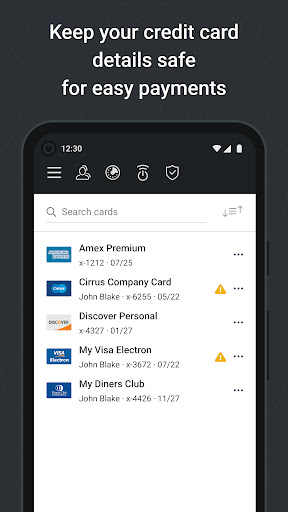
✔ Credit cards storing.
✔ SecureMe feature: remote logout from websites, clear cookies, history and close tabs.
✔ Security report.
USE OF ACCESSIBILITY
Total Password uses Android Accessibility to ensure a smooth experience filling logins across apps and websites on browsers and older versions of Android that don't support Android's Autofill feature.
কীভাবে Total Password এপিকে ডাউনলোড করবেন
- APK Downloader হোমপেজে প্যাকেজ নাম
net.protected.totalpasswordলিখুন। - আপনার ডিভাইসের আর্কিটেকচার নির্বাচন করুন (আধুনিক ডিভাইসের জন্য ARM64 সুপারিশকৃত)।
- একত্রিত এপিকে ফাইল পেতে ডাউনলোড করুন এ ক্লিক করুন।
- আপনার অ্যান্ড্রয়েড ডিভাইসে এপিকে স্থানান্তর এবং ইনস্টল করুন।
- আপডেট থাকুন: আপনার প্রিয় অ্যাপগুলির সর্বশেষ নিরাপদ সংস্করণগুলি অনুসন্ধান এবং ডাউনলোড করতে নিয়মিত APK Downloader ভিজিট করুন।
নিরাপত্তা ও স্বাক্ষর যাচাইকরণ
এই APK ডাউনলোডটি ১০০% নিরাপদ। আমরা যাচাই করি যে ফাইলটির ক্রিপ্টোগ্রাফিক স্বাক্ষর অফিশিয়াল ডেভেলপারের ক্রেডেনশিয়ালের সাথে মেলে। কোনো মডিফিকেশন বা অ্যাডওয়্যার নেই।