


Fuentes de descarga
Device Configuration
Guía de instalación de APKs divididas (Split APKs)
Algunas aplicaciones se distribuyen como APKs divididas (varios archivos .apk empaquetados juntos) para optimizar recursos. Los instaladores estándar de Android no pueden abrirlas.
Novedades
Version 5.5.1: Online tactics
- Integrated tactics from 12chess.com (You can still use the old offline problems from the settings)
- Updated to Stockfish 16
- Added a new icon
- Due to new Android policies, the permission to write to external storage has been removed and not it uses the Storage Access Framework
- Consequently, the option to save all online played games to a PGN file had to be removed
- Upgraded libraries and SDKs
Acerca de esta aplicación
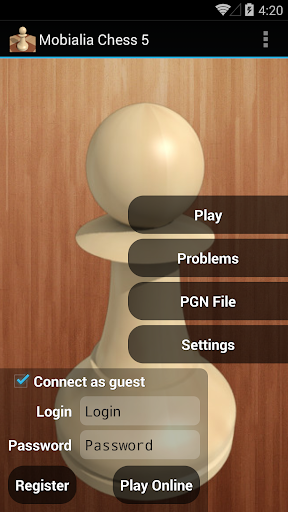
The best app for chess lovers: Play against AI or online at FICS or ICC
Play against AI
- Selectable ELO Levels to adjust playing strength, from 500 to 2100, on 50 ELO points steps
- Selectable time per move: changing the ELO and the time per move, lots of difficulty levels can be selected
- Opening book with more than 30.000 positions: ensures variated funny games
- Can undo/redo all moves
- Send PGN by email: This way, you can analyze later your games on your PC
- Graphical setup board, also can edit position’s FEN notation
- On closing, saves the current game and it is loaded when the application is restarted
Play online
- Play online at freechess.org (FICS) or chessclub.com (ICC)
- Play as guest or as a registered user
- Seek/offer match rated and unrated
- View seeks posted by other users. Can sort seek list by username, rating or game time
- Takeback, draw, abort, resign and rematch options while playing
- Play, Finger and Observe, can also observe LectureBot on FICS or play ProblemBot/TrainingBot on ICC
- Observe current played games in the chess server or follow highest rated games
- Messages: read and send messages to other users
- Game History: you can examine or send by email all your played games
- Console to see server output and to send commands, also for chatting with other users
- Timeseal (FICS) and Timestamp (ICC): avoids lag problems
- Premove option: You can introduce the next movement in your opponent’s turn
- Option to confirm the move before sending it to the server. Forward and Backward buttons are converted on Confirm/Cancel buttons
- Supports wild chess variants: Atomic, Losers, Suicide and Chess960
Chess problems
- 2900+ chess problems to solve looking for the best moves: problems collected by Uwe Auerswald, from Germany
- Selectable problem difficult (Easy, Medium and Hard Problems)
Chess database
- Chess database of ~3.1M games updated weekly from http://www.theweekinchess.com
- It allows to search for players, events and dates from the section Database in the main sidebar
- It can search specific positions from the board with ⋮-> Search position in DB
- Searching a board position shows stats including, for each move, the number of games where the move was played and the white victory/draw/black victory percentages as bars
- From the stats screen you can list all the games in the current position with ⋮-> Show games
PGN browser
- Simple PGN browser, allows you to open PGN files from SD card or from your email
Analysis
- Analyis mode in the board screens with ⋮-> Analysis
- It shows the position's ECO code
A great interface
- 2D/3D board
- Clean, simple and intuitive interface
- Move by dragging and dropping the piece with useful guide lines
- Also move by tapping the origin and the destiny squares or with the trackball
- Portrait and landscape mode
- Shows legal moves (as yellow translucent squares)
- Highlights last move (with a yellow arrow or a colored square, can be configured with a settings option), also move hints (as a green arrow) after a request in the menu
- Many piece sets and board styles
- Shows a dot in the side to move and can show board coordinates
- The material gauge indicates the material advantage using this piece values: Pawn=1 Knight=3 Bishop=3 Rook=5 Queen=9. Click on the gauge to show/hide the captured pieces difference
- Shows captured pieces advantage (as an example if black captured 3 pawns and whites 2, it shows an advantage of 1 white pawn for blacks)
- Speaks moves, checks and game results
- Different sounds for moves, captures and checks, also vibration
- Option to keep the screen on while playing
You can try the Free version with ads first
Opiniones de usuarios

vale pagarlo y no tener propagandas. aunque seria bueno. que con ese dinero invirtieran en hacer al menos otro juego (paquete) de piezas en 3D de diferente color al menos. y tableros en 3d de diferente color. los tiempos cambian y hay que actualizarse. También falta que haga análisis de la partida terminada
Estaría bueno que agreguen mas tableros 3d y piezas. Aunque sea para esta versión paga. Es una de las app que se pago totalmente lo que me costo para quitarle la propaganda. Lo vale

Desinstalé una versión anterior por esta nueva y no mantiene la lectura desde la raíz de archivos PNG, ni tampoco se pueden descargar motores de análisis.

Aunque a día de hoy sigue funcionando todo bastante bien y es la app de ajedrez que más uso. Se echan de menos más actualizaciones
Cómo descargar Mobialia Chess APK
- Ingrese el nombre del paquete
com.alonsoruibal.chessdroiden la APK Downloader. - Seleccione la arquitectura de su dispositivo (se recomienda ARM64 para dispositivos modernos).
- Haga clic en Descargar para obtener el archivo APK fusionado.
- Transfiera e instale el APK en su dispositivo Android.
- Manténgase actualizado: Visite APKDER.COM regularmente para buscar y descargar las últimas versiones seguras de sus aplicaciones favoritas.
Seguridad y Verificación de Firma
Esta descarga de APK es 100% segura. Verificamos que la firma criptográfica del archivo coincida con las credenciales oficiales del desarrollador. No se inyectan modificaciones ni adware.


