
Fuentes de descarga
Device Configuration
Guía de instalación de APKs divididas (Split APKs)
Algunas aplicaciones se distribuyen como APKs divididas (varios archivos .apk empaquetados juntos) para optimizar recursos. Los instaladores estándar de Android no pueden abrirlas.
Aplicaciones Relacionadas




Novedades
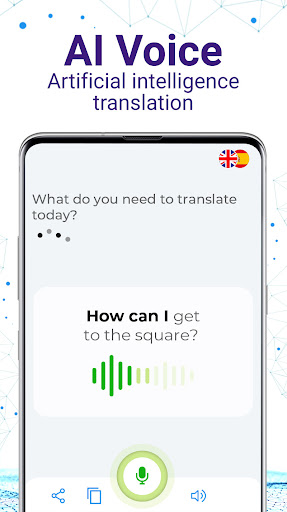
-New improved interface: AI-powered Audio Mode
- Text mode now is available: Translate all texts using your camera. Fast, easy and dinamic
- Multilabel detection: Detect, recognize and translate objects around you
- Minor bugs fixed
- Stability improved
Thanks for using AR Translate! We publish updates regularly on Google Play with speed user experience and reliability improvements to keep our app as good as always.
Acerca de esta aplicación
AI Translate Camera Translator with artificial intelligence
This app is: AI Translator + AI Voice + AR Camera = AI Translate with Video Translator, photo translator, voice translator and text translator
Translate voice, video & text with AI, using AR Translation and Language Camera translator
Translate everything with your AI Translate camera translator app with AI Voice and AI Text, translate conversation, translate voice, translate text, translate documents, translate and interprets environments, landscapes and anything, recognize humans, object, texts, materials, etc.. Augmented Reality and a precise translation engine in a single AI Translator and AR Camera with document translator
AI Translate Camera Translator with AI Voice and AI Text, allows you to have a conversation in another language and see the translated subtitles at the bottom of the screen in real time. Use it with smart AR glasses and travel understanding anyone you are looking at. You are using the most complete voice translator, document translator, photo translator and video translator in one app.
The world of translated conversation is revolutionized with AR Translate - Augmented Reality with artificial intelligence. It recognizes the human face, the movement of the mouth and the gaze using artificial intelligence, and in this way it can understand when someone is speaking to you, offering a high-quality language translator, without interference.
Translation and interpretation speed in real time with RA Camera, thus achieving a total immersive translation experience. AR Camera recognition with Augmented Reality is better than a photo o camera translation, these labels can be used to translate objects, they are generated in space and time forever and keeping all the additional information since these labels are also interactive. Click on the + button and access to the dictionary, synonyms, definitions, voice translation and more
The scene mode verifies an environment and gives you a result, using in this case an object recognition tool, landscapes, documents, etc. Recognizing landscapes and identifying complete images is possible thanks to the AI Translate Photo Translator – Augmented reality + AR Camera Translator
Companies all over the world today use virtual reality, augmented reality and artificial intelligence services. Virtual reality combined with smart glasses and augmented reality will provide you a new translation experience. The Best translator engine with AR and VR to learn languages easily. AI Language Translator is a english translator, document translator, photo translator, voice translator and image translator.
These are some of the languages supported by Ar Translate Augmented Reality: Arabic, English, Bulgarian, Catalan, Simplified Chinese, Traditional Chinese, Croatian, Czech, Danish, Dutch, Estonian, Finnish, French, German, Greek, Hebrew, Hindi, Hungarian, Indonesian, Italian, Japanese, Korean, Lithuanian, Norwegian, Persian, Polish, Portuguese, Romanian, Russian, Serbian, Slovenian, Slovak, Spanish, Swedish, Thai, Turkish, Ukrainian, Vietnamese, and Welsh. For example you can use it like Spanish Translator or English Translator App.
Cómo descargar AI Translate Photo Translator APK
- Ingrese el nombre del paquete
com.appgroup.app.arcameraen la página de inicio de APK Downloader. - Seleccione la arquitectura de su dispositivo (se recomienda ARM64 para dispositivos modernos).
- Haga clic en Descargar para obtener el archivo APK fusionado.
- Transfiera e instale el APK en su dispositivo Android.
- Manténgase actualizado: Visite APK Downloader regularmente para buscar y descargar las últimas versiones seguras de sus aplicaciones favoritas.
Seguridad y Verificación de Firma
Esta descarga de APK es 100% segura. Verificamos que la firma criptográfica del archivo coincida con las credenciales oficiales del desarrollador. No se inyectan modificaciones ni adware.