Fuentes de descarga
Device Configuration
Guía de instalación de APKs divididas (Split APKs)
Algunas aplicaciones se distribuyen como APKs divididas (varios archivos .apk empaquetados juntos) para optimizar recursos. Los instaladores estándar de Android no pueden abrirlas.
Novedades
Bug fixed.
Acerca de esta aplicación
🎨 Unleash Your Creativity with ModArt Launcher! 🚀
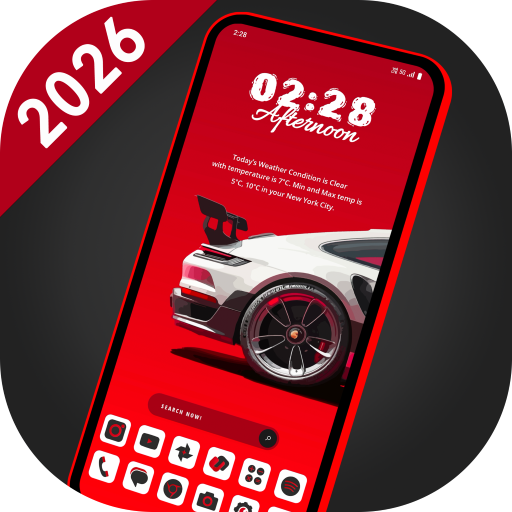
Transform your Android device with ModArt Launcher, a versatile and feature-packed launcher that lets you customize your home screen like never before. Elevate your mobile experience with over 115 stunning vector wallpapers featuring nature and flower themes. With 18 unique themes and various widgets, you have the power to make your device truly your own.
🌟 **Key Features:**
✨ **Beautiful Vector Wallpapers:** Immerse yourself in 115+ high-quality wallpapers inspired by the wonders of nature and flowers.
✨ **Customizable Themes:** Choose from 18 unique themes to match your style, each with its own set of widgets. Mix and match for a truly personalized experience.
✨ **Icon Pack:** ModArt Launcher includes a clean white icon pack, and you can seamlessly integrate third-party icon packs to further enhance your home screen.
✨ **Personalize Layout:** Rearrange icons and widgets with ease. Create folders by simply dragging one app onto another for a tidy home screen.
✨ **Intuitive App Management:** Bring more apps to your home screen effortlessly by dragging and dropping. Easily view notification counts on app icons.
✨ **Widgets Galore:** Access 30+ widgets for various utilities, including calendar, clock, digital clock, weather, greetings, and more. Customize your weather forecast city for accurate updates.
✨ **Font Size Selection:** Choose from three font sizes (small, medium, large) to make text more readable and visually appealing.
✨ **App Privacy:** Hide any app from the app list to keep your private apps discreet. Secure your apps with a built-in app locking feature, adding a layer of protection with password security.
✨ **Dual App List Views:** Choose between grid and list views for your app list, both with efficient alphabetical search options.
ModArt Launcher empowers you to take control of your Android experience, ensuring it reflects your unique style and preferences. Download now and start personalizing your device with endless possibilities!
📈 **Boost Your Android Experience:** ModArt Launcher is optimized for performance, ensuring a smooth and responsive user experience. Unlock the full potential of your Android device with our feature-packed launcher.
🔒 **Secure and Private:** Keep your personal information safe with app locking, giving you peace of mind while enjoying the ultimate customization options.
🌐 **Localized Content:** Choose your weather forecast city to receive accurate updates tailored to your location.
📦 **Lightweight and Efficient:** ModArt Launcher is designed to be easy on system resources while offering a wealth of customization options.
🌠 **Endless Possibilities:** With ModArt Launcher, your Android device becomes a canvas for your imagination. Download now and embark on a journey of endless customization!
📊 **Optimized for App Discovery:** ModArt Launcher is designed with app store optimization in mind to ensure you find us easily. Share the excitement with your friends, and let your creativity run wild!
Unlock the potential of your Android device - download ModArt Launcher now and experience the difference!
👉 **Note:** ModArt Launcher is compatible with Android devices running version 7.0 and above.
[Download Now!](#) 🔥
Opiniones de usuarios

Es buena , si, pero no puedes cambiar la tipografía de las letras, tampoco puedes cambiar el color de las mismas y para los temas, son muy pocos los que tiene. Si nos dejaran crear nuestros temas, cambiar los colores de las letras y más widgets, seria brutal esta app. Por eso los castigo con 1 estrella, hasta que hagan alguna modificación a lo que pido.

La acabo de instalar, la estoy usando, le faltan varias cosillas entre ellas y la principal... que sea en español, todo esta en inglés, solo por eso le quito 2 estrellas, cuando le pongan la opción en español le daré hasta 10 estrellas si es posible.

La app está muy interesante, me gustan los temas y además tiene variedad. Apenas la acabo de instalar y la estoy conociendo, pero a primera vista, me ha gustado mucho. Espero seguir descubriendo sus características y según funcione, así mismo serán sus estrellas. Gracias, distinta y atractiva...

Un launcher muy especial y muy entretenido los felicito, les doy las cinco estrellas, están app es la mejor . fácil y dinámica . completa. me encanta esta aplicación . es dinámica...
Cómo descargar ModArt Launcher -Theme 18 in 1 APK
- Ingrese el nombre del paquete
com.lw.modartlauncheren la APK Downloader. - Seleccione la arquitectura de su dispositivo (se recomienda ARM64 para dispositivos modernos).
- Haga clic en Descargar para obtener el archivo APK fusionado.
- Transfiera e instale el APK en su dispositivo Android.
- Manténgase actualizado: Visite APKDER.COM regularmente para buscar y descargar las últimas versiones seguras de sus aplicaciones favoritas.
Seguridad y Verificación de Firma
Esta descarga de APK es 100% segura. Verificamos que la firma criptográfica del archivo coincida con las credenciales oficiales del desarrollador. No se inyectan modificaciones ni adware.