

Capturas de pantalla de Solaris- sunrise, sunset times APK
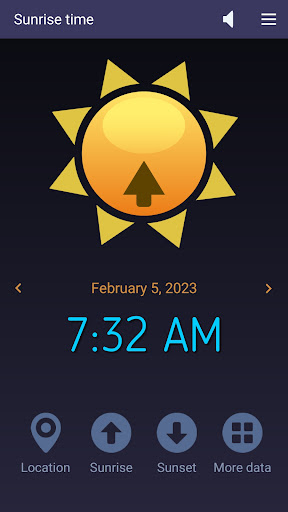


Información de la aplicación Solaris- sunrise, sunset times
Fuentes de descarga
Device Configuration
Guía de instalación de APKs divididas (Split APKs)
Algunas aplicaciones se distribuyen como APKs divididas (varios archivos .apk empaquetados juntos) para optimizar recursos. Los instaladores estándar de Android no pueden abrirlas.
Novedades en Solaris- sunrise, sunset times
- Code optimization
- AM/PM option added
- Text to speech (English)
Acerca de Solaris- sunrise, sunset times
This easy-to-use app accurately computes the sunrise and sunset times based on your current location and current day of the year. Also, it can show those solar times for yesterday and tomorrow if you tap the left or, respectively, right arrow buttons. Solaris works on tablets and smartphones connected to the Internet. At first, it gets the local coordinates (latitude and longitude) from your device's GPS and then retrieves the solar data from an Internet server. In addition to the time values we already mentioned, our app also reads the First and Last Light times, Dawn and Dusk moments, Solar Noon, Golden Hour, and Day Length and shows them when you tap the four-dots button.
What do these solar data indicate?
Sunrise and Sunset times are determined by the position of the sun relative to the observer on the Earth's surface. Latitude affects sunrise and sunset times because it determines the observer's position north or south of the equator, which affects the angle at which the sun's rays reach the surface. The closer a location is to the equator, the more directly overhead the sun will be at solar noon, leading to faster sunrise and sunset times. Longitude affects sunrise and sunset times because it determines the observer's position east or west of the Prime Meridian, which affects the observer's local time. A location that is further west will have an earlier sunrise and a later sunset compared to a location that is further east.
First light is the first appearance of natural light in the morning, before sunrise. It signals the beginning of a new day.
Dawn is the period of time between first light and sunrise, characterized by a gradual brightening of the sky.
Dusk is the period of time between sunset and nightfall, also characterized by a gradual darkening of the sky.
Solar noon is the time when the sun is at its highest point in the sky, and is directly overhead at the observer's location. It occurs at different times for different longitudes and occurs twice a year for a location on the equator.
The Golden Hour mostly refers to the last hour of sunlight in the day, when the sun is low on the horizon and the light is soft and warm. Photographers often prefer to take photos during the golden hour because of the quality of the light.
How it works
When it starts, Solaris shows the sunrise time in the universal 24-hour format (tap this label once for the AM/PM format).
- To find the sunset time, tap the Sunset button.
- Tap the Four-dots button for more solar data.
- Tap the Speaker button to toggle the text-to-speech feature on and off.
- Tap the Location button to refresh your GPS position (if it has changed since your last run).
Features
-- accurate sunrise and sunset times
-- short measurement interval
-- simple, intuitive commands
-- AM/PM option
-- Text-to-speech capability
-- free app - no ads, no limitations
Cómo descargar Solaris- sunrise, sunset times APK
- Ingrese el nombre del paquete
com.microsys.Solarisen la APK Downloader. - Seleccione la arquitectura de su dispositivo (se recomienda ARM64 para dispositivos modernos).
- Haga clic en Descargar para obtener el archivo APK fusionado.
- Transfiera e instale el APK en su dispositivo Android.
- Manténgase actualizado: Visite APKDER.COM regularmente para buscar y descargar las últimas versiones seguras de sus aplicaciones favoritas.
Preguntas frecuentes
¡Sí! Cada descarga de APK proporcionada por APKDER se somete a una rigurosa verificación de seguridad. Verificamos que la firma criptográfica del archivo APK coincida con la firma oficial del desarrollador, lo que garantiza que el APK sea original, esté intacto y libre de cualquier modificación.
Para instalarlo, primero debe habilitar "Fuentes desconocidas" en la configuración de seguridad de su dispositivo Android. Después de descargar el archivo APK de APKDER, tóquelo para comenzar la instalación y siga las instrucciones en pantalla.
¡Sí! Tan pronto como el desarrollador lance una nueva versión de Solaris- sunrise, sunset times, obtendremos y publicaremos el APK actualizado en APKDER. Simplemente puede descargar e instalar el new APK sobre el existente sin perder los datos de su aplicación.
Sí. APKDER le permite eludir las restricciones geográficas y descargar archivos APK oficiales directamente, incluso si la aplicación o el juego no está disponible oficialmente en la tienda de su país.
Un APK estándar es un único paquete de instalación. Un XAPK o APK dividido (Split APK) contiene varios archivos de recursos empaquetados juntos. Para instalarlos, puede descargar las partes individualmente o utilizar herramientas como Split APKs Installer (SAI).
Seguridad y Verificación de Firma
Esta descarga de APK es 100% segura. Verificamos que la firma criptográfica del archivo coincida con las credenciales oficiales del desarrollador. No se inyectan modificaciones ni adware.


