



Fuentes de descarga
Device Configuration
Guía de instalación de APKs divididas (Split APKs)
Algunas aplicaciones se distribuyen como APKs divididas (varios archivos .apk empaquetados juntos) para optimizar recursos. Los instaladores estándar de Android no pueden abrirlas.
Novedades
Improvements and bug fixes.
Acerca de esta aplicación
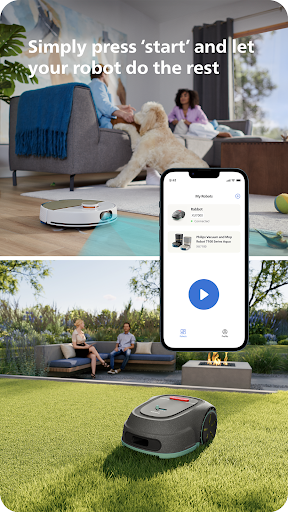
Unlock the full potential of your Philips HomeRun robot. Tell it exactly how and when to clean each room and mow your lawn. Then, relax.
With the Philips HomeRun Robot app you can:
● Start, pause or stop cleaning and mowing remotely
● Make a precise map of your home to clean each room in no time
● Control where your robot cleans and mows
● Choose a cleaning mode per room and mowing mode per lawn
● Set up once, enjoy spotless floors and lawns daily
● Custom clean and mow for specific situations
● Get step-by-step guidance to set up easily
● Receive progress updates on each clean and mow
● Keep your data secure
Start, pause or stop your robot remotely
Come home to clean floors and a perfect-looking garden every day by using your Philips HomeRun vacuum, mop, and lawn mowing robot in combination with the app. Set it up once—to clean each room and mow your lawn just the way you like it—touch ‘Start’, anytime, anywhere, and let your robot do the rest.
On its first run, your robot will map your floor plan and garden. Now you have an interactive map of your home that you can use to tell your robot how and when to clean each room or to monitor how your lawn is mowed. The robot vacuum cleaner can store up to five maps.
Control where your robot vacuum cleaner cleans
Only want your robot to clean the kitchen, bathroom, living room? With the app, you can tell your robot which rooms you want cleaned, and in what order. If there are areas or things you’d like it to avoid—like precious items or a rug in an area you want to mop—you can tell it where not to go, or not to mop, as well.
Choose a cleaning mode for each room and mowing mode for each lawn
Give each room unique attention with one of the cleaning modes and mowing modes for your lawn. Use Dry mode to vacuum the bedroom and Wet & Dry mode to vacuum and mop hard floors. Put your robot on Quiet mode if, say, you have a meeting, or give the kitchen an extra thorough clean by using Intensive mode. Choose a mowing mode for your lawn to get the perfect looking garden.
Set up once. Enjoy spotless floors and lawns every day
Once you’ve created a cleaning and mowing plan, clean floors and perfectly mowed lawns are always a tap away. Tap ‘Start’ when you want your robot to begin - every day if you like, and at a time that suits your schedule.
Custom clean for specific situations
Had friends over and need an extra thorough clean? Or maybe the dog left paw prints in your hallway. Again. Schedule a custom clean and mow that targets specific rooms, areas.
Get step-by-step guidance to setup easily
From connecting to Wi-Fi to the first clean and mow, we’ll guide you through every step of getting started. You’ll find easy-to-follow instructions and how-to-videos as well.
Always have support at your fingertips
Have extra questions about the HomeRun app and robot? You’ll find a user manual in the app, answers to FAQs and easy access to Customer Care if need be.
Receive progress updates
As your robot cleans and mows, you’ll receive in-app updates. See where your robot currently is in your home and what the robot mowing progress is in your garden. Check on its battery levels and, most importantly, get notified as soon as the cleaning run or mowing is done
Maintain high performance
Get the best performance from your robot by replacing parts on time. Our app lets you know when it’s time to replace parts like filters, mops, and blades, and makes it easy to order them.
Keep your data secure
Philips adheres to a strict privacy policy. We recommend creating an account to ensure you can save your preferences. If you prefer, you can use the app as a guest.
WiFi
Philips HomeRun robot vacuum cleaners have dual band Wi-Fi so they are easy to connect to your home Wi-Fi, whether it's to 2.4 or 5.0GHz. Robot lawn mowers only connect to your 2.4GHz home Wi-Fi.
Need help?
Visit www.Philips.com to find answers to our most frequently asked questions, or get in touch with our Consumer Care team.
Opiniones de usuarios
Una aplicación horrible. Conecto el Philips XU3100 siguiendo las indicaciones y me pone que pierde la conexión, que ignore o abandone, abandono y me dice conectado, no encuentra el wifi, he probado con tres routers teniendo la base al lado de los mismos y todo el rato mala conexión y me desaparecen los mapas, los planes de limpieza,... Limpiar, limpian pero la aplicación es horrible. Me funcionó una sola vez y ya no he conseguido que funcione más

Una porquería. Ya probé de todo y no logro conectar la app con el robot (aunque el robot esté correctamente conectado al wifi) por ende, no puedo utilizar todas las funcionalidades del robot. Intenté contactarme con soporte y no logro dar con ninguno que me ayude con este problema en Argentina. Pésima experiencia.

tiene mensajes en otros idiomas, alemán o turco. no permite el control remoto adecuadamente. no permite el reseteo de errores en remoto. se queda bloqueada en "robot está listo" la app es muy mala y es una pena porque el robot es bueno.

A) En ocaciones presenta dos problemas cuando limpia otra planta sin la wstación base: 1) busca la base??? 2) no respeta la secuencia. En los manuales y en ayuda online dice: "Importante: ... Una vez creado el mapa ... podra usar el robot incluso si la estacion esta en otra planta" B) La edición de zonas prohibidas tienen un tamaño mínimo grande y no me permite excluir patas de escritorio que son "trampas" para el robot. Basicamente, la edición no es buena.
Cómo descargar Philips HomeRun Robot App APK
- Ingrese el nombre del paquete
com.philips.da.philipsroboten la APK Downloader. - Seleccione la arquitectura de su dispositivo (se recomienda ARM64 para dispositivos modernos).
- Haga clic en Descargar para obtener el archivo APK fusionado.
- Transfiera e instale el APK en su dispositivo Android.
- Manténgase actualizado: Visite APKDER.COM regularmente para buscar y descargar las últimas versiones seguras de sus aplicaciones favoritas.
Preguntas frecuentes
¡Sí! Cada archivo alojado en APKDER se somete a una rigurosa verificación de seguridad. Verificamos que la firma criptográfica coincida con la firma oficial del desarrollador, asegurando que la aplicación no haya sido modificada ni alterada.
Para instalarlo, primero debe habilitar "Fuentes desconocidas" en la configuración de seguridad de su dispositivo Android. Después de descargar el archivo APK de APKDER, tóquelo para comenzar la instalación y siga las instrucciones en pantalla.
¡Sí! Tan pronto como el desarrollador lance una nueva versión de Philips HomeRun Robot App, obtendremos y publicaremos el APK actualizado en APKDER. Simplemente puede descargar e instalar el nuevo APK sobre el existente sin perder los datos de su aplicación.
Seguridad y Verificación de Firma
Esta descarga de APK es 100% segura. Verificamos que la firma criptográfica del archivo coincida con las credenciales oficiales del desarrollador. No se inyectan modificaciones ni adware.


