
Fuentes de descarga
Device Configuration
Guía de instalación de APKs divididas (Split APKs)
Algunas aplicaciones se distribuyen como APKs divididas (varios archivos .apk empaquetados juntos) para optimizar recursos. Los instaladores estándar de Android no pueden abrirlas.
Aplicaciones Relacionadas



Novedades
Bug fixes.
Acerca de esta aplicación
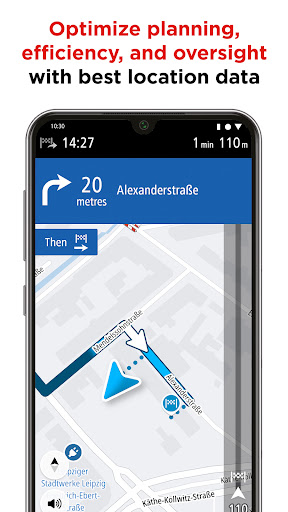
TomTom GO Fleet is specially designed for professional fleet managers and drivers. Licensed fleet management operators easily optimize planning, efficiency and oversight with GO Fleet’s powerful location data. Drivers stay on schedule with custom routing based on the vehicle’s dimensions to avoid unexpected surprises or delays, along with restriction alerts, ADR tunnel codes, trusted TomTom Traffic and clear, reliable guidance both online and offline.
Easy fleet management integration:
- Unlimited navigation via the license from partner apps like WEBFLEET Work App
- Share your current location and ETA
- Receive new destinations and waypoints
Designed for commercial vehicles:
- Optimized routing for trucks that avoids sharp turns and narrow roads
- Specify your vehicle’s dimensions to get routes tailor-made for your vehicle
- Provide info on hazardous materials or applicable ADR tunnel codes to avoid restricted roads
- Find relevant places (like the nearest truck stop, weigh station, truck wash and more) with dedicated points of interest
- Get timely alerts about Low Emission Zones on your route
Stay up to date:
- Maps À La Carte: Save mobile data with downloaded maps for offline guidance
- Monthly Map Updates: Route around the latest road closures and stay within speed limits, even when you’re offline
- Moving Lane Guidance: End the guesswork – know which lane is yours for junctions and exits with clear Moving Lane Guidance
Stay connected:
- TomTom Traffic: Avoid traffic delays on the road with intelligent routes**
- Speed Camera Warnings: Drive safer and gain peace of mind with average speed alerts and warnings for fixed and mobile speed cameras**
- Online Search: Your go-to destinations as well as popular attractions and essential POIs are stored on the app. Once connected, you can search TomTom's full catalogue of destinations**
Drive safely and simply:
- Points of Interest: Search and find destinations, rest areas and attractions en route and at your destination.
- Alternative Routes: Find the fastest ways around traffic congestion, backed by precise distance and time calculations
- Always Ad-Free: Forget annoying ads, drive without distractions or interruptions
Disclaimers:
Note - TomTom GO Fleet requires a valid license provided by a supported business partner app. Contact your fleet management provider for available options and prices.
** Check http://tomtom.com/20719 for availability per country. Services require a mobile phone connection. Your operator may charge you for the data used and costs may be significantly higher when used abroad. On average, TomTom Services uses less then 10MB of data per month.
** Data storage constraints may apply. Download 4 or more full updates of any installed map per year. You need a WiFi or cellular data connection to download new maps and updates.
Continued use of GPS running in the background can dramatically decrease battery life.
TomTom reserves its right to unilaterally withdraw and/or to amend this offer and/or to amend the terms and conditions. For more information, please see our Terms and Conditions and Privacy Policy.
Cómo descargar TomTom GO Fleet APK
- Ingrese el nombre del paquete
com.tomtom.gplay.navapp.gofleeten la página de inicio de APK Downloader. - Seleccione la arquitectura de su dispositivo (se recomienda ARM64 para dispositivos modernos).
- Haga clic en Descargar para obtener el archivo APK fusionado.
- Transfiera e instale el APK en su dispositivo Android.
- Manténgase actualizado: Visite APK Downloader regularmente para buscar y descargar las últimas versiones seguras de sus aplicaciones favoritas.
Seguridad y Verificación de Firma
Esta descarga de APK es 100% segura. Verificamos que la firma criptográfica del archivo coincida con las credenciales oficiales del desarrollador. No se inyectan modificaciones ni adware.