
Fuentes de descarga
Device Configuration
Guía de instalación de APKs divididas (Split APKs)
Algunas aplicaciones se distribuyen como APKs divididas (varios archivos .apk empaquetados juntos) para optimizar recursos. Los instaladores estándar de Android no pueden abrirlas.
Aplicaciones Relacionadas




Novedades
What’s new
- Usability changes: View your friend code on your profile, and sign in from the Settings tab
- You can now share the Emotions 101 certification
Acerca de esta aplicación
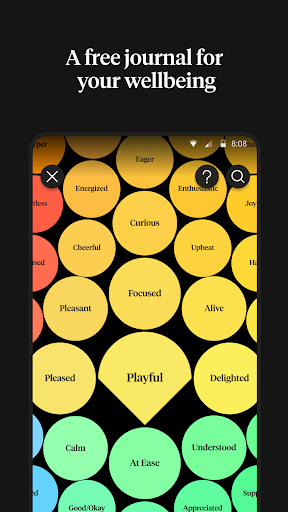
How We Feel is a free app created by scientists, designers, engineers, and therapists to help people better understand their emotions and find strategies to help them navigate their emotions in the moment. Conceived in conjunction with Yale University’s Center for Emotional Intelligence and based on the work of Dr Marc Brackett, How We Feel helps people find the right word to describe how they feel while tracking their sleep, exercise, and health trends in order to spot patterns over time.
Founded as a science-based nonprofit, How We Feel is made possible by donations from people who are passionate about bringing mental wellbeing to the widest possible audience. Our data privacy policy puts you in control of how your data is stored and shared. Data is stored on your device unless you choose to send your data to an alternative storage solution. Data is only accessible by you unless you choose to share it with others. Data is not used for research unless you opt-in to contribute an anonymized version of your data for research studies designed to help more people.
Whether you are downloading this app in order to build better relationships, make your emotions to work for you, not against you, improve how you handle stress and anxiety or simply to feel better, How We Feel will help you identify patterns and find emotional regulation strategies that will work for you. The How We Feel friends feature allows you to share how you feel with the people you trust most in real time, strengthening your most important relationships.
Filled with step-by-step video strategies you can do in as little as one minute on themes like “Change Your Thinking” to help you address negative thought patterns with cognitive strategies; “Move Your Body” to express and release emotions through movement strategies; “Be Mindful” to gain perspective and minimize the negative impact of misunderstood emotions with mindfulness strategies; “Reach Out” to build intimacy and trust, two important tools for emotional wellbeing, with social strategies.
Cómo descargar How We Feel APK
- Ingrese el nombre del paquete
org.howwefeel.moodmeteren la página de inicio de APK Downloader. - Seleccione la arquitectura de su dispositivo (se recomienda ARM64 para dispositivos modernos).
- Haga clic en Descargar para obtener el archivo APK fusionado.
- Transfiera e instale el APK en su dispositivo Android.
- Manténgase actualizado: Visite APK Downloader regularmente para buscar y descargar las últimas versiones seguras de sus aplicaciones favoritas.
Seguridad y Verificación de Firma
Esta descarga de APK es 100% segura. Verificamos que la firma criptográfica del archivo coincida con las credenciales oficiales del desarrollador. No se inyectan modificaciones ni adware.