
Sources de téléchargement
Device Configuration
Guide d'installation des APKs divisées (Split APKs)
Certaines applications sont distribuées sous forme d'APKs divisées (plusieurs fichiers .apk groupés) pour optimiser les ressources. Les installateurs Android standard ne peuvent pas les ouvrir.
Applications Connexes


Nouveautés
v3.91
★ add a search function to the About window
★ revamped the Settings window and added a search function.
★ bugs fixed and optimizations
v3.90
★ supports per-app language settings on devices running Android 13 or later
★ support Chinese (Traditional) and Chinese (Simplified) languages
À propos de cette application
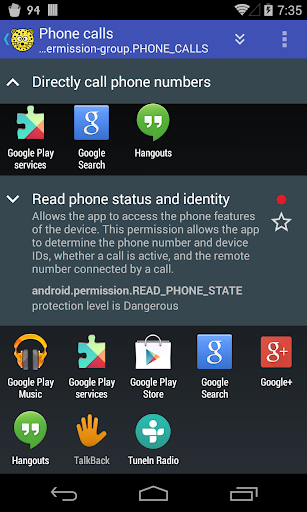
Which apps use services (like SMS) that cost your money?
Which apps use GPS to determine where you are and consume additional battery power?
aSpotCat lists installed apps by permission to help you find and uninstall the malicious apps.
It's the best permission manager for your Android device.
No Notification Ads - we don't use any notification ads.
No ads (PRO-only)
Required permissions:
* Both "Internet" and "View network status" permissions are required by Google Ad component
* "Market billing" permission is required for purchasing the "No Ads" license
* "Read/Write external storage" permission is required for reading/writing the app log to SD
We have been selected as a Google I/O 2011 Developer Sandbox partner, for its innovative design and advanced technology.
Credits:
French - Thibault Rohmer
German - Michel Mueller, Dirk Haar
Polish - Grzegorz Jabłoński
Russian - Идрис a.k.a. Мансур (Ghost-Unit), Roman Rublevskiy
Spanish - Lahiri López
Turkish - Mustafa COŞKUN
If you are interested in helping us to translate this app to your local language, please let me know. Thanks.
Comment télécharger l'APK de aSpotCat - Permission Checker
- Entrez le nom du paquet
com.a0soft.gphone.aSpotCatsur la page d'accueil d'APK Downloader. - Sélectionnez l'architecture de votre appareil (ARM64 recommandé pour les appareils récents).
- Cliquez sur Télécharger pour obtenir le fichier APK fusionné.
- Transférez et installez l'APK sur votre appareil Android.
- Restez à jour: Visitez régulièrement APK Downloader pour rechercher et télécharger les dernières versions sécurisées de vos applications préférées.
Sécurité et Vérification de Signature
Ce téléchargement APK est 100% sûr. Nous vérifions que la signature cryptographique du fichier correspond aux informations d'identification officielles du développeur. Aucune modification ni adware n'est injecté.