
Sources de téléchargement
Device Configuration
Guide d'installation des APKs divisées (Split APKs)
Certaines applications sont distribuées sous forme d'APKs divisées (plusieurs fichiers .apk groupés) pour optimiser les ressources. Les installateurs Android standard ne peuvent pas les ouvrir.
Applications Connexes




Nouveautés
Thank you for using FamCal!
In the latest version, we have optimized widget display issues and enhanced the app's overall performance for a better experience.
We are committed to continuously improving FamCal. If you have any questions or suggestions, please feel free to contact us at [email protected].
À propos de cette application
FamCal: Organize Your Home, Elevate Your Love.
Manage all family chores and schedules in one place.
FEATURES:
FAMILY CALENDAR
- Share events with the whole family;
- Keep everyone synced with shared event updates;
- Set local notifications or notify others via the cloud;
- Switch between Month, Week, Agenda, and Text Month views;
- Assign unique colors to each member to view or add events by person.
SHARED LISTS & TASK DELEGATION
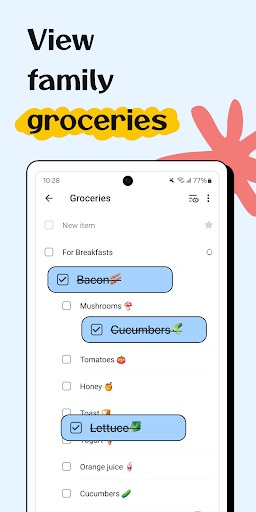
- Share grocery lists, shopping lists, work schedules, and more;
- Create task lists and to-dos, then notify a specific member or the whole family;
- Add dates and times to tasks to remind family members;
- Print, email your schedule, or export as ICS;
- Set list visibility to public, private, or shared with select family members.
SHARED FAMILY MEMOS & SPECIAL DAYS
- Share notes and jot down every precious moment;
- Attach photos to capture the moment in your memos;
- Share and store important contact info;
- Track Birthdays and Anniversaries;
- Add comments and chat with family on each memo.
SHARED FAMILY RECIPE BOX
- Keep and share all your family recipes in one place;
- Add ingredients to your shopping list with a single tap;
- Plan your meals on the calendar with ease;
- Add recipes manually or import them from a URL;
- Keep your screen on while cooking with our "No-Dim" toggle.
SHARED TRIP EXPENSES
- Keep all your family trips in one place;
- Track every expense throughout your trip;
- Use detailed charts to analyze all your travel expenses;
- Export all trip expenses as PDF or CSV files.
STAY CONNECTED & IN SYNC
Organize your calendar, projects, and notes anywhere, and access them on any device. The whole family shares one account; just log in with your own email address and the shared password.
One space for your whole crew.
FamCal isn’t just for families, it’s for any group that needs to stay in sync:
For Home: Manage chores and meal plans;
For School: Ace group projects and track deadlines;
For Life: Log shared expenses and plan trips.
Payment models for Premium Subscription:
- $3.99/week
- $39.99/year
Please note the subscription is automatically renewed unless you choose to cancel the subscription at least 24 hours before the end of the current period.
Permissions Overview:
1. Calendar: FamCal needs this permission to read events from local calendars
2. Contacts: FamCal needs this permission to read contact from local device when you choose to import a contact
3. Location: FamCal needs this permission to get your location when you add an event with location info
4. Storage: FamCal needs this permission to read photos from Gallery when you choose to upload a photo to a memo or write photos to Gallery when you choose to download photos from memos
The content of the screenshots, preview videos, and audio are provided by the following platforms:
- Shutterstock: Used with permission from Shutterstock.com (where applicable);
- Epidemic Sound: Touch by Otherguys / provided by Epidemic Sound;
- Freepik: Designed by Freepik;
- iStock: Standard license obtained from iStock.
We're glad to hear your feedback. If you have any problems or suggestions please send a mail to [email protected], you’ll get a response in a short time.
Comment télécharger l'APK de Family Shared Calendar: FamCal
- Entrez le nom du paquet
com.appxy.famcalsur la page d'accueil d'APK Downloader. - Sélectionnez l'architecture de votre appareil (ARM64 recommandé pour les appareils récents).
- Cliquez sur Télécharger pour obtenir le fichier APK fusionné.
- Transférez et installez l'APK sur votre appareil Android.
- Restez à jour: Visitez régulièrement APK Downloader pour rechercher et télécharger les dernières versions sécurisées de vos applications préférées.
Sécurité et Vérification de Signature
Ce téléchargement APK est 100% sûr. Nous vérifions que la signature cryptographique du fichier correspond aux informations d'identification officielles du développeur. Aucune modification ni adware n'est injecté.