
Sources de téléchargement
Device Configuration
Guide d'installation des APKs divisées (Split APKs)
Certaines applications sont distribuées sous forme d'APKs divisées (plusieurs fichiers .apk groupés) pour optimiser les ressources. Les installateurs Android standard ne peuvent pas les ouvrir.
Applications Connexes



Nouveautés
Marhaba! The team at Muslim Pro is humbled and delighted to bring to you a new dedicated light app: Namaz Pro.
Introducing a simple, focused daily ibadah companion.
Get verified prayer times, smart Azan alerts, and a precise qibla finder that confirms confidence with a gentle vibration. Track your daily prayers, view time until the next Salah, and pray confidently even offline. Designed with clarity and zero distractions to support your ibadah with calm and trust.
À propos de cette application
Accurate Salah Time & Reliable Qibla Finder
You will never miss a prayer and always face the Kaaba with confidence. Get precise Azan time (prayer timings) based on your exact location and a revolutionary qibla finder that provides tactile confirmation. Easily track your daily consistency and instantly find the correct qibla direction, even offline. Focus purely on your Ibadah (worship) with this simple, essential tool.
Key Features for Confident Devotion
Precise Salah Times (Salah): Never miss a Salah Wajib (obligatory prayer) again. Our app provides reliable, GPS-verified times for all five daily prayers (Fajr, Dhuhr, Asr, Maghrib, and Isha).
Accurate Waqt (Time): GPS-verified calculations provide the most accurate time for all five prayers.
Azan Alarm Customization: Set Azan audio or silent notifications for each prayer, ensuring timely alerts.
Time Until Next Salah: A prominent countdown shows the remaining duration until the next prayer enters its Waqt, helping you prepare mentally and physically.
Daily Consistency Tracking: Easily log your daily prayers to monitor your spiritual Istiqamah (steadfastness) and build better habits over time.
Confident qibla Direction: Find the precise direction of the Kaaba with unparalleled confidence and ease. We move beyond simple visuals to offer a truly reliable experience.
Responsive Haptic Feedback: Intuitive Haptics provide a physical vibration the exact moment your device is perfectly aligned with the qibla. No more guessing—feel the correct direction instantly.
Instant qibla Lock: Uses your phone's built-in sensors and GPS location for immediate, high-speed direction calculation. Works quickly from the moment you open the app.
Offline Functionality: Find the qibla reliably when travelling or in areas with poor reception. Simply set your location once to enable offline precision.
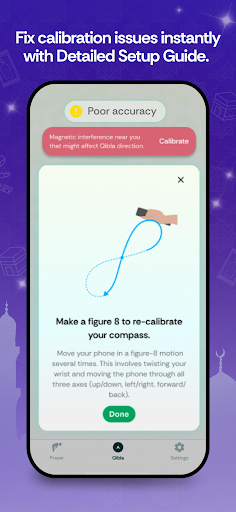
Detailed Setup Guide: Our comprehensive, step-by-step Troubleshooting Guide helps you instantly resolve common compass issues, ensuring your reading is always accurate and trustworthy.
Designed with a Clean, Focus-Driven Design, this app ensures you can concentrate completely on your Ibadah without unnecessary distractions or clutter. Salah & qibla is your trusted, dual-function companion for maintaining devotion, helping you confidently face the qibla for every prayer.
Download now and confidently face the qibla for every Salah on time.
Comment télécharger l'APK de Namaz Pro: Azan Time, Qibla
- Entrez le nom du paquet
com.bitsmedia.android.namazsur la page d'accueil d'APK Downloader. - Sélectionnez l'architecture de votre appareil (ARM64 recommandé pour les appareils récents).
- Cliquez sur Télécharger pour obtenir le fichier APK fusionné.
- Transférez et installez l'APK sur votre appareil Android.
- Restez à jour: Visitez régulièrement APK Downloader pour rechercher et télécharger les dernières versions sécurisées de vos applications préférées.
Sécurité et Vérification de Signature
Ce téléchargement APK est 100% sûr. Nous vérifions que la signature cryptographique du fichier correspond aux informations d'identification officielles du développeur. Aucune modification ni adware n'est injecté.