
Sources de téléchargement
Device Configuration
Guide d'installation des APKs divisées (Split APKs)
Certaines applications sont distribuées sous forme d'APKs divisées (plusieurs fichiers .apk groupés) pour optimiser les ressources. Les installateurs Android standard ne peuvent pas les ouvrir.
Applications Connexes




Nouveautés
This release brings overall improvements to performance, reliability, and everyday usability across the app. It helps employees complete tasks more smoothly and gives finance teams a more consistent experience.
À propos de cette application
Expensya, the Business Spend platform you and your teams will love
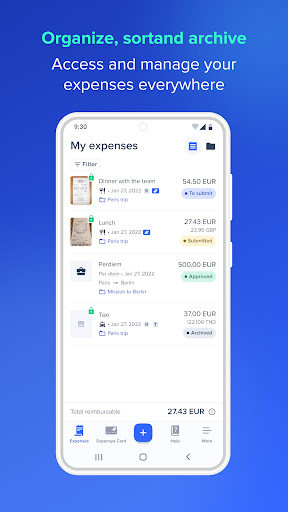
Expensya is THE web and mobile solution that digitizes and simplifies business expense management: expense reports, business travel expenditure, remote working expenses, etc. Whether you are a freelancer, an employee, a manager, an accountant or a company CEO: Expensya allows you to manage your expenses and save time!
Discover today the expense management of tomorrow! Download Expensya for free and get 30 days free!
With Expensya, you can enjoy:
• The management of all stages of travel: Take advantage of the management of all types of expenses before, during and after the trip, generate mission orders to plan your business trips with ease and add your expense reports in a single photo thanks to our smart scan
• Mobile management and validation: Expensya works even in offline mode and automatically synchronizes data between the two platforms: Web and Mobile. Manage your business expenses in real time while on the move. Add them in the currency of your choice, the conversion is automatic according to the currency configured on your account. (Conversion rate of the day or customized) Then send your expenses with one click for validation.
• User-friendly mobile application: The mobile application is very easy to use, whatever the user profile, whatever the equipment used to enter and track expenses in real time.
• Automated management of mileage expenses and company cars: Expensya makes it easy for you to do this; simply enter your departure and arrival points or a favorite route to save even more time: the distance is automatically calculated thanks to the integration with Google Maps, and the mileage is calculated according to the existing scale, whether it is the HMRC scale of mileage allowances, URSSAF or a personalized scale.
Managers, easily add and manage all the vehicles used by the company and your employees on a single platform. Also add documents relating to professional vehicles such as vehicle registration documents.
• Subscription management: The Expensya application makes it easy to manage recurring subscription expenses and proactively save time on these expenses.
• Take advantage of customized reports that allow you to control all your expenses in real time and optimize your costs!
• Automate control:
o Validation levels
o Expense rules: caps, alerts
• Simplify accounting:
o Automated accounting entry
o SEPA transfer order
o Data export
o Bank matching
o Archiving with probative value
Expensya's added value:
- Multiple integrations with ERP, PGI and enterprise software: Sage, Cegid, SAP, Quadra, Quadratus, Loop, Ibiza, Divalto, QuickBooks, Oracle, JD Edwards, PeopleSoft, Workday, Microsoft Office 365, SSO, FTP. Several APIs are also available.
Easy migration of your data to Expensya for historical recovery from other providers: Xpenditure, SAP Concur, Expensify, ExpenseIt, Jenji, Cleemy, N2F, Notilus InOne, Rydoo, Captio, Zoho, Spendesk, Certify, etc.
Comment télécharger l'APK de Expensya: Spend Management
- Entrez le nom du paquet
com.expensyaandroid.expensyaandroidsur la page d'accueil d'APK Downloader. - Sélectionnez l'architecture de votre appareil (ARM64 recommandé pour les appareils récents).
- Cliquez sur Télécharger pour obtenir le fichier APK fusionné.
- Transférez et installez l'APK sur votre appareil Android.
- Restez à jour: Visitez régulièrement APK Downloader pour rechercher et télécharger les dernières versions sécurisées de vos applications préférées.
Sécurité et Vérification de Signature
Ce téléchargement APK est 100% sûr. Nous vérifions que la signature cryptographique du fichier correspond aux informations d'identification officielles du développeur. Aucune modification ni adware n'est injecté.