
Sources de téléchargement
Device Configuration
Guide d'installation des APKs divisées (Split APKs)
Certaines applications sont distribuées sous forme d'APKs divisées (plusieurs fichiers .apk groupés) pour optimiser les ressources. Les installateurs Android standard ne peuvent pas les ouvrir.
Applications Connexes


Nouveautés
🚀 Big Update: Plan Your Day Like Never Before.
This release unlocks a whole new way to organize your time — more visual, flexible, and in your control.
🧠 Smarter Planning
- Add duration to tasks and plan your day realistically
- Introducing Time Block / Agenda view — your day, laid out clearly
- Drag & drop tasks to adjust time and duration instantly
⚡ Effortless Organization
- Sort your unplanned tasks and bring order to chaos
- Improved timeline sorting so your day flows naturally
À propos de cette application
Master Your Schedule with Taskito: The Best Daily Planner & To-Do List
Transform your productivity with Taskito’s intuitive timeline view. Unlike a basic task manager, Taskito combines your to-do list, calendar events, reminders, and habits into one seamless daily planner. See your day with total clarity and turn your plans into finished tasks.
Why choose Taskito for your daily organization?
Taskito is designed to be a flexible personal organizer. Whether you are a student managing assignments, a professional time-blocking meetings, or someone building better daily habits, this all-in-one planner adapts to your life.
Key Features for Better Planning:
Timeline View: Bring your to-dos, calendar events, reminders, and notes into a single focused feed.
Agenda View: Implement TimeBlock techniques to avoid schedule conflicts. The daily agenda view lets you drag and resize your tasks to fit your way.
Google Calendar Integration: Sync your schedule for seamless event import and effective time-blocking.
Project Boards: Visualize long-term goals. Organize complex projects on a board and move tasks into your timeline when you’re ready to execute.
Habit Tracker & Recurring Tasks: Build lasting routines with multi-reminder support to keep your daily habits on track.
Powerful Widgets: Glance at your agenda and manage your to-do list directly from your home screen without opening the app.
Smart Organization: Use templates for recurring lists (like groceries or workouts), color-coded tags for categorization, and bulk actions to manage tasks en masse.
A Cleaner Productivity Experience
No Ads: Keep your focus where it belongs—on your goals.
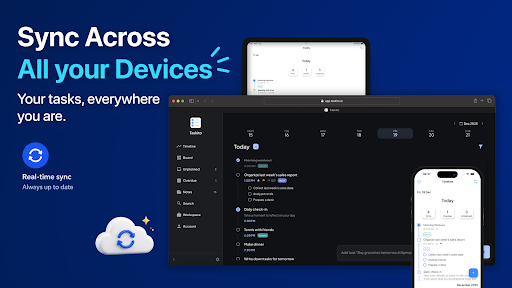
Cloud Sync & Multiplatform: Keep your data synchronized across all your devices - Available on Android, iPhone, iPad and Computer.
Taskito is more than just a checklist; it’s a productivity powerhouse that helps you stay organized.
Download Taskito today and start organizing your life with the most versatile timeline planner available.
• • •
If you have feedback or suggestions, Send us an email: [email protected]
Website: https://taskito.io/
Help Center: https://taskito.io/help
Blog: https://taskito.io/blog
Comment télécharger l'APK de To-Do List & Planner: Taskito
- Entrez le nom du paquet
com.fenchtose.reflogsur APK Downloader. - Sélectionnez l'architecture de votre appareil (ARM64 recommandé pour les appareils récents).
- Cliquez sur Télécharger pour obtenir le fichier APK fusionné.
- Transférez et installez l'APK sur votre appareil Android.
- Restez à jour: Visitez régulièrement APKDER.COM pour rechercher et télécharger les dernières versions sécurisées de vos applications préférées.
Sécurité et Vérification de Signature
Ce téléchargement APK est 100% sûr. Nous vérifions que la signature cryptographique du fichier correspond aux informations d'identification officielles du développeur. Aucune modification ni adware n'est injecté.