
Sources de téléchargement
Device Configuration
Guide d'installation des APKs divisées (Split APKs)
Certaines applications sont distribuées sous forme d'APKs divisées (plusieurs fichiers .apk groupés) pour optimiser les ressources. Les installateurs Android standard ne peuvent pas les ouvrir.
Applications Connexes





Nouveautés
Several stability improvements and bug fixes.
À propos de cette application
Family Link parental controls is the companion app to Family Link for parents. Please only download this app to a device being used by a child or teen.
Try the Family Link parental controls app from Google. Whether your children are younger or in their teens, the Family Link app lets you set digital ground rules remotely from your own device to help guide them as they learn, play, and explore online. For children under 13 (or the applicable age of consent in your country), Family Link also lets you create a Google Account for your child that's like your account, with access to most Google services.
With Family Link parental controls, you can:
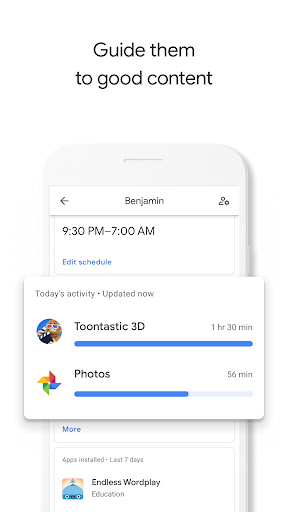
Guide them to good content
• View app their activity - Not all screen time is the same. Help your child make healthy decisions about what they do on their Android device, with activity reports showing how much time they’re spending on their favorite apps. You can see daily, weekly, or monthly reports.
• Manage their apps - Handy notifications let you approve or block apps your child wants to download from the Google Play Store. You can also manage in-app purchases, and hide specific apps on their device all remotely from your own device.
• Feed their curiosity - It can be hard to figure out what apps are right for your child, so Family Link shows you teacher-recommended apps on Android that you can add directly to their device.
Keep an eye on screen time
• Set limits - It’s up to you to decide the right amount of screen time for your child. Family Link lets you set time limits and a bedtime for their supervised devices, so you can help them find a good balance.
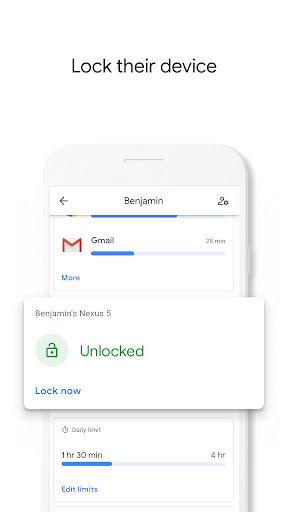
• Lock their device - Whether it’s time to go play outside, have dinner, or just spend time together, you can remotely lock a supervised device whenever it’s time to take a break.
See where they are
• It’s helpful to be able to find your child when they’re on the go. You can use Family Link to help locate them as long as they’re carrying their Android device.
Important Information
• Family Link’s tools vary depending on your child’s device. See a list of compatible devices at families.google.com/familylink/setup
• While Family Link helps you manage your child's purchases and downloads from Google Play, they will not need approval to install app updates (including updates that expand permissions), apps you have previously approved, or apps that have been shared in Family Library. Parents should regularly review their child’s installed apps and app permissions in Family Link.
• You should carefully review the apps on your child’s supervised device and disable those you don’t want them to use. Note that you may not be able to disable some pre-installed apps.
• To see the location of your child or teen’s device, it must be powered on, recently active, and connected to the internet.
• Teacher-recommended apps are only available on Android devices in the US to parents of children of certain ages.
• While Family Link provides tools to manage your child’s online experience, it does not make the internet safe. Rather, it is intended to give parents choices about how their kids use the internet, and encourage conversations about internet use.
Comment télécharger l'APK de Family Link parental controls
- Entrez le nom du paquet
com.google.android.apps.kids.familylinkhelpersur la page d'accueil d'APK Downloader. - Sélectionnez l'architecture de votre appareil (ARM64 recommandé pour les appareils récents).
- Cliquez sur Télécharger pour obtenir le fichier APK fusionné.
- Transférez et installez l'APK sur votre appareil Android.
- Restez à jour: Visitez régulièrement APK Downloader pour rechercher et télécharger les dernières versions sécurisées de vos applications préférées.
Sécurité et Vérification de Signature
Ce téléchargement APK est 100% sûr. Nous vérifions que la signature cryptographique du fichier correspond aux informations d'identification officielles du développeur. Aucune modification ni adware n'est injecté.