
Sources de téléchargement
Device Configuration
Guide d'installation des APKs divisées (Split APKs)
Certaines applications sont distribuées sous forme d'APKs divisées (plusieurs fichiers .apk groupés) pour optimiser les ressources. Les installateurs Android standard ne peuvent pas les ouvrir.
Applications Connexes




Nouveautés
Thank you for using Hava, the app that helps you feel fuller for longer, so you can eat as much as you want, lose weight, and live healthier.
This version of the app includes:
- Minor improvements
Now open Hava to find out how the foods you eat can help you feel fuller and healthier.
À propos de cette application
Lose weight without hunger. Our food tracker helps you stay full, eat fewer calories, and skip both calorie counting and cravings.
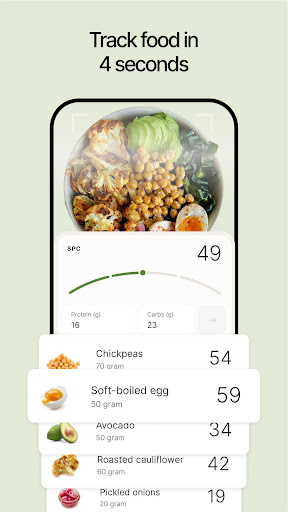
Just snap a picture of your meals for instant feedback and guidance. No nutrition knowledge is required to use Hava. If you can use your iPhone camera, you can use Hava.
Our groundbreaking approach helps people eat HALF as much without hunger, according to over 100,000 days of eating logged by early users.
This can help turbocharge weight loss and potentially reverse type 2 diabetes and high blood pressure. It’s also great for getting stronger and leaner, as we guide you to higher-protein foods.
Hava is flexible and sustainable and works with any dietary preference. You can keep eating foods that you love – just eat more of your high-scoring foods.
Hava gives you instant guidance and suggestions, through our 24/7 nutrition coach.
Hava is backed by cutting-edge science and built by doctors, including our founder and CEO, Andreas Eenfeldt, MD, as well as our Lead Science Advisor, Ted Naiman, MD. Together they have more than 40 years of weight loss expertise.
Instead of fighting hunger, we help you avoid it by showing you which foods naturally keep you feeling satisfied and happy, while you eat less and lose excess body fat. It’s like Ozempic, but with food.
Try Hava for free and join the movement. Your fuller, healthier life starts now.
Download Hava, and Hava great day.
SUBSCRIPTION TERMS
Enjoy every feature for free during a no-commitment trial. After the trial, continued use requires an auto-renewing monthly or yearly subscription. You can cancel or manage your subscription anytime in your App Store settings.
Hava integrates with HealthKit to optionally sync your weight data with the Health app.
Terms of use: https://www.hava.co/terms
Privacy policy: https://www.hava.co/privacy
Comment télécharger l'APK de Hava – Lose weight, feel full
- Entrez le nom du paquet
com.hava.androidsur la page d'accueil d'APK Downloader. - Sélectionnez l'architecture de votre appareil (ARM64 recommandé pour les appareils récents).
- Cliquez sur Télécharger pour obtenir le fichier APK fusionné.
- Transférez et installez l'APK sur votre appareil Android.
- Restez à jour: Visitez régulièrement APK Downloader pour rechercher et télécharger les dernières versions sécurisées de vos applications préférées.
Sécurité et Vérification de Signature
Ce téléchargement APK est 100% sûr. Nous vérifions que la signature cryptographique du fichier correspond aux informations d'identification officielles du développeur. Aucune modification ni adware n'est injecté.