


Sources de téléchargement
Device Configuration
Guide d'installation des APKs divisées (Split APKs)
Certaines applications sont distribuées sous forme d'APKs divisées (plusieurs fichiers .apk groupés) pour optimiser les ressources. Les installateurs Android standard ne peuvent pas les ouvrir.
Nouveautés
Meet the Homey Heroes! 🌟
Homey has a brand new look! Say hello to our new companions designed to motivate kids and make chores fun.
The New Squad:
Felix: Turns chores into quests.
Ruby: Master of daily streaks.
Bea: The focused builder.
Benny: Your biggest cheerleader.
Gordy: Wise goal mentor.
Plus:
✨ Total visual revamp.
🚀 Performance & bug fixes.
👀 More hero features coming soon!
À propos de cette application
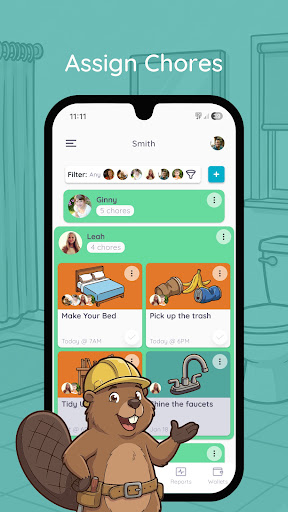
The perfect app to teach your kids about money through completing chores and working towards goals.
Features:
- set daily, weekly or monthly recurring or one time chores for the whole family
- set chores that are responsibilities and you won't pay for and jobs to teach kids how to earn money or rewards
- manage allowance and extra money rewards for each child
- transfer allowance to bank account (US only)
- track IOU
- add or remove funds from wallet
- set saving jars with financial goals
- kids learn to manage funds for each of their goals
- Homey syncs across all devices in the household
SHOW KIDS HOW MONEY IS EARNED
With Homey you can pay kids commissions based on chores they do around the house like taking out the trash, cleaning their room, or mowing the grass. And you can also set responsibilities that are required to teach kids that everyone needs to contribute to the household.
SUPPORT LONG-TERM GOALS AND SAVING
Teach kids delayed gratification and financial responsibility by providing them with incentives that differ in value. With Homey kids learn they need to work longer or harder to earn more.
TEACH REAL LIFE FINANCIAL SKILLS
Homey enables you to transfer allowance and money kids earn directly to their savings or checking account or tracks the money as IOU and pay it out in cash. This way you can teach your child how banking works, they can accumulate interests on their savings and you can be sure that their money will stay safe.
By subscribing to Homey Premium or Homey Unlimited you'll get access to other great features like:
Connecting your bank account and safely transferring allowance and chore money directly to your child's savings account. (US only)
Multiple saving jars for each child.
Adding or deducting money from the wallet.
Customizable permissions.
• You can subscribe on a month-to-month ($4.99) or yearly ($49.99) basis.
• The payment will be charged to your Google Play when you confirm the purchase.
• The subscription automatically renews for the same price and duration period as the original monthly/yearly plan unless canceled at least 24-hours before the end of the current period.
• Free trial automatically converts to a paid subscription unless canceled at least 24-hours before the end of the trial period. From that point onwards, subscription automatically renews unless canceled at least 24-hours before the end of the current period.
• You can cancel the subscription or the free trial anytime via the subscription setting through your Google Play Store app: Open the Google Play Store. Tap Menu, Account,Subscriptions. Find the subscription you want to cancel. Tap Cancel. Do it at least 24 hours before the end of the free trial or subscription period to avoid being charged. Learn more: https://support.google.com/googleplay/answer/7018481?co=GENIE.Platform%3DAndroid&hl=en
• Any unused portion of a free trial period will be forfeited when the user purchases a subscription.
Terms and Conditions: http://www.homeyapp.net/homey-terms-conditions/
Avis des utilisateurs

App intéressante et qui semble complète mais malheureusement non traduite en français.

Nul, le formulaire description ne fonctionne pas...

A pain to delete your account

Taking photos after every clean is not productive. It is fun while the idea is fresh in the users mind, but in practice... Time consuming
Comment télécharger l'APK de Homey - Chores and Allowance
- Entrez le nom du paquet
com.homey.appsur APK Downloader. - Sélectionnez l'architecture de votre appareil (ARM64 recommandé pour les appareils récents).
- Cliquez sur Télécharger pour obtenir le fichier APK fusionné.
- Transférez et installez l'APK sur votre appareil Android.
- Restez à jour: Visitez régulièrement APKDER.COM pour rechercher et télécharger les dernières versions sécurisées de vos applications préférées.
Sécurité et Vérification de Signature
Ce téléchargement APK est 100% sûr. Nous vérifions que la signature cryptographique du fichier correspond aux informations d'identification officielles du développeur. Aucune modification ni adware n'est injecté.


